
Visitors entering unfamiliar buildings face a common frustration: finding their destination among dozens or hundreds of rooms, departments, and people. Traditional static building directories—fixed boards with printed names and room numbers—force visitors to scan long alphabetical lists, offer no search functionality, and become outdated within weeks of installation. Worse, they provide no additional information beyond basic location data, missing opportunities to inform, engage, and make positive first impressions on everyone who walks through your doors.
Touchscreen building directories solve these navigation challenges while transforming lobby displays into dynamic engagement platforms. These interactive systems provide instant search functionality, turn-by-turn directions, rich multimedia content, and real-time updates—all through intuitive interfaces visitors can use independently without staff assistance. Whether you manage a school campus, corporate office, healthcare facility, government building, or multi-tenant complex, touchscreen directories improve visitor experiences while showcasing your organization’s achievements and culture.
This comprehensive guide explores everything you need to understand about touchscreen building directories—from core features and benefits through selection criteria, implementation strategies, content management, and measuring return on investment. You’ll discover how organizations across education, corporate, healthcare, and government sectors use touchscreen directories to enhance wayfinding, reduce staff workload, and create memorable visitor experiences.
What Is a Touchscreen Building Directory?
A touchscreen building directory is an interactive digital display system installed in building lobbies, entrances, or high-traffic areas that allows visitors to search for people, departments, or rooms through intuitive touch interfaces. Unlike static printed directories that require manual updates and offer no interactivity, touchscreen systems provide searchable databases, dynamic content updates, multimedia capabilities, and engaging experiences that serve both practical wayfinding needs and broader communication goals.
Modern touchscreen directories combine three integrated components: physical display hardware (ranging from wall-mounted tablets to large-format freestanding kiosks), cloud-based content management systems enabling real-time updates from any internet-connected device, and interactive software interfaces providing search, navigation, and content display functionality.

Interactive touchscreen directories enable visitors to independently navigate buildings through intuitive search and wayfinding features
The Evolution from Static to Interactive Directories
Traditional building directories evolved from simple printed boards to more sophisticated static displays, but fundamental limitations remained:
Static Directory Limitations:
- Manual updates required for every staff change, department relocation, or room reassignment
- Limited space constraining the amount of displayable information
- No search functionality forcing visitors to scan complete alphabetical lists
- Outdated information within weeks of installation as organizations change
- No ability to provide directions beyond identifying building or room numbers
- No connection to organization culture, achievements, or visitor engagement
Touchscreen directories address these fundamental challenges while adding capabilities impossible with static systems—instant updates, multimedia content, wayfinding tools, and analytics showing how visitors use directory systems.
Core Features of Touchscreen Building Directories
Effective touchscreen directory systems incorporate essential capabilities that address practical navigation needs while creating engaging visitor experiences.
Intuitive Search and Navigation
The foundation of useful directory systems is fast, accurate search across multiple access methods:
Comprehensive Search Capabilities:
- Full-text search finding people by first name, last name, or department
- Department browsing exploring organizational structure
- Room number search for visitors with specific location information
- Phonetic search accommodating spelling variations
- Predictive suggestions appearing as visitors type
- Voice search for accessibility and hands-free operation
Quality systems return results instantly—within fractions of a second—maintaining the fluid experience visitors expect from consumer technology. Slow search interfaces that require visitors to wait several seconds discourage use and create frustration rather than solving navigation challenges.
Real-Time Content Management and Updates
Perhaps the most significant advantage over static directories is the ability to update content instantly through cloud-based management systems:
Dynamic Content Capabilities:
- Add or remove personnel instantly when hiring or staff changes occur
- Update department locations during office relocations without replacing hardware
- Modify room assignments to reflect organizational changes
- Correct errors immediately rather than living with printed mistakes
- Schedule temporary changes for building maintenance or special events
- Manage multiple building directories from centralized dashboards
Organizations implementing interactive kiosk solutions report that instant update capability represents one of the most valued features—transforming directory management from time-consuming maintenance projects to simple five-minute updates.

Modern touchscreen directories provide self-service wayfinding that reduces reception desk workload while improving visitor satisfaction
Interactive Wayfinding and Directions
Beyond simply identifying locations, advanced touchscreen directories provide comprehensive wayfinding support:
Navigation Features:
- Interactive building maps showing “you are here” orientation
- Highlighted routes from current location to destination
- Floor-by-floor directions for multi-story buildings
- Turn-by-turn written instructions visitors can follow
- Printable or mobile-sharable directions
- Accessibility route options for visitors with mobility needs
- QR codes sending directions directly to smartphones
These wayfinding capabilities reduce the burden on reception staff who otherwise spend significant time providing repetitive directions to common destinations throughout each day.
Multimedia Content and Engagement
Touchscreen directories can serve dual purposes—practical wayfinding tools and engaging communication platforms showcasing organizational culture:
Content Display Capabilities:
- Welcome videos from leadership
- Photo galleries showing facilities and culture
- Achievement highlights celebrating organizational success
- Event calendars displaying upcoming activities
- News feeds with organizational updates
- Emergency notifications and alerts
- Sponsor or donor recognition content
Schools particularly benefit from combining wayfinding with recognition content through digital hall of fame displays that honor achievements while providing visitor navigation.

Educational institutions combine practical wayfinding with achievement recognition, creating engaging visitor experiences
Accessibility and Inclusive Design
Effective touchscreen directories accommodate diverse visitor needs through accessible design:
Accessibility Features:
- ADA-compliant height positioning for wheelchair users
- Large text options for visually impaired visitors
- High-contrast display modes improving readability
- Voice-activated controls for hands-free operation
- Multi-language support for international visitors
- Hearing loop integration for visitors with hearing aids
- Screen reader compatibility
Organizations subject to accessibility regulations must ensure touchscreen directories meet WCAG 2.2 AA standards and ADA requirements—considerations that should inform hardware selection and software configuration.
Key Benefits of Touchscreen Building Directories
Understanding the specific advantages touchscreen directories provide helps organizations evaluate whether interactive systems justify investment compared to traditional static approaches.
Improved Visitor Experience and First Impressions
First impressions significantly influence how visitors perceive organizations. When guests can independently navigate buildings through intuitive touchscreen interfaces, they develop positive associations with technological sophistication, visitor-centered service, and organizational professionalism.
Conversely, visitors who struggle to find destinations, wait in reception lines for directions, or navigate using outdated printed directories form negative impressions that affect relationships, enrollment decisions, business partnerships, and community perceptions.
Schools implementing campus directory touchscreen systems report that prospective students and families consistently comment on technology during campus tours—viewing interactive wayfinding as indicators of overall institutional quality and innovation.
Reduced Reception and Staff Workload
Reception staff spend considerable time providing repetitive directions to common destinations—conference rooms, specific departments, restrooms, parking areas, and frequently visited offices. This workload increases during peak visitor periods like school open houses, corporate events, or government office hours.
Touchscreen directories enable self-service wayfinding, allowing visitors to find destinations independently while freeing staff to focus on higher-value interactions requiring human expertise—answering complex questions, addressing specific concerns, or providing personalized assistance to visitors who need additional support.
Organizations tracking reception desk metrics report that touchscreen directories reduce directional assistance requests by 40-60%, significantly improving staff efficiency and job satisfaction by eliminating repetitive tasks.
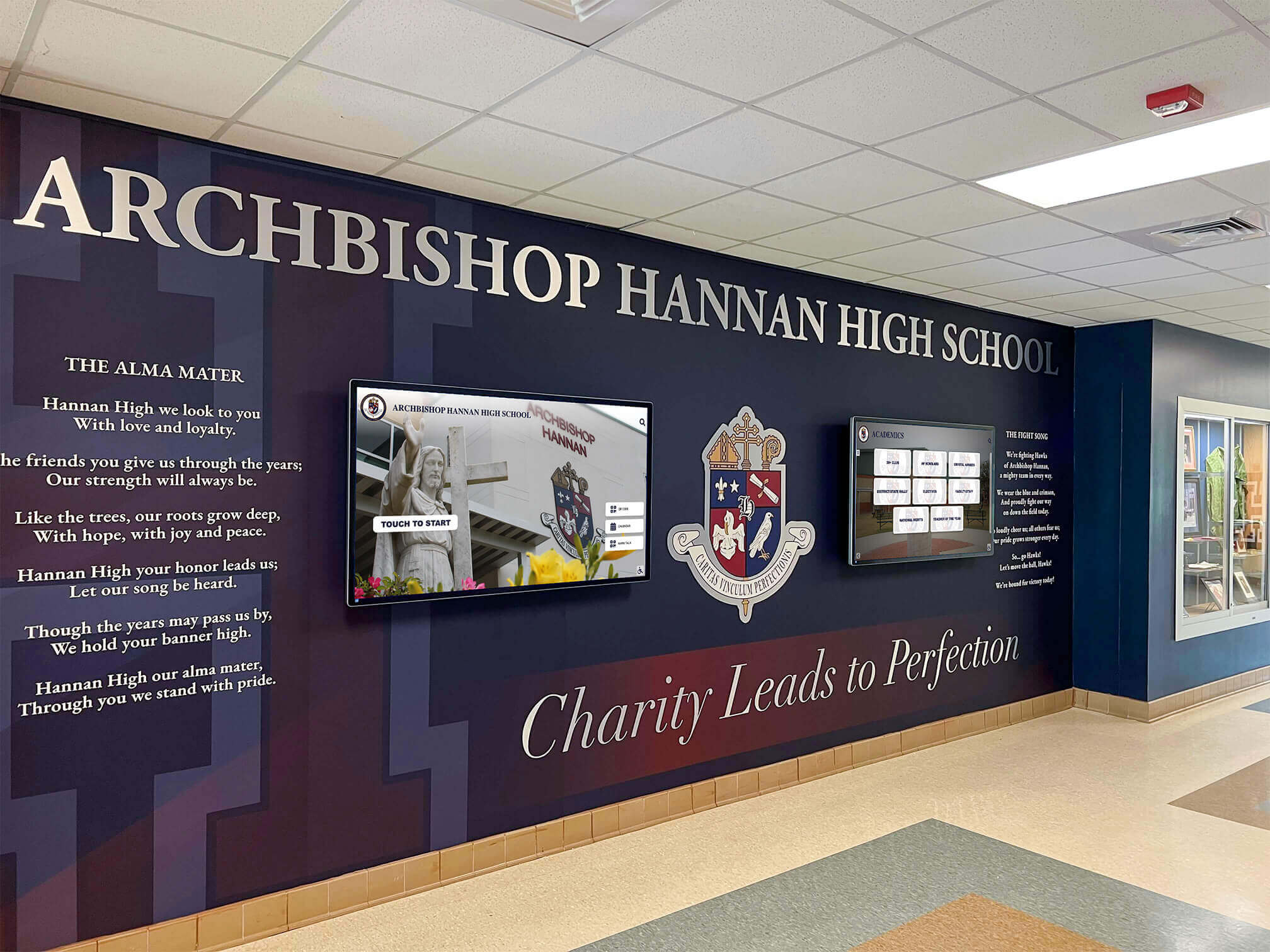
Strategic placement of touchscreen directories in building entrances provides immediate visitor assistance while showcasing institutional identity
Always Current and Accurate Information
Static printed directories become outdated almost immediately after installation. Staff changes, department relocations, room reassignments, and organizational restructuring occur continuously—but physical directories can only be updated through expensive reprinting and replacement processes that lag weeks or months behind actual changes.
This information decay creates visitor frustration when directories show people who no longer work for organizations, departments in old locations, or rooms repurposed for different functions. Worse, staff who know information is outdated lose confidence in directory accuracy and stop directing visitors to use them.
Touchscreen directories remain continuously current through instant cloud-based updates. When changes occur, authorized staff update directory databases within minutes—ensuring visitors always access accurate information while eliminating the administrative burden of managing printed directory replacement cycles.
Valuable Usage Analytics and Insights
Static directories provide no data about how visitors use them or what information they seek. Touchscreen systems generate analytics revealing:
Usage Metrics:
- Most-searched people and departments
- Peak usage times and seasonal patterns
- Search terms visitors enter (revealing terminology they use)
- Average interaction time and engagement depth
- Success rates finding desired information
- Common navigation paths through building systems
These insights inform facilities planning, identify wayfinding pain points, demonstrate ROI to stakeholders, guide content optimization, and help organizations understand how visitors navigate and interact with buildings.
Organizations implementing interactive touch screen displays use engagement data to continuously improve navigation systems based on actual visitor behavior rather than assumptions about how people should find destinations.
Enhanced Building Security
Modern touchscreen directories can integrate with building security systems to improve safety without compromising user experience:
Security Integration:
- Visitor check-in capabilities capturing guest information
- Host notification automatically alerting staff when visitors arrive
- Visitor badge printing for identification requirements
- After-hours directory restrictions limiting access to sensitive information
- Emergency alert displays for building evacuation or shelter-in-place situations
- Integration with access control systems for secure areas
These security features provide particular value in corporate offices, government facilities, and healthcare settings where visitor tracking and facility security represent important operational requirements.
Touchscreen Building Directory vs. Digital Kiosk: Understanding the Difference
Organizations evaluating interactive display systems often encounter terminology confusion around “touchscreen directories,” “digital kiosks,” “interactive displays,” and “wayfinding systems.” Understanding distinctions helps clarify specific needs and evaluate appropriate solutions.
Touchscreen Building Directory
A touchscreen building directory is a specialized interactive system designed primarily for wayfinding and navigation within specific buildings or facilities. Primary functions include searching for people and departments, identifying room locations, providing directions and maps, and displaying current building occupancy information.
These systems prioritize speed and efficiency—visitors need quick access to specific information so they can reach destinations promptly. User interfaces emphasize search functionality, clear navigation, and minimal steps between arriving at the directory and finding needed information.
Digital Kiosk
A digital kiosk is a broader category of interactive display systems serving diverse purposes beyond basic wayfinding. Kiosks might provide product information and catalogs, process transactions and payments, display promotional content and advertising, enable self-service check-in, offer entertainment and games, or showcase organizational achievements and history.
Educational institutions often implement digital kiosks that combine wayfinding with broader engagement content—campus tours, achievement recognition, historical archives, event calendars, and institutional information. Solutions like those from Rocket Alumni Solutions blend practical directory functionality with rich multimedia content showcasing school culture and accomplishments.
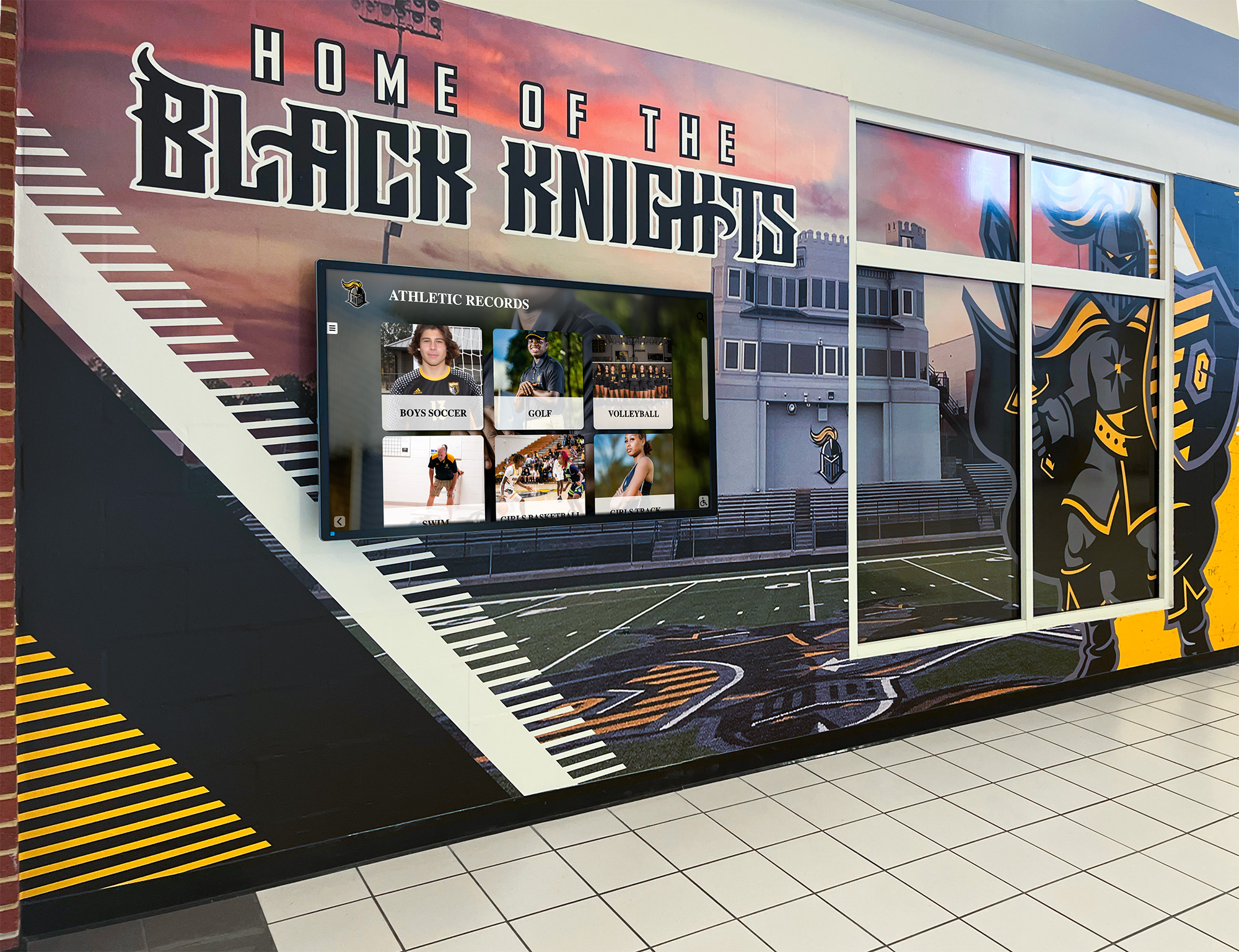
Educational institutions benefit from systems that combine directory functionality with achievement recognition and institutional storytelling
When to Choose Each Approach
Choose touchscreen building directories when:
- Primary need is wayfinding and navigation assistance
- Visitor goals focus on finding specific people or locations quickly
- Building complexity requires sophisticated mapping and directions
- Directory updates occur frequently due to organizational changes
- User interface should emphasize speed and efficiency above all else
Choose broader digital kiosk systems when:
- Organizations want to combine wayfinding with engagement content
- Lobby displays should serve multiple communication purposes
- Institutional storytelling and achievement recognition matter
- Interactive systems should showcase culture and accomplishments
- Visitor dwell time supports richer content exploration
Many organizations find that systems combining both approaches—efficient wayfinding with engaging content—provide the best return on investment by serving practical needs while creating memorable visitor experiences that communicate organizational excellence.
Schools implementing interactive digital displays benefit from platforms that integrate directory functionality with hall of fame content, digital yearbooks, achievement recognition, and institutional archives.
Essential Considerations When Implementing Touchscreen Directories
Successful touchscreen directory implementations require thoughtful planning across several dimensions that determine long-term satisfaction and user adoption.
Hardware Selection and Placement Strategy
Physical hardware decisions significantly impact usability, durability, and total cost of ownership:
Display Size and Format:
- Wall-mounted tablets (10-15 inches) for compact spaces with limited traffic
- Mid-size displays (32-43 inches) for standard lobby installations
- Large-format screens (55-75 inches) for high-traffic areas and multi-purpose content
- Freestanding kiosks versus wall-mounted displays based on lobby layout
- Portrait versus landscape orientation depending on content type
Location Considerations:
- Highly visible placement near building entrances where visitors naturally encounter them
- Sufficient clearance around displays for wheelchair accessibility
- Height positioning allowing comfortable use by diverse visitors
- Lighting conditions avoiding glare that reduces screen visibility
- Proximity to electrical power and network connectivity
- Multiple directory locations in large buildings or multi-wing facilities
Durability and Environmental Factors:
- Commercial-grade touchscreens rated for continuous operation
- Tempered glass protection against impact damage
- Vandal-resistant enclosures for public-access environments
- Temperature and humidity tolerances for non-climate-controlled spaces
- Cleaning and maintenance requirements for high-traffic surfaces
Software Platform Evaluation
Content management capabilities determine whether staff can maintain current, engaging directories or whether systems stagnate with outdated information:
Content Management Features:
- Intuitive dashboards requiring no technical expertise
- Visual editors showing real-time preview before publishing
- Bulk upload capabilities for efficiently managing large directories
- Role-based permissions controlling who can edit specific content
- Change history tracking all updates for accountability
- Mobile-friendly management interfaces allowing updates from any device
Search and Navigation Capabilities:
- Sub-second search response times
- Intelligent sorting prioritizing most relevant results
- Synonym recognition understanding various search terms
- Fuzzy matching accommodating misspellings
- Customizable result displays showing relevant information
- Integration with organizational databases for automated updates
Customization and Branding:
- Template systems maintaining consistent visual identity
- Color scheme customization matching organizational branding
- Logo integration and branded interface elements
- Custom category creation for organization-specific needs
- Flexible content layouts adapting to different information types
Integration with Existing Systems
Touchscreen directories work best when integrated with broader organizational technology ecosystems:
Database Integration:
- HR systems automatically updating personnel directories
- Active Directory or LDAP synchronization
- Facility management systems reflecting current room assignments
- Event management platforms displaying calendar information
- Email systems sending visitor notifications
Security System Integration:
- Visitor management and check-in systems
- Access control and badge printing
- Emergency notification and alert systems
- Video surveillance for public area monitoring
Content Strategy and Maintenance
Technical capabilities mean nothing if directories contain outdated or incomplete information. Establishing clear content management processes ensures ongoing accuracy:
Organizational Responsibilities:
- Designate specific staff members responsible for content updates
- Establish update procedures when personnel changes occur
- Define review schedules ensuring periodic accuracy verification
- Create content guidelines maintaining consistent information quality
- Document processes for training new administrators
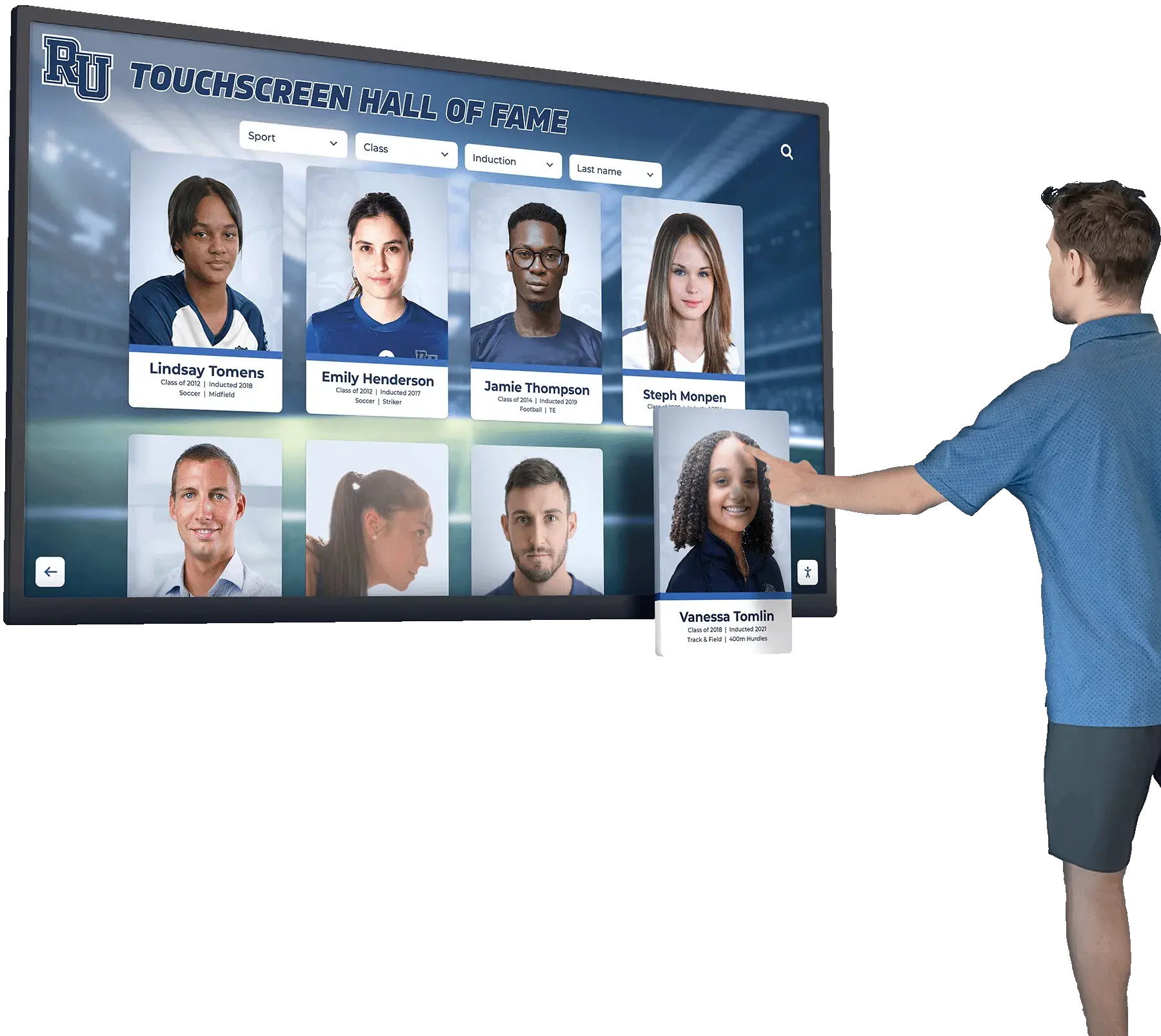
Regular content updates ensure directories remain valuable resources visitors trust and use consistently
Content Quality Standards:
- Complete information for all listed individuals and departments
- Professional photos where appropriate
- Accurate contact information including phone and email
- Helpful descriptions of department functions and services
- Current room numbers and building locations
- Correct spellings and title information
Budget and Total Cost of Ownership
Understanding complete costs helps organizations make informed investment decisions:
Initial Investment Components:
- Hardware costs ($2,000-8,000 per display depending on size and features)
- Software licensing (one-time or subscription-based)
- Installation including electrical, mounting, and networking
- Initial content creation and database population
- Staff training and implementation support
- Facility modifications if required (electrical, mounting infrastructure)
Ongoing Operational Costs:
- Software subscriptions or maintenance fees ($500-2,000 annually)
- Network connectivity and data services
- Content management staff time (typically minimal for established systems)
- Electricity consumption (relatively low for modern displays)
- Occasional hardware repairs or replacements
- Software updates and feature enhancements
Most organizations find that touchscreen directories achieve cost parity with traditional printed directory replacement cycles within 3-5 years while providing dramatically superior functionality and visitor experience.
Industry-Specific Applications and Use Cases
Different sectors benefit from touchscreen building directories in ways reflecting their unique operational needs and visitor patterns.
Educational Institutions
Schools, colleges, and universities use touchscreen directories to help diverse visitors navigate complex campuses:
Educational Applications:
- Prospective student tours requiring independent campus exploration
- Parent visitors locating specific classrooms, offices, or event venues
- Alumni returning to campus after years away
- Community members attending public events or meetings
- Vendors and service providers finding appropriate check-in locations
Educational institutions particularly benefit from systems that combine wayfinding with achievement recognition—showcasing athletic halls of fame, academic honors, notable alumni, and institutional history that strengthen community pride and influence enrollment decisions.
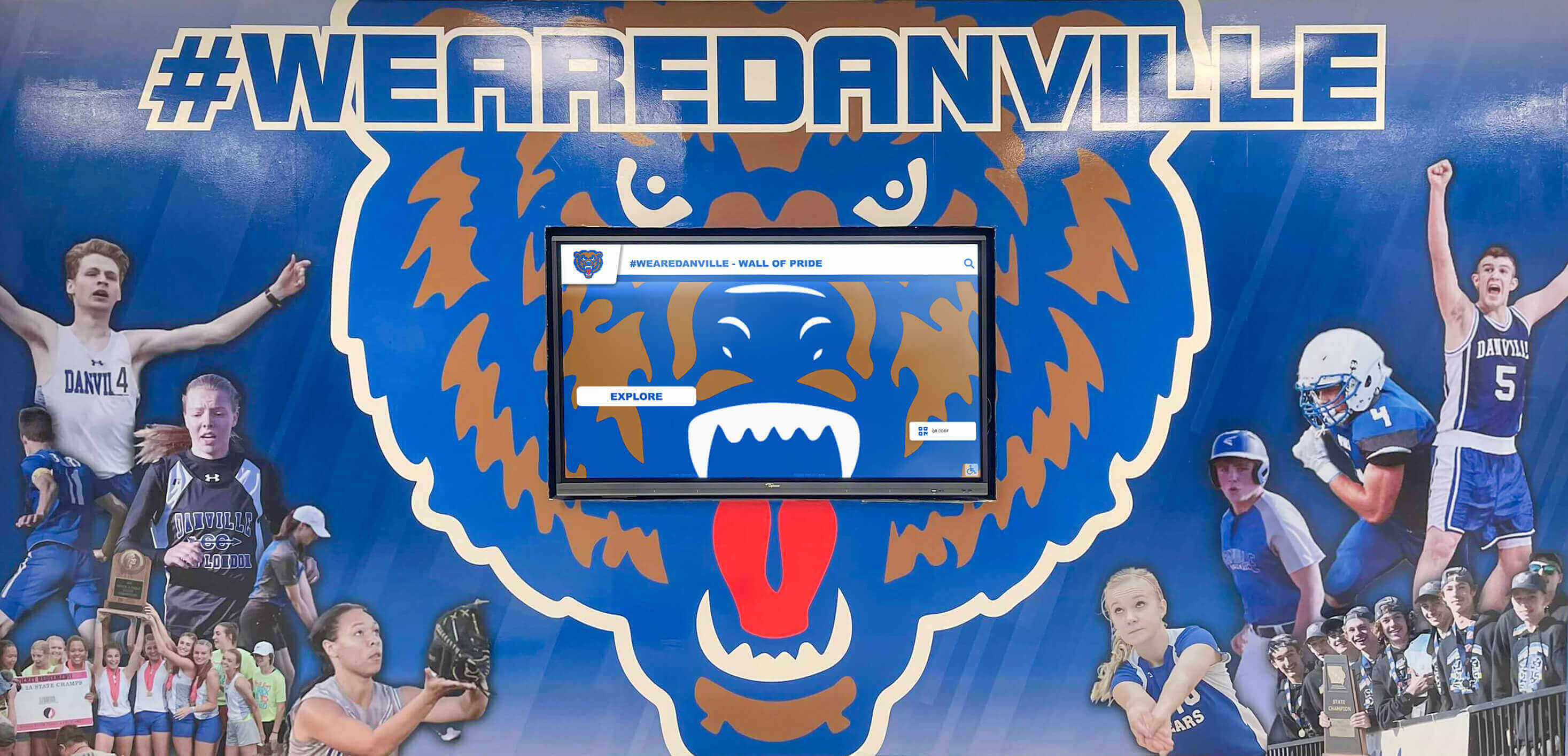
Educational institutions integrate wayfinding with recognition content that celebrates achievements while assisting campus navigation
Corporate Office Buildings
Companies implement touchscreen directories to improve professional image while reducing reception workload:
Corporate Applications:
- Client visitors finding meeting rooms and executive offices
- Vendors and delivery personnel locating receiving or purchasing departments
- Job candidates navigating to interview locations
- Employee guests and family members visiting offices
- Multi-tenant building occupants finding specific companies
Corporate directories often integrate with visitor management systems enabling guest check-in, host notification, and temporary badge printing—combining wayfinding with security protocols.
Healthcare Facilities
Hospitals, clinics, and medical centers use touchscreen directories to reduce patient stress in already challenging situations:
Healthcare Applications:
- Patients finding specific departments, clinics, or physician offices
- Visitors locating patient rooms (when integrated with room management systems)
- Family members finding cafeterias, waiting areas, or support services
- Medical professionals navigating large hospital complexes
- Volunteers and staff locating administrative offices
Healthcare directories must accommodate visitors who may be elderly, stressed, or dealing with medical emergencies—requiring particularly intuitive interfaces with minimal steps between arrival and finding critical information.
Government and Municipal Buildings
Public sector organizations implement touchscreen directories improving citizen access to services:
Government Applications:
- Citizens finding specific departments or services
- Visitors locating courtrooms, hearing rooms, or council chambers
- Contractors and vendors navigating large municipal facilities
- Community members attending public meetings or events
- Multi-language support serving diverse populations
Government directories often include accessibility features exceeding minimum ADA requirements, reflecting public sector commitments to serving all community members regardless of ability or background.
How Rocket Alumni Solutions Serves Educational Directory Needs
Schools face unique challenges balancing practical wayfinding needs with opportunities to showcase institutional culture, celebrate achievements, and create memorable visitor experiences. Traditional single-purpose building directories solve navigation problems but miss chances to influence enrollment decisions, strengthen community connections, and demonstrate institutional excellence during critical first impressions.
Rocket Alumni Solutions provides comprehensive interactive display platforms combining efficient directory functionality with rich recognition content—hall of fame displays, digital yearbooks, achievement timelines, and institutional archives. These integrated systems serve both practical visitor navigation needs and broader communication goals that matter deeply to educational communities.
Schools implementing Rocket Alumni Solutions report that prospective students and families consistently engage with touchscreen systems during campus tours—exploring not just building locations but also athletic achievements, academic honors, notable alumni, and historical milestones that communicate program quality and institutional pride. This engagement creates positive associations that influence enrollment decisions while solving practical wayfinding challenges simultaneously.
The platform includes intuitive content management enabling faculty and staff to update directory information, add new achievements, and maintain current content without technical expertise or outside assistance. Cloud-based systems mean updates appear instantly across all displays and web platforms—ensuring consistency whether visitors explore content on campus touchscreens or from smartphones anywhere in the world.
Whether your school needs basic building wayfinding, comprehensive achievement recognition, or integrated systems serving multiple purposes, Rocket Alumni Solutions provides flexible platforms scaling from single displays to campus-wide networks showcasing the full depth of your institutional story.
Measuring Success and Return on Investment
Understanding how touchscreen directories deliver value helps organizations justify investments and improve implementations over time.
Quantifiable Metrics
Track concrete measurements demonstrating directory effectiveness:
Usage Statistics:
- Number of daily interactions showing adoption rates
- Average session duration indicating engagement depth
- Search success rates revealing interface effectiveness
- Most-searched terms and destinations guiding content optimization
- Peak usage times informing staffing and support decisions
Operational Efficiency:
- Reduction in reception desk directional assistance requests
- Staff time savings reallocated to higher-value activities
- Decrease in visitor confusion or getting lost in facilities
- Fewer phone calls requesting location information
- Improved visitor flow and reduced lobby congestion
Cost Comparisons:
- Eliminated printed directory replacement cycles
- Reduced staff time managing directory updates
- Avoided signage projects adding wayfinding information
- Decreased reception staffing needs during peak periods
Qualitative Benefits
Numbers tell part of the story, but softer benefits matter equally:
Visitor Experience Improvements:
- Increased visitor confidence navigating buildings independently
- Positive first impressions from modern technology
- Reduced stress for visitors with mobility challenges
- Greater accessibility for non-English speakers through multi-language support
Organizational Benefits:
- Enhanced professional image and perceived sophistication
- Improved staff satisfaction eliminating repetitive directional assistance
- Stronger brand consistency through unified directory presentation
- Greater flexibility adapting to organizational changes quickly
Educational institutions implementing digital wayfinding systems consistently report that prospective students and families mention impressive technology during post-tour surveys—indicating that interactive systems influence enrollment decisions even when wayfinding represents just one of many factors.
Future Trends in Touchscreen Directory Technology
Understanding emerging capabilities helps organizations make investment decisions that remain relevant as technology evolves.
Artificial Intelligence and Natural Language
Directories using artificial intelligence will provide more intuitive interactions through conversational interfaces understanding natural questions like “Where is the admissions office?” or “How do I get to the cafeteria?” rather than requiring specific search syntax.
Augmented Reality Wayfinding
AR integration will enable visitors to use smartphones for visual navigation overlaying directional arrows and location information onto real-world views through camera interfaces—creating smooth transitions from directory kiosks to personal mobile guidance.
Personalization and Visitor Recognition
Advanced systems will recognize returning visitors through facial recognition or mobile device detection, automatically displaying relevant personalized content, saved locations, and tailored navigation based on previous interactions.
Enhanced Analytics and Predictive Insights
Machine learning will analyze usage patterns predicting peak demand periods, identifying confusing navigation elements requiring improvement, and recommending content optimization based on actual visitor behavior rather than assumptions.
Integration with Smart Building Systems
Directories will connect with building management systems providing real-time information about room availability, event schedules, temperature and air quality, parking space occupancy, and facility status—creating comprehensive information centers beyond basic wayfinding.
Conclusion: Transforming Visitors into Engaged Community Members
Touchscreen building directories solve immediate practical challenges—helping visitors navigate unfamiliar facilities, reducing staff workload, and maintaining current information. But the best implementations go beyond basic wayfinding to create engaging experiences that inform, inspire, and build lasting positive impressions.
Whether you manage a school campus, corporate office, healthcare facility, or government building, interactive directory systems represent investments in visitor experience that communicate organizational values through every interaction. When people can independently find destinations through intuitive interfaces while discovering your achievements, culture, and story, they develop associations with technological sophistication, visitor-centered service, and institutional excellence that influence relationships, decisions, and perceptions.
Modern organizations recognize that every visitor interaction—including those first moments entering buildings—shapes how people perceive and engage with institutions. Touchscreen building directories ensure those crucial first impressions reflect the quality, innovation, and professionalism that characterize excellent organizations across every sector.
Ready to transform your building directory from static information board to engaging visitor experience? Book a demo to explore how interactive display systems can serve both practical wayfinding needs and broader communication goals that strengthen your organization’s community connections.































