



Modern touchscreen augmented reality displays represent the next evolution in interactive recognition technology, combining the direct navigation of traditional touchscreens with augmented reality layers that bring achievements, historical moments, and institutional stories to life in ways static displays never could. For schools, universities, and athletic programs seeking to engage digitally-native students while preserving institutional heritage, understanding how AR-enabled touchscreen systems work—and when they add genuine value versus unnecessary complexity—determines whether implementations deliver powerful experiences or expensive disappointments.
Augmented reality overlays digital content onto physical environments through smartphone cameras or specialized displays, while touchscreens provide direct tactile interaction with digital interfaces. The intersection of these technologies creates recognition systems where visitors can touch a display to browse athletic records, then point their smartphones at trophy cases to see 3D championship moments, watch archived game highlights floating above physical artifacts, or explore interactive timelines that animate institutional evolution across decades.
This comprehensive guide explores touchscreen augmented reality displays specifically for educational recognition applications—examining how AR enhances traditional interactive displays, practical implementation approaches balancing innovation with usability, real-world applications transforming school recognition programs, and decision frameworks helping you determine whether AR capabilities justify additional investment for your institution’s goals and audience.
The promise of augmented reality in educational recognition extends beyond novelty—when thoughtfully implemented, AR transforms passive trophy case viewing into active exploration, connects current students with historical achievements through rich storytelling, and extends physical recognition capacity by layering unlimited digital content onto constrained physical spaces.

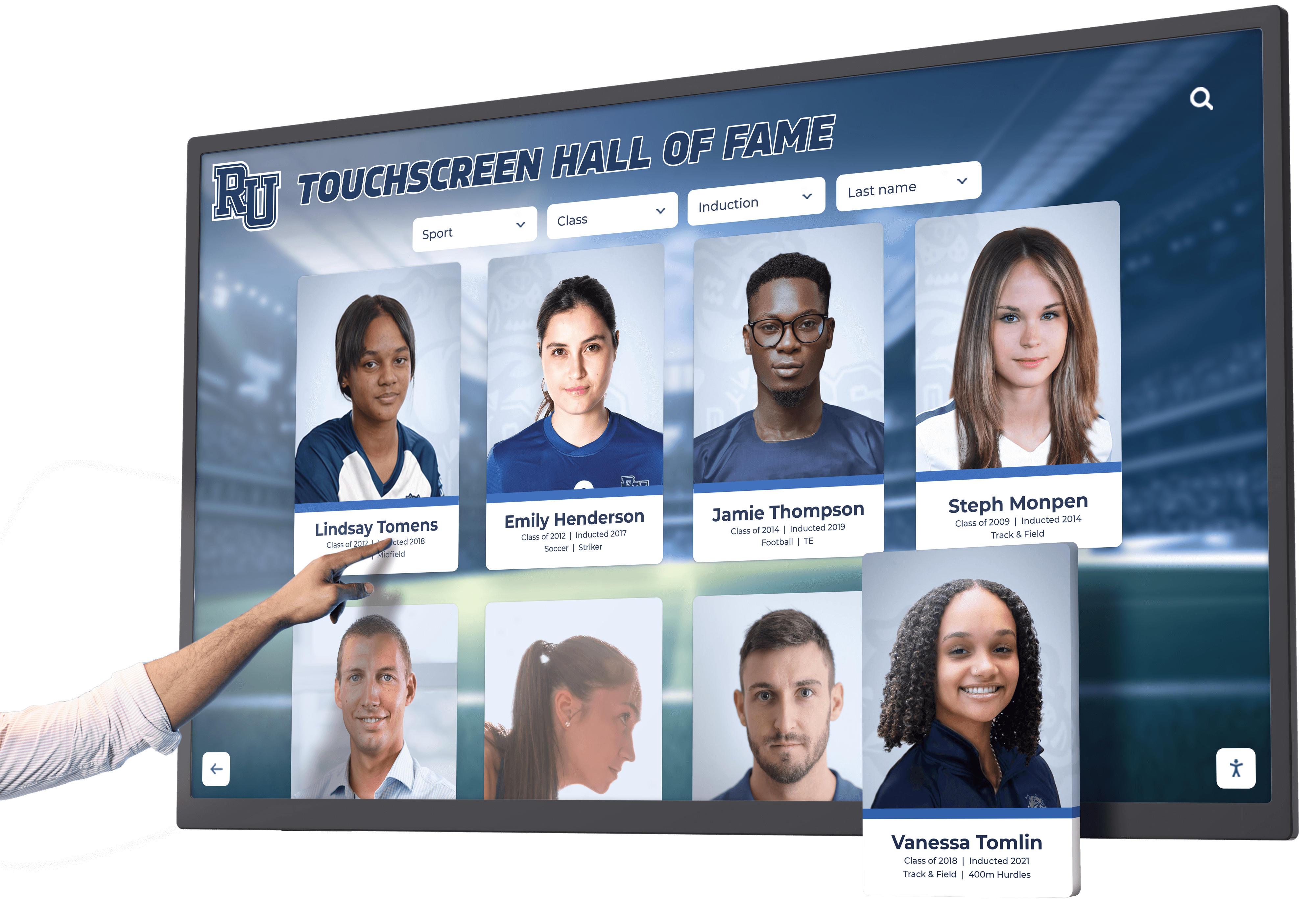
Modern touchscreen displays serve as primary interfaces while AR capabilities extend recognition experiences beyond the screen through mobile devices
Understanding Touchscreen Augmented Reality Display Systems
Touchscreen augmented reality display systems combine multiple technologies creating layered recognition experiences accessible through different modalities.
Core Technology Components
Primary Touchscreen Interface
The foundation remains a traditional interactive touchscreen display providing the primary browsing and navigation experience. Visitors approach wall-mounted or kiosk displays, search for achievements, browse profiles, watch videos, and explore institutional history through familiar touch interactions requiring no special equipment or technical knowledge.
This touchscreen layer ensures universal accessibility—every visitor can engage with recognition content regardless of smartphone ownership, technical comfort, or AR capability awareness. Schools implementing systems report that 80-90% of engagement occurs through direct touchscreen interaction, with AR features serving as enhancement rather than primary interface.
Augmented Reality Extension Layer
AR capabilities extend recognition beyond the touchscreen through visitors’ smartphones or tablets. Common AR implementations include marker-based experiences where QR codes or image targets trigger AR content when scanned, location-based AR activating content based on physical position within facilities, object recognition identifying trophies or artifacts and displaying related information, and web-based AR accessible through mobile browsers without requiring app downloads.
Solutions like those from Rocket Alumni Solutions integrate AR features into comprehensive recognition platforms, ensuring consistent content management across touchscreen displays and AR experiences without requiring separate systems for each modality.
Cloud-Based Content Management
Unified content management systems enable updating both touchscreen displays and AR experiences from single administrative interfaces. When staff add new championship photos, update athlete profiles, or create historical timelines, content automatically appears across physical displays, mobile web platforms, and AR experiences—eliminating duplicate entry across multiple systems.
This centralized approach ensures consistency while simplifying ongoing content management, particularly important for schools where yearbook advisers and athletic staff manage recognition rather than dedicated IT personnel.
How AR Enhances Traditional Recognition Displays
Spatial Context and Storytelling
AR overlays enable placing digital content in meaningful physical contexts. Point a smartphone at an empty trophy case location and see 3D models of championship trophies that no longer fit in constrained physical spaces. Focus on a retired jersey and watch highlight reels of the athlete’s career moments. Scan a team photo and see individual player profiles appear above their images.
This spatial connection between physical artifacts and digital content creates stronger emotional resonance than disconnected digital displays, helping visitors understand relationships between historical items and fuller achievement stories.
Unlimited Content Capacity
Physical trophy cases eventually reach capacity limits, forcing difficult decisions about which achievements warrant limited space. AR layers eliminate these constraints by overlaying unlimited digital content onto existing physical displays—every championship can have associated AR experiences, regardless of physical trophy availability.
Schools implementing AR-enhanced recognition report celebrating 3-5x more achievements compared to physical-only displays by creating AR experiences for accomplishments that never received physical recognition due to space or budget constraints.

Touchscreen interfaces provide immediate accessibility while AR features offer optional enhanced experiences for engaged visitors
Mobile Continuation and Social Sharing
AR experiences accessed through personal smartphones enable visitors to continue exploring recognition after leaving physical displays. Alumni can revisit their achievements from anywhere, share AR experiences through social media, and maintain ongoing connections with institutional heritage beyond campus visits.
This mobile extension significantly multiplies recognition reach—schools report that AR content sharing generates 5-10x more exposure compared to touchscreen-only displays limited to physical visitors.
Practical AR Implementation Approaches for Schools
Educational institutions pursue various AR integration strategies balancing innovation with practical usability and budget considerations.
Marker-Based AR Through QR Codes
The most accessible AR implementation uses QR codes placed near physical recognition elements, linking to web-based AR experiences accessible through smartphone browsers without requiring dedicated apps.
Implementation Process
Schools create AR content using web-based AR platforms like 8th Wall or AR.js, generate unique QR codes for specific recognition elements, place printed QR codes on plaques near trophy cases or recognition displays, and design AR experiences that activate when visitors scan codes with standard camera apps.
This approach requires minimal technical infrastructure—no custom apps, no specialized displays, and no complex installation. Content updates occur through cloud platforms, automatically appearing when visitors scan unchanged QR codes.
Organizations implementing interactive touchscreen displays for schools often begin with QR-based AR as low-risk enhancement before considering more sophisticated implementations.
Effective AR Content Types
Schools achieve strongest engagement with 3D trophy and artifact models rotating for viewing from all angles, archival video highlights from championship games and performances, interactive timelines showing program evolution across decades, virtual tours of historical facilities and locations, animated statistics and record progressions, and audio narration from coaches or alumni sharing memories.
Content should load quickly on cellular networks, display well on various smartphone screen sizes, and provide clear value beyond what touchscreen displays already offer—avoiding AR for AR’s sake.

QR codes placed on or near displays enable smartphone AR experiences extending touchscreen content
Location-Based AR Experiences
More sophisticated implementations use GPS and indoor positioning to trigger AR content based on visitor location within facilities.
Technology Requirements
Location-based AR requires custom mobile applications with GPS integration and camera access, beacon systems or WiFi positioning for indoor location accuracy, content management platforms organizing AR experiences by physical location, and sufficient visitor adoption of required mobile apps.
This approach enables campus-wide recognition experiences where walking through athletic facilities triggers location-specific AR content about surrounding achievements, historical moments relevant to specific locations appear when visitors stand in particular spots, and wayfinding overlays guide visitors to recognition displays and trophy cases throughout large facilities.
Schools with existing mobile apps for students and parents can integrate AR features into established platforms, avoiding the adoption challenges of standalone AR applications.
Cost and Complexity Considerations
Location-based AR requires significantly higher investment than QR-based implementations: custom mobile app development ($15,000-50,000 initially), indoor positioning infrastructure ($5,000-20,000 per building), ongoing app maintenance and updates ($3,000-10,000 annually), and content creation requiring 3D modeling expertise.
Educational institutions should evaluate whether location-based capabilities justify these incremental costs versus simpler QR-based approaches delivering similar content through different activation mechanisms.
Object Recognition AR
Advanced AR systems recognize physical objects—trophies, jerseys, plaques—without requiring QR code markers, creating smooth experiences where pointing cameras at recognition elements automatically triggers relevant AR content.
Implementation Approach
Object recognition AR requires photographing every physical recognition element from multiple angles, training machine learning models to identify specific items, designing unique AR experiences for each recognized object, and testing recognition accuracy across varied lighting and viewing angles.
When functional, object recognition creates magical experiences where recognition content appears without deliberate QR scanning. However, recognition accuracy challenges in real-world conditions often frustrate visitors—systems may fail to identify objects in dim lighting, from unusual angles, or when partially obscured.
Organizations exploring advanced interactive recognition technology should carefully evaluate whether object recognition reliability justifies complexity versus simpler marker-based alternatives.
Real-World Applications in Educational Recognition
Schools implement touchscreen AR displays across various recognition contexts with different engagement outcomes and investment justifications.
Athletic Record Boards and Championship Recognition
AR-enhanced athletic recognition remains the most common educational application, combining traditional record boards with detailed championship storytelling.
Implementation Examples
Physical touchscreen displays show current records, championship lists, and athlete profiles through traditional navigation. QR codes placed near trophy cases link to AR experiences showing 3D championship trophy models for titles won before physical trophies existed, archived game highlights from historic championship victories, animated play-by-play recreations of record-setting performances, and virtual tours of historical athletic facilities and stadiums.
This layered approach celebrates comprehensive athletic history despite physical trophy case limitations, provides context for statistical records through AR game footage, and engages current athletes with historical program excellence in memorable ways.
Schools implementing digital athletic record boards report that AR features particularly resonate during prospective athlete recruiting visits when demonstrating program tradition and success.
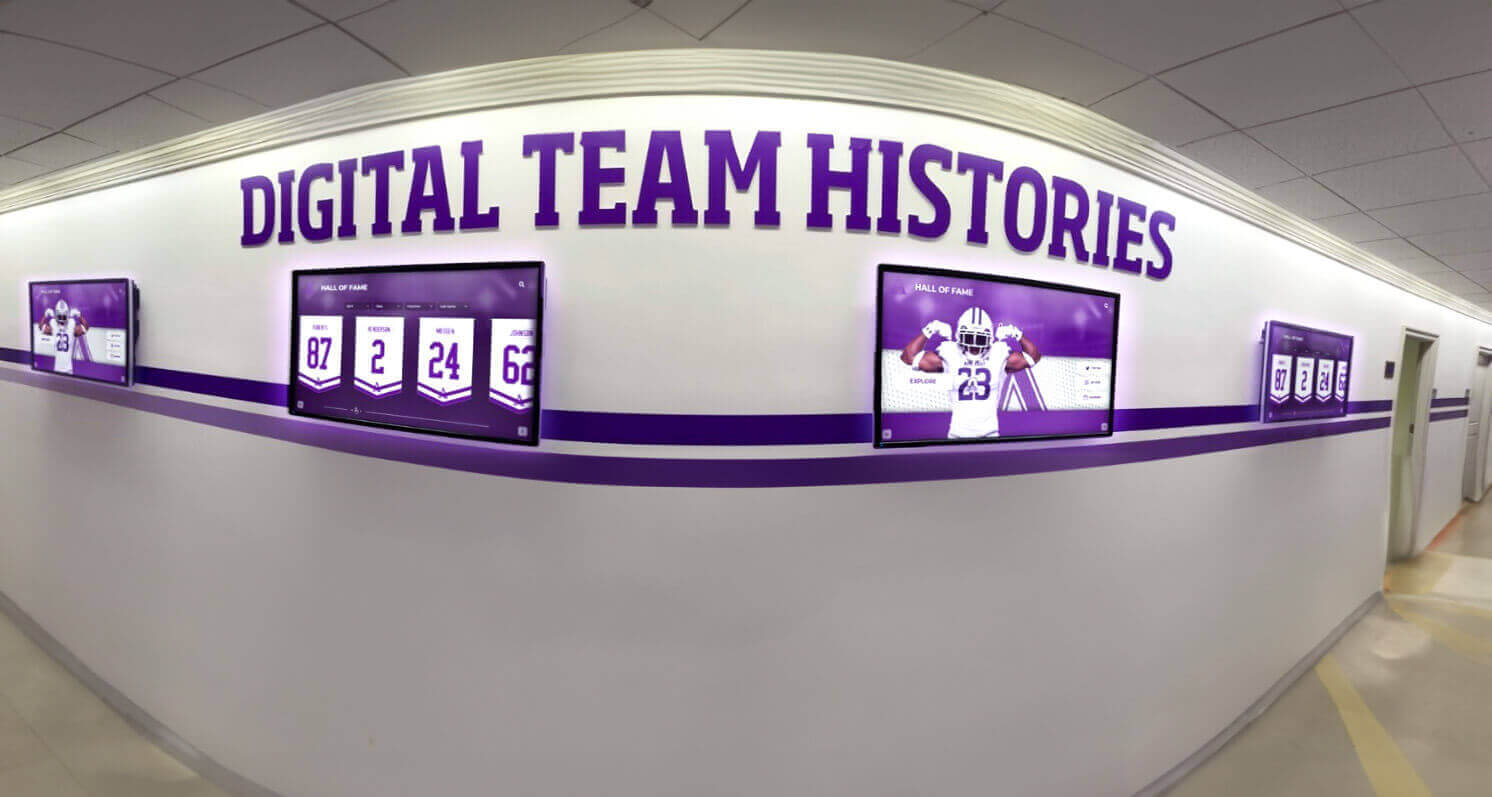
Multi-display installations create comprehensive recognition while AR extends content beyond screen limitations
Alumni Recognition and Historical Timelines
AR capabilities enable interactive historical experiences connecting current students with institutional heritage across decades.
Content Approaches
Touchscreen displays present alumni achievement databases searchable by name, graduation year, or career field. AR extensions provide period-appropriate archival photos and videos showing campus evolution, virtual tours recreating historical school buildings and facilities, animated timelines showing institutional growth and major milestones, and video interviews with notable alumni discussing their experiences.
This combination helps students understand institutional context while making historical achievements feel immediate and relevant rather than distant historical facts.
Organizations implementing comprehensive alumni recognition programs discover that AR features particularly engage younger alumni comfortable with mobile technology and accustomed to interactive digital experiences.
Academic Honor Rolls and Scholarship Recognition
While less visually dramatic than athletic applications, AR-enhanced academic recognition provides valuable context for achievement significance.
Implementation Strategies
Touchscreen displays show honor roll lists, scholarship recipients, and academic achievements through searchable databases. AR experiences add student testimonials about scholarship impact, virtual tours of scholarship-funded facilities and programs, interactive visualizations showing academic achievement trends over time, and donor stories explaining scholarship program histories and motivations.
This additional context helps students understand achievement significance while connecting recognition to institutional values and donor generosity in tangible ways.
Museum-Style Exhibit Experiences
Schools with rich historical artifact collections create museum-quality experiences combining physical displays with AR-enhanced storytelling.
Application Examples
Physical trophy cases display vintage uniforms, equipment, and memorabilia with touchscreen directories providing context. AR extensions enable viewing artifacts in historical use through archival photos and videos, comparing vintage equipment with modern equivalents through side-by-side overlays, hearing audio narration from individuals associated with displayed items, and exploring related artifacts stored off-display due to space constraints.
This approach maximizes educational value from limited physical artifact collections while preserving items that might otherwise languish in storage unseen.
Educational institutions implementing digital archives and historical preservation benefit from AR capabilities enabling comprehensive collections accessible beyond physical space constraints.
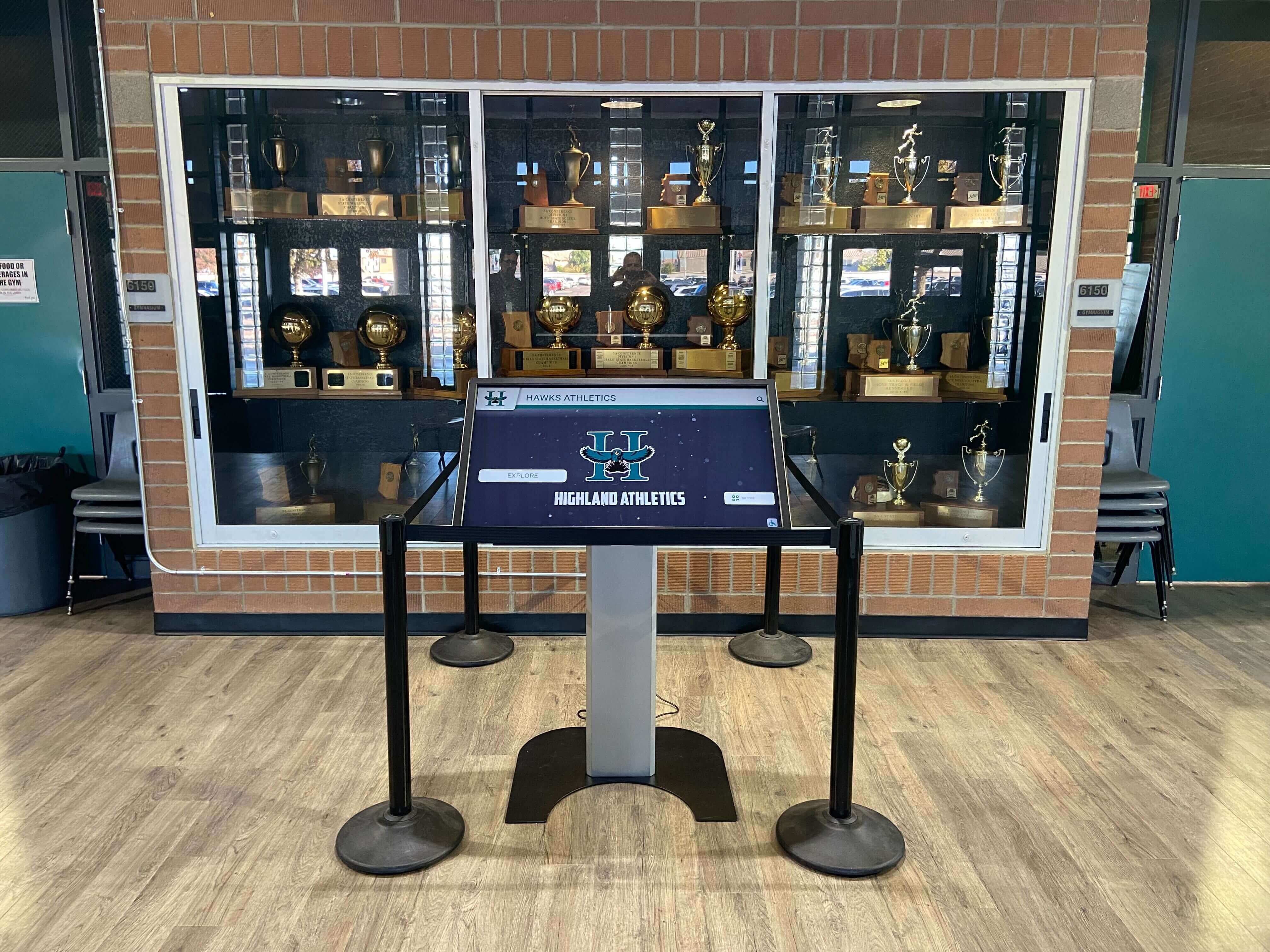
AR-enabled displays complement physical trophy cases by overlaying additional context and historical content
Technical Considerations and Implementation Challenges
While AR offers compelling possibilities, practical challenges require careful planning and realistic expectations.
Mobile Device Compatibility and Adoption
AR experiences require visitors using smartphones or tablets with compatible capabilities—not always guaranteed in educational settings.
Device Requirement Realities
Web-based AR requires relatively modern smartphones (iPhone X or newer, Android devices from 2018+) with capable cameras and processors, sufficient mobile data or WiFi connectivity for loading AR content, visitor willingness to use personal devices for school experiences, and privacy comfort with camera activation and potential location tracking.
Schools serving economically diverse populations may find 20-40% of visitors lack compatible devices or hesitate to use personal phones for school activities—making AR enhancement rather than primary interface critical for inclusive recognition.
Organizations should ensure touchscreen displays provide complete recognition experiences accessible to all visitors, with AR offering optional enhancement rather than required functionality.
Content Creation Complexity and Costs
Creating quality AR experiences requires expertise and resources beyond traditional digital content development.
Required Capabilities
AR content development involves 3D modeling of trophies, artifacts, and environmental elements ($500-2,000 per complex model), video editing and mobile streaming preparation, spatial audio recording and editing for rich experiences, testing across multiple device types and operating systems, and ongoing content updates as AR platform standards evolve.
Schools lacking in-house capability typically spend $5,000-15,000 annually on AR content creation and maintenance—justifiable for institutions with compelling content and engaged audiences, but potentially excessive for modest recognition programs.
Educational institutions should evaluate whether AR content investment delivers proportional engagement increases versus simpler approaches like traditional video integration in touchscreen displays.
Network Infrastructure Requirements
AR experiences loading multimedia content demand robust network connectivity often exceeding typical school WiFi capabilities.
Infrastructure Needs
Effective AR requires high-bandwidth WiFi throughout facility areas where AR experiences activate, cellular coverage for visitors using mobile data, content delivery networks ensuring fast loading regardless of traffic, and sufficient bandwidth accommodating multiple simultaneous AR users without degradation.
Schools report that network infrastructure upgrades required for smooth AR experiences often cost $3,000-10,000 per building—unexpected expenses that should factor into total AR implementation budgets.
Organizations implementing campus-wide digital display networks should assess existing network capacity before committing to AR features requiring substantial bandwidth.
Maintenance and Long-Term Sustainability
AR technology evolves rapidly, creating ongoing maintenance requirements for sustained functionality.
Sustainability Considerations
AR implementations require updating content formats as mobile operating systems evolve, maintaining compatibility as browser standards change, refreshing 3D models and media as quality expectations increase, testing functionality after platform updates, and monitoring for deprecated features requiring migration.
Schools discover that AR experiences functional at launch may degrade or fail entirely within 2-3 years without ongoing maintenance investment—a stark contrast to traditional touchscreen displays remaining functional for 7-10 years with minimal updates.
Budget planning should include 15-25% of initial AR development costs annually for ongoing maintenance and updates ensuring continued functionality.
Decision Framework: When AR Adds Value vs. Unnecessary Complexity
Not every recognition program benefits equally from AR enhancement—systematic evaluation ensures appropriate technology selection.
Criteria Favoring AR Implementation
Rich Visual Content and Historical Materials
Schools with extensive archival videos, historical photographs, and artifact collections benefit most from AR capabilities enabling comprehensive content presentation beyond physical display constraints. Institutions lacking rich visual materials find AR provides limited incremental value.
Technically Comfortable Audience
High schools and universities serving digitally-native students and young alumni see higher AR adoption than elementary schools or communities with older demographics less comfortable with mobile technology. Audience technical comfort significantly impacts AR engagement returns.
Adequate Budget for Quality Implementation
Quality AR experiences require $10,000-30,000 initial investment plus ongoing maintenance. Institutions with sufficient budgets can create compelling experiences, while schools forced into minimal implementations often deliver frustrating experiences that harm rather than improve recognition programs.
Strong Existing Touchscreen Foundation
AR works best as enhancement to already-successful touchscreen recognition programs. Schools should establish functional, engaging touchscreen displays before considering AR augmentation rather than attempting both simultaneously.
Organizations implementing comprehensive digital recognition strategies typically evolve from traditional displays to interactive touchscreens to AR enhancement over 3-5 years as budgets, content, and expertise develop.
Situations Where AR May Not Justify Investment
Limited Content or Simple Recognition Needs
Basic recognition programs showcasing current students or recent achievements gain little from AR—traditional touchscreen displays with photos and basic profiles provide sufficient functionality at lower cost and complexity.
Budget Constraints Below Quality Threshold
Poor AR implementation damages programs more than no AR at all. Schools unable to invest $15,000+ for quality development should focus resources on excellent touchscreen experiences rather than compromised AR features.
Audience Technical Limitations
Schools serving populations with limited smartphone access or low technical comfort should prioritize universally accessible touchscreen experiences over AR features excluding significant visitor segments.
Insufficient Ongoing Maintenance Capacity
AR requiring ongoing technical maintenance doesn’t suit schools lacking dedicated IT support or budget for annual updates. Touchscreen displays without AR dependencies require less ongoing technical investment for sustained functionality.
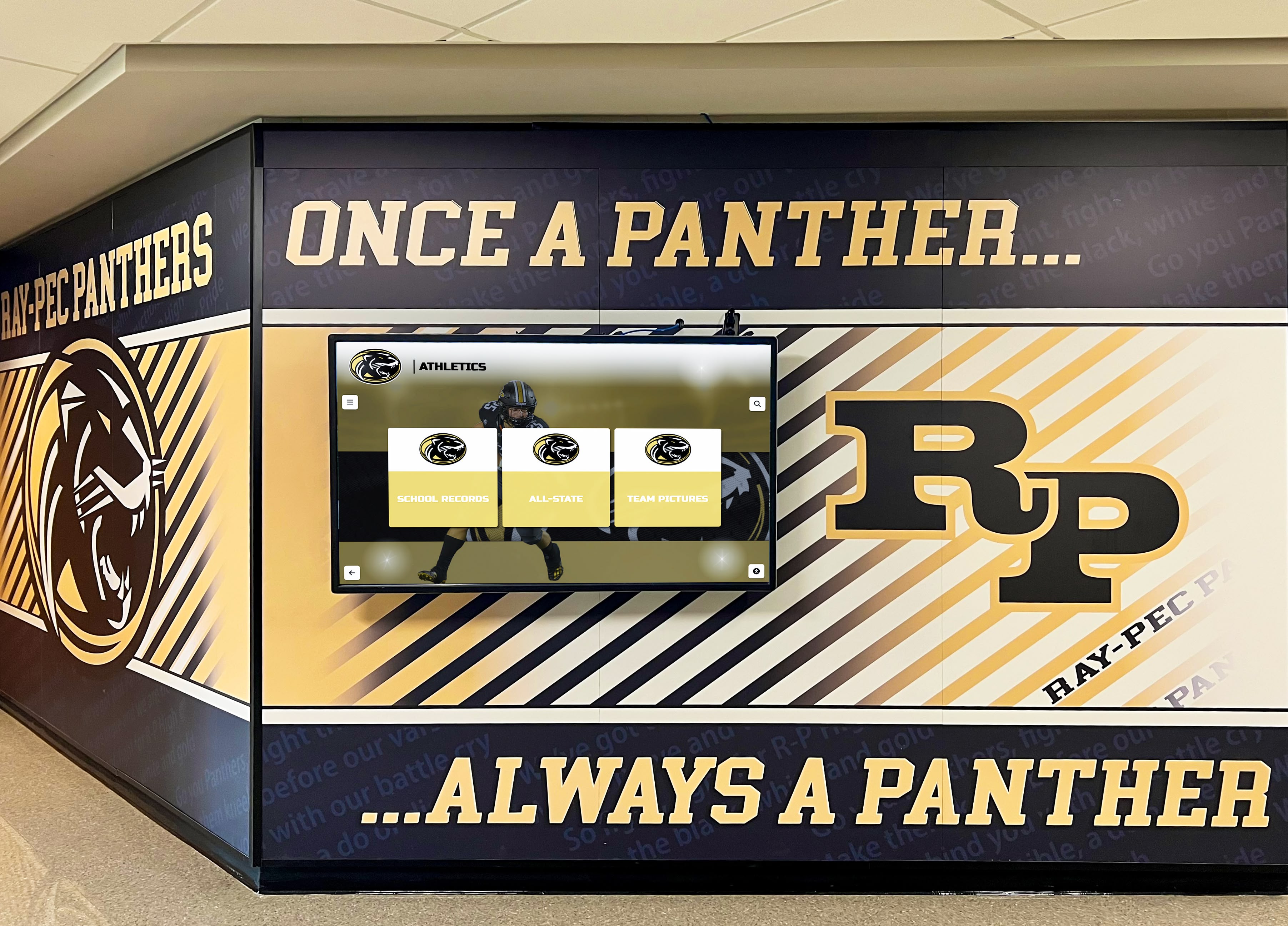
Traditional touchscreen displays integrated with school environments provide accessible recognition without AR complexity
Future Trends in AR-Enhanced Recognition Technology
Augmented reality capabilities continue evolving, creating new possibilities for educational recognition applications.
Glasses-Free Spatial AR Displays
Emerging light-field and holographic displays enable AR effects visible without smartphones or glasses, creating shared experiences for groups viewing displays simultaneously.
Technology Development
Companies developing spatial displays that project three-dimensional content visible from multiple viewing angles, holographic plates creating floating 3D images in physical space, clear OLED displays overlaying digital content on physical artifacts behind glass, and volumetric displays generating 3D imagery in mid-air.
While currently expensive ($50,000-200,000 per installation), prices will decline as technology matures—potentially enabling mainstream educational adoption within 5-7 years for signature recognition installations.
Adaptive Personalization
Artificial intelligence will enable AR experiences adapting to individual visitors without explicit input or privacy concerns.
Emerging Capabilities
Systems detecting visitor age ranges and adapting content complexity accordingly, recognizing alumni attire or accessories and highlighting relevant achievement eras, analyzing which AR content visitors engage with longest and prioritizing similar material, and generating customized achievement paths connecting visitor interests to historical content.
This personalization increases relevance and engagement while maintaining privacy through anonymous pattern recognition rather than individual identification.
Social and Collaborative AR Experiences
Multi-user AR will enable groups exploring recognition content together through shared experiences.
Application Possibilities
Multiple visitors viewing AR content simultaneously and discussing what they see, collaborative challenges encouraging groups to discover recognition content throughout facilities, social comparison features showing friends’ achievements side-by-side, and virtual tours guided by alumni or coaches appearing through AR.
These social features particularly engage student groups and families during campus visits, creating memorable shared experiences rather than solitary mobile browsing.
Educational institutions should monitor emerging trends in interactive display technology to understand when advancing capabilities justify investment for their specific contexts.
Implementation Strategy: Starting with Touchscreen, Enhancing with AR
Most successful deployments follow evolutionary approaches building AR on strong touchscreen foundations.
Phase 1: Establish Core Touchscreen Recognition
Begin with comprehensive interactive touchscreen displays providing searchable achievement databases, multimedia profiles with photos and videos, straightforward navigation accessible to all visitors, and mobile-responsive web platforms extending recognition beyond physical displays.
This foundation ensures recognition programs deliver value to all visitors regardless of AR adoption, creates content libraries that AR experiences will enhance, and establishes content management workflows that will serve both touchscreen and AR modalities.
Organizations implementing solutions like Rocket Alumni Solutions’ recognition platforms benefit from systems designed for gradual enhancement rather than complete replacement as capabilities expand.
Phase 2: Add QR-Based AR Enhancements
After touchscreen displays prove successful, add modest AR capabilities through QR codes placed strategically around displays and trophy cases, linking to mobile-optimized AR experiences hosted on cloud platforms, featuring 3D models of select high-value artifacts and championships, and requiring minimal ongoing maintenance for sustained functionality.
This incremental approach enables testing AR engagement without massive investment, learning visitor preferences and technical challenges with limited risk, and demonstrating value before committing to more sophisticated implementations.
Phase 3: Expand Based on Adoption and ROI
If Phase 2 AR features demonstrate strong adoption and clear value, consider expanding capabilities with more sophisticated AR experiences leveraging object recognition or location awareness, custom mobile applications providing enhanced functionality beyond web-based AR, and integration with student information systems personalizing recognition experiences.
This phased strategy ensures each investment level demonstrates value before proceeding to more expensive capabilities, maintains functional recognition throughout evolution, and protects budget by avoiding premature investment in sophisticated features that may not justify costs for your specific audience and content.
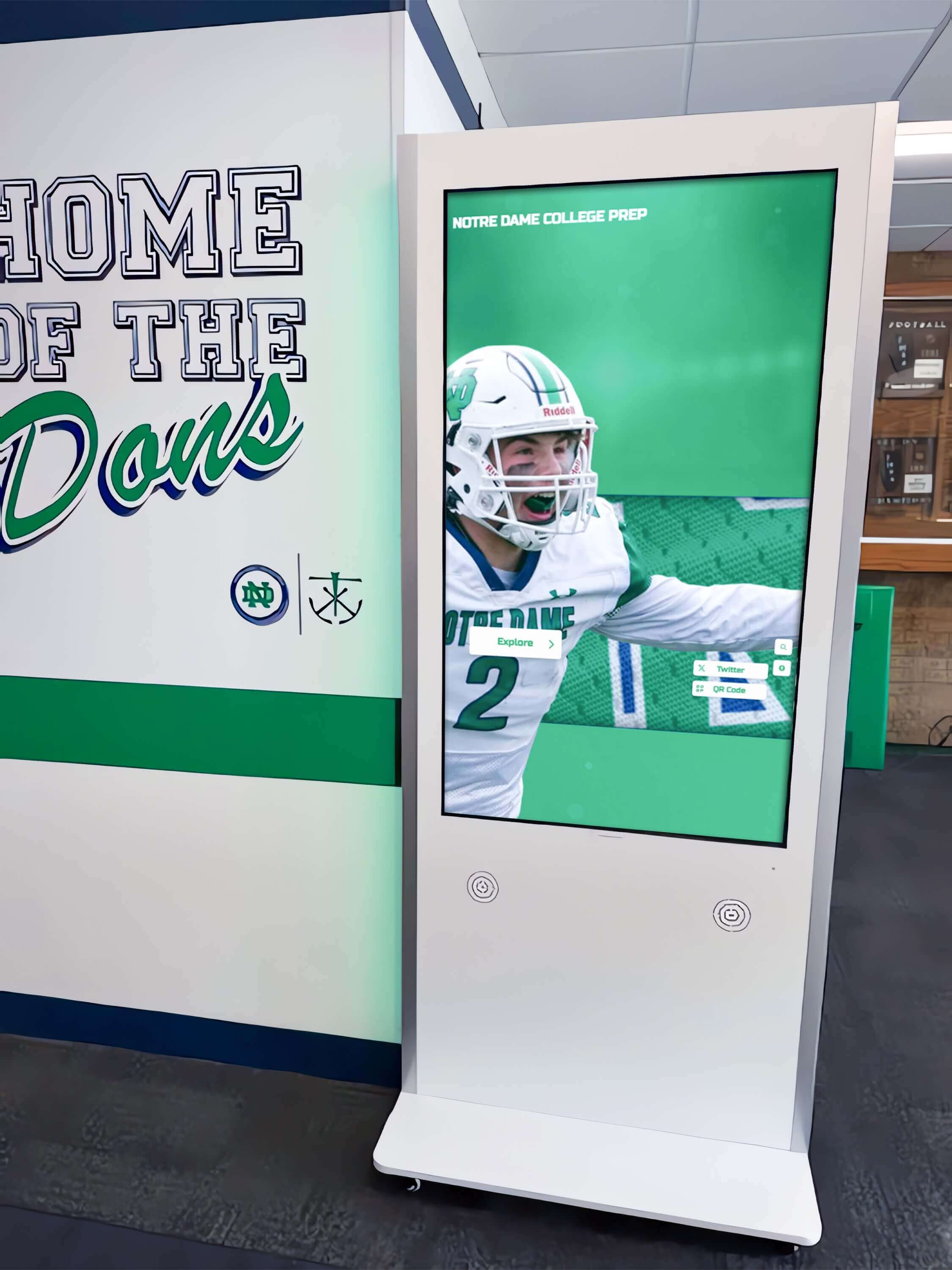
Professional kiosk installations serve as AR-enhanced recognition hubs while ensuring universal accessibility through touchscreen interfaces
Selecting Providers for AR-Enhanced Recognition Systems
Choosing appropriate technology partners determines implementation success and long-term sustainability.
Comprehensive Platform Providers
Organizations specializing in educational recognition offer integrated solutions combining touchscreen displays, content management, and optional AR capabilities within unified platforms.
Advantages of Complete Platforms
Single vendor relationship simplifying support and accountability, consistent administrative interfaces managing both touchscreen and AR content, proven recognition-specific features and templates, technical support understanding educational context and constraints, and gradual enhancement paths enabling starting simple and expanding capabilities over time.
Solutions like Rocket Alumni Solutions provide complete recognition platforms where AR features integrate seamlessly with core touchscreen functionality rather than requiring separate systems—ensuring content consistency and administrative efficiency.
Specialized AR Development Studios
Schools with unique requirements or substantial budgets may engage specialized AR developers creating custom experiences beyond platform capabilities.
Custom Development Considerations
Complete creative control enabling unique experiences impossible with platform templates, connection with specialized equipment or existing custom systems, competitive differentiation through custom features, but significantly higher development costs ($25,000-100,000+), ongoing maintenance dependencies on original developers, and technical risk if developers cease supporting custom implementations.
Custom development makes sense for flagship recognition installations at major universities with substantial budgets, but most schools achieve better value through platform-based approaches balancing capability with maintainability.
DIY Platform Approaches
Budget-conscious schools with technical capability can build AR experiences using development platforms like AR.js, 8th Wall, or Unity AR Foundation.
DIY Feasibility Assessment
This approach requires staff with 3D modeling, web development, or game engine expertise, substantial time investment for development and testing, ongoing maintenance responsibility as platforms evolve, and limited support beyond online communities.
Schools with capable IT departments or technology education programs can successfully implement modest AR experiences, while institutions lacking technical resources should engage specialized providers ensuring quality and sustainability.
Organizations can review comprehensive comparisons of recognition display providers understanding options from simple to sophisticated implementations.
Measuring Success and Return on Investment
AR-enhanced recognition programs require systematic evaluation ensuring investments deliver appropriate value.
Quantitative Engagement Metrics
Track touchscreen interaction counts and duration establishing baseline engagement, QR code scan rates showing AR feature adoption, unique AR experience launches indicating visitor interest, AR session duration measuring depth of engagement, and web platform traffic showing mobile continuation beyond physical visits.
Compare metrics between touchscreen-only installations and AR-enhanced displays quantifying incremental engagement from AR investment.
Qualitative Feedback Collection
Systematic feedback gathering provides insights beyond quantitative metrics through visitor surveys assessing AR experience satisfaction, focus groups exploring recognition program effectiveness, staff observations of visitor behaviors and common challenges, and social media monitoring revealing organic discussions and sharing patterns.
Pay particular attention to feedback identifying technical problems—AR features that frequently fail or frustrate visitors damage recognition programs regardless of theoretical capabilities.
Cost-Benefit Analysis
Calculate total AR investment including initial development costs, ongoing maintenance expenses, staff time for content creation, and network infrastructure upgrades.
Compare costs against engagement increases, expanded recognition capacity from unlimited AR content layers, recruitment impact during prospective student visits, and alumni engagement measured through web platform usage and social sharing.
Quality AR implementation should demonstrate measurable engagement increases justifying 15-30% budget premiums over touchscreen-only approaches. If costs significantly exceed engagement improvements, reconsider whether AR capabilities suit your specific context and audience.
Conclusion: Balancing Innovation with Accessibility
Touchscreen augmented reality displays represent genuine evolution in educational recognition technology—when implemented thoughtfully for appropriate contexts with adequate budgets and realistic expectations. The most successful programs recognize that AR enhances rather than replaces accessible touchscreen interfaces, serves as optional enrichment rather than required functionality, and requires ongoing investment maintaining quality as technology evolves.
Schools beginning recognition modernization should prioritize comprehensive touchscreen displays ensuring universal accessibility and complete functionality for all visitors. Once core displays prove successful, modest AR enhancements using QR-based activation enable testing augmented capabilities with limited risk and investment. If AR features demonstrate strong adoption and clear value, subsequent expansion to more sophisticated implementations becomes justifiable with evidence supporting additional investment.
The key lies in understanding your specific context—audience technical comfort, available budget, content richness, and institutional goals—then selecting appropriate technology balancing innovation with accessibility. Not every school benefits equally from AR capabilities, and excellent traditional touchscreen recognition often delivers superior value compared to mediocre AR implementation.
For institutions with compelling visual content, technically comfortable audiences, adequate budgets, and commitment to ongoing maintenance, AR-enhanced recognition creates memorable experiences that strengthen connections between students, alumni, and institutional heritage. For schools lacking these prerequisites, focus resources on excellent touchscreen experiences accessible to all visitors rather than spreading budgets across technologies that may not deliver proportional returns.
Ready to explore how integrated recognition platforms can serve your institution’s needs—with or without AR enhancement based on your specific goals and constraints? Talk to our team about comprehensive touchscreen recognition systems designed for educational contexts, with evolutionary paths enabling AR capabilities as budgets and requirements justify expansion beyond core interactive display functionality.































