
A senior awards ceremony at high school requires three parallel workstreams: collecting accurate honoree data before the event, executing the ceremony itself, and converting your documentation into permanent displays and archives afterward. Schools that treat the ceremony as a standalone event lose the names, photos, and award details that yearbook staff, digital display managers, and reunion coordinators will need for years to come. Schools that plan all three phases together walk away from recognition night with content ready for trophy cases, hallway displays, alumni records, and digital archives.
This checklist walks through every phase—pre-ceremony preparation, night-of-ceremony documentation, and post-ceremony display follow-up—so your senior awards night becomes a data-collection event as much as a celebration.
Senior awards ceremonies sit at a critical moment in the school calendar: seniors are leaving, memories are fresh, and the community is paying attention. The window to gather accurate headshots, confirm award criteria, collect speech content, and document honoree details closes quickly after graduation. The checklist below helps coordinators, yearbook advisers, and athletic directors capture that information before it disappears.

Portrait-style honor cards like these require accurate names, award titles, and photos collected before the ceremony — not scrambled together after
Quick-Reference: Senior Awards Ceremony Checklist
Use this master checklist to track all three phases. Print it or adapt it to your school’s project management tool.
| Phase | Task | Owner | Timeline |
|---|---|---|---|
| Pre-Ceremony | Finalize award categories and criteria | Principal / AD | 6–8 weeks out |
| Collect honoree names (full legal spelling) | Registrar / Counselor | 4–6 weeks out | |
| Gather headshots or schedule photo sessions | Yearbook / Communications | 4–5 weeks out | |
| Draft and rehearse presenter speeches | Dept. Heads / Coaches | 2–3 weeks out | |
| Produce printed program with all recipient names | Communications | 1–2 weeks out | |
| Brief AV team on run-of-show and slide deck | Tech / Media | 1 week out | |
| Night-of | Assign photographer and videographer | Yearbook Adviser | Day of |
| Capture each recipient with award (individual shot) | Photographer | During ceremony | |
| Record speeches for archive and display use | AV / Media | During ceremony | |
| Collect signed award verification sheet | Ceremony Coordinator | End of ceremony | |
| Back up all photos and video files | Tech / Yearbook | Same night | |
| Post-Ceremony | Export final recipient list to spreadsheet | Counselor / Admin | 1–2 days after |
| Submit content to yearbook and digital display teams | Communications | 1 week after | |
| Update hallway or lobby recognition displays | Display Manager | 2 weeks after | |
| Archive program, photos, and video to school records | Registrar / Library | 2 weeks after | |
| Send recognition announcement to alumni network | Alumni Relations | 2–3 weeks after |
Phase 1: Pre-Ceremony Preparation
The work that determines whether a senior awards ceremony becomes a lasting record or a forgotten evening happens weeks before anyone walks onto the stage.
Finalizing Award Categories and Criteria
Before collecting any student names, confirm what your school is actually recognizing. Common senior award categories at high school ceremonies include:
- Academic distinction awards — valedictorian, salutatorian, Latin honors tiers, department excellence
- Character and service awards — leadership, community service, citizenship, perseverance
- Athletic recognition — four-year varsity letters, athletic scholarship recipients, sport-specific honors
- Performing and fine arts awards — music department honors, drama, visual arts portfolios
- Career and technical education awards — industry certifications, CTE pathway completions
- Scholarship recipients — local, regional, and national scholarship winners announced before graduation
Documenting award criteria alongside recipient names gives your display team and yearbook staff the context to explain why each student received each honor. A name without criteria is a name on a list; a name with criteria is a story worth preserving.
Comprehensive academic recognition programs typically define criteria before announcing recipients — applying the same discipline to your ceremony preparation produces sharper, more defensible recognition.
Collecting Honoree Names Accurately
Name errors are the most common and most embarrassing problem in award ceremonies. Mispronounced names, misspelled plaques, and incorrect program listings undermine the sincerity of recognition and require costly corrections after the fact.
Name collection protocol:
- Pull legal name spellings directly from the registrar — not from rosters, social media, or student submissions alone
- Create a pronunciation guide for every name that staff will read aloud, using phonetic spelling (e.g., “Nguyen = WIN”)
- Send a verification form to each honoree’s family at least three weeks before the ceremony asking them to confirm: full name, preferred name if different, and any pronunciation notes
- Lock the list at least one week before printing programs or engraving plaques — allow no additions after that date except in documented exceptional circumstances
- Store the verified name list in a shared folder accessible to the AV team, printing vendor, and yearbook staff simultaneously
This same list becomes the foundation for your post-ceremony display updates and alumni records. Getting it right once saves hours of corrections across multiple systems later.
Gathering Photos for Display and Archive Use
Headshots are the most frequently requested asset after a senior awards ceremony. Yearbook editors need them for the recognition spread. Digital display managers need them for touchscreen walls. Social media teams need them for announcement graphics.
Photo collection options:
- Use existing senior portraits — most schools photograph seniors in the fall; coordinate with the photographer to obtain high-resolution versions approved for display use
- Schedule a dedicated recognition photo session — a 30-minute session with a photographer can capture all award recipients in consistent format in advance of the ceremony
- Accept family-submitted photos — if using submitted photos, specify minimum resolution (at least 1200×1600 pixels), file format (JPG or PNG), and framing (head and shoulders, neutral background preferred)
Store photos labeled with the student’s full name and award category, not just a number sequence. A file named garcia-elena-valedictorian-2026.jpg is findable in five years; IMG_4523.jpg is not.
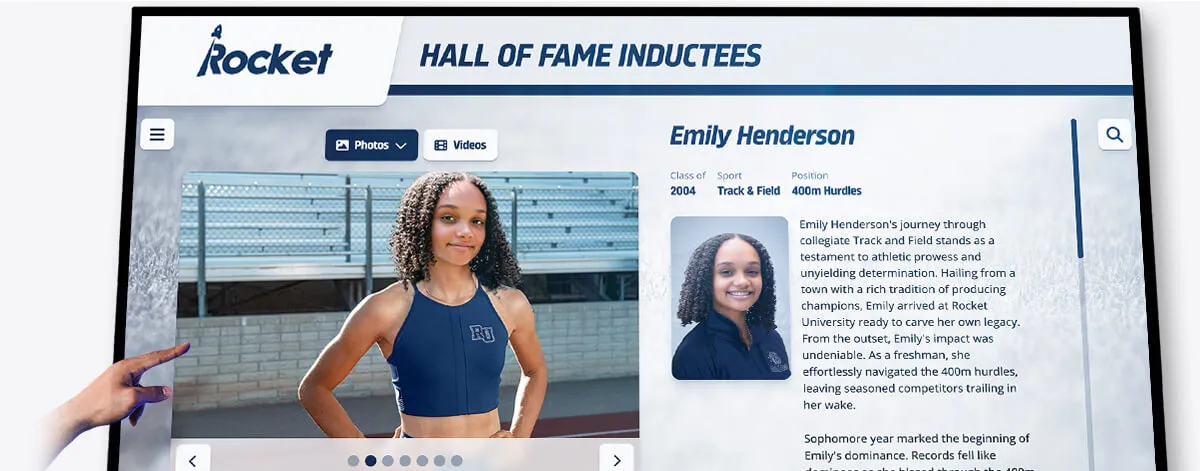
Individual honoree profiles like this one require accurate photos and verified data collected before ceremony night — not assembled from memory afterward
Preparing Speeches and Presenter Notes
Award ceremony speeches serve two functions: they celebrate the recipient in the moment, and they create a record of why the award matters. Speeches that describe specific achievements — naming the accomplishment, the challenge overcome, or the quality recognized — produce content that archives and display teams can use afterward.
Speech preparation checklist for presenters:
- Draft remarks at least two weeks before the ceremony
- Include the full award name, a one-sentence criteria description, and specific details about the recipient’s achievement
- Note the correct pronunciation of the recipient’s name at the top of each card
- Time each speech during rehearsal — most individual award presentations run 60–90 seconds
- Submit a final written copy to the ceremony coordinator for the archive file
If your ceremony includes student speeches (valedictorian addresses, award acceptance remarks), request written drafts in advance for the program and archive — students often improvise additions, but a written baseline ensures the record reflects their intended words.
Academic achievement awards at the high school level are most meaningful when the criteria are stated publicly alongside the recipient’s name — a practice that starts with well-prepared presenter notes.
Producing the Program
The printed ceremony program functions as the primary source document for your post-ceremony archive. Every name that appears onstage should appear in the program, with correct spelling, correct award title, and year.
Program content to include:
- School name, ceremony name, and academic year on the cover
- Complete list of all awards to be presented, in ceremony order
- Full name of each recipient under each award
- Brief one-line criteria description for each award
- Sponsor or donor names for endowed or funded awards
- Program committee or organizing staff with titles
Print more programs than you expect to need. Families keep them. Yearbook editors need physical copies. Archives need at least three filed copies.
Phase 2: Night-of-Ceremony Documentation
Even a well-planned ceremony produces missing pieces if no one is assigned to document what actually happens.
Photography Coverage Plan
Assign specific shots rather than trusting a single photographer to intuit coverage needs.
Required shots for archive and display use:
- Each recipient receiving their award from the presenter (medium shot showing face and award)
- Group photo of all recipients by award category
- Full stage or auditorium photo with all recipients assembled
- Close-up of each physical award or plaque before distribution
Optional but high-value shots:
- Candid reactions from family members in the audience
- Behind-the-scenes preparation (staging area, presenter reviewing notes)
- Audience photos capturing the community moment
Designate one photographer exclusively for individual recipient shots and a second for wide and candid coverage if resources allow. A single photographer covering both typically misses individual close-ups during the ceremony’s most active moments.
Video and Audio Recording
Video of the ceremony serves multiple purposes beyond social media. Well-recorded footage enables your communications team to extract clips for display content, pull quotes from speeches, and share highlights with the alumni network.
Recording checklist:
- Position one camera on a tripod for static full-stage recording (the master take)
- Assign a second operator for roaming close-up coverage of recipients and presenters if possible
- Test audio levels before guests arrive — ambient room noise at capacity differs from an empty auditorium
- Record the complete ceremony, not just award moments — context matters for archives
- Export files immediately after the ceremony; memory cards get lost in the shuffle

Digital displays that pull honoree content from ceremony archives let families and alumni explore recognition records long after graduation
Award Verification Sheet
Before the ceremony ends, have the ceremony coordinator sign off on a physical sheet confirming:
- Each award presented and the recipient’s name (as verified before the ceremony)
- Any late substitutions or additions that occurred the day of
- Awards not presented (removed from program, postponed, or held for a different event)
- Presenter names for each award (for historical records)
This signed sheet becomes the master reconciliation document when yearbook deadlines require a final authoritative list.
Real-Time Data Entry
If your school manages a digital recognition platform or student records system, assign a staff member to log recipients as the ceremony progresses rather than reconstructing the list from memory or photos afterward. Real-time entry eliminates the reconstruction step entirely and reduces errors from post-hoc recall.
Understanding how schools define, display, and preserve student honors starts with capturing the data at the source — the ceremony itself.
Phase 3: Post-Ceremony Display Follow-Up
The two weeks after a senior awards ceremony are when most of the archival and display value is created — or permanently lost. Establishing a short post-ceremony workflow before the event ensures this window doesn’t close on unfinished work.
Exporting the Final Recipient List
Within 48 hours of the ceremony, export a verified spreadsheet containing:
| Field | Example |
|---|---|
| Full legal name | Elena Garcia Morales |
| Preferred display name | Elena Garcia |
| Award title | Principal’s Leadership Award |
| Award category | Character and Service |
| Academic year | 2025–2026 |
| Grade / class year | 12 / Class of 2026 |
| Photo filename | garcia-elena-leadership-2026.jpg |
| Notes | Also named NHS President |
This structured format enables your yearbook team, digital display manager, and alumni records staff to each use the same authoritative source without translating between formats.
Updating Hallway and Lobby Displays
Physical recognition displays — honor boards, trophy cases, hallway murals — typically update once per year and the senior awards ceremony provides the primary source for that update. Common display applications for ceremony content:
- Academic honor boards: Add this year’s valedictorian, salutatorian, and Latin honors recipients alongside prior classes
- Athletic display cases: Incorporate any athletic award recipients alongside season records and championship photos
- Leadership walls: Update leadership award and student government recognition displays with new honorees
- Scholarship and donor walls: Add scholarship recipients alongside the donor or fund name
The day-to-day reality of managing school digital displays includes fielding requests from administrators, yearbook staff, and coaches who all need the same content in different formats — a single well-structured export answers all of them.
Updating Digital Recognition Platforms
Schools using touchscreen recognition kiosks, digital trophy cases, or interactive hall of fame systems can push ceremony content directly from the verified export. This typically involves:
- Uploading headshots sized to platform specifications
- Adding honoree profiles with name, award, year, and any biographical details collected from pre-ceremony verification forms
- Tagging each profile with searchable categories (academic, athletic, arts, service) so future visitors can filter by award type
- Archiving prior years’ content rather than replacing it — each class should remain accessible
The key advantage of updating digital platforms immediately after the ceremony is that the content is accurate, the photos are fresh, and the families who attended that night are most likely to search for and share the profiles in the days that follow.

Touchscreen recognition kiosks updated with ceremony content within two weeks of the event capture peak family and community engagement
Yearbook Content Submission
Yearbook editors typically face the tightest post-ceremony deadlines. Provide them with a complete package rather than making them assemble it from multiple sources:
Yearbook submission package:
- Verified recipient list in the spreadsheet format above
- High-resolution photos for every recipient (minimum 300 dpi for print)
- Award descriptions (one sentence each) written and proofread
- Ceremony overview photo (full stage with all recipients)
- Any notable moments or quotes from the evening (from recorded speeches, not recalled after the fact)
Submitting this package within one week of the ceremony aligns with most yearbook production timelines for spring delivery.
See How Schools Preserve Award Ceremony Records Permanently
Rocket Alumni Solutions builds interactive digital displays that turn your senior awards ceremony documentation into searchable, shareable recognition profiles — accessible by families, alumni, and future students for years after graduation night.
Request a DemoAlumni Network Communication
Senior award recipients are newly minted alumni the moment they leave graduation. Sending a recognition announcement to your existing alumni database within two to three weeks of the ceremony:
- Introduces the incoming class to the broader alumni community
- Gives current alumni a reason to engage with their school’s communications
- Creates a documented record in your alumni communications archive
- Often generates social sharing from families who forward the announcement
The announcement should name recipients, award categories, and — if permitted under your school’s FERPA practices — brief details about each recipient’s plans after graduation. Reunion planning and alumni engagement both benefit from a well-maintained record of award recipients by class year, which starts with this post-ceremony communication.
Long-Term Archive Filing
Every senior awards ceremony should produce at minimum:
- Physical file: One printed program, signed award verification sheet, and any correspondence related to the ceremony
- Digital file: Spreadsheet of recipients, all photos, video recording, and submitted speech drafts — stored in a named folder by academic year
- Display record: Documentation of which display systems were updated, when, and with which content
Schools that maintain consistent archives across years gain significant advantages when staff changes, when reunion coordinators need historical honoree lists, or when a donor wants to endow a named award and asks how previous recipients were documented. Athletic director transitions highlight how much institutional knowledge disappears when records aren’t systematically maintained — the same risk applies to academic and senior recognition programs.
Adapting the Checklist for Different Ceremony Formats
Not all senior awards ceremonies follow the same format. Here is how to adjust this checklist for common variations.
Combined Academic and Athletic Ceremonies
Many high schools hold a single year-end awards night that covers both academic and athletic recognition. The pre-ceremony preparation must coordinate across departments — counselors own academic award lists while athletic directors own sport-specific recognition.
Designate a single ceremony coordinator who receives all award lists from all departments, reconciles duplicates (a student may receive both academic and athletic honors), and produces one unified program. Keeping two separate programs running in parallel creates version control problems and risks printing errors.
Ceremonies with Surprise Recipients
Some awards — character recognitions, senior superlatives, or informal program honors — are kept secret from recipients until the ceremony. This does not exempt the coordinator from collecting accurate data; it requires confirming name spellings and photos through channels other than direct outreach to the student (parent contact, registrar records, yearbook files).
Virtual or Hybrid Ceremonies
If the senior awards ceremony is live-streamed or held partially online, the documentation checklist expands to include:
- Screen recordings of virtual elements
- Chat logs or real-time audience responses if these are part of the ceremony format
- Confirmation that remote recipients received their award documentation by mail
The same post-ceremony workflow applies — the export format, display updates, and yearbook submission process are identical whether the ceremony was in-person or hybrid.
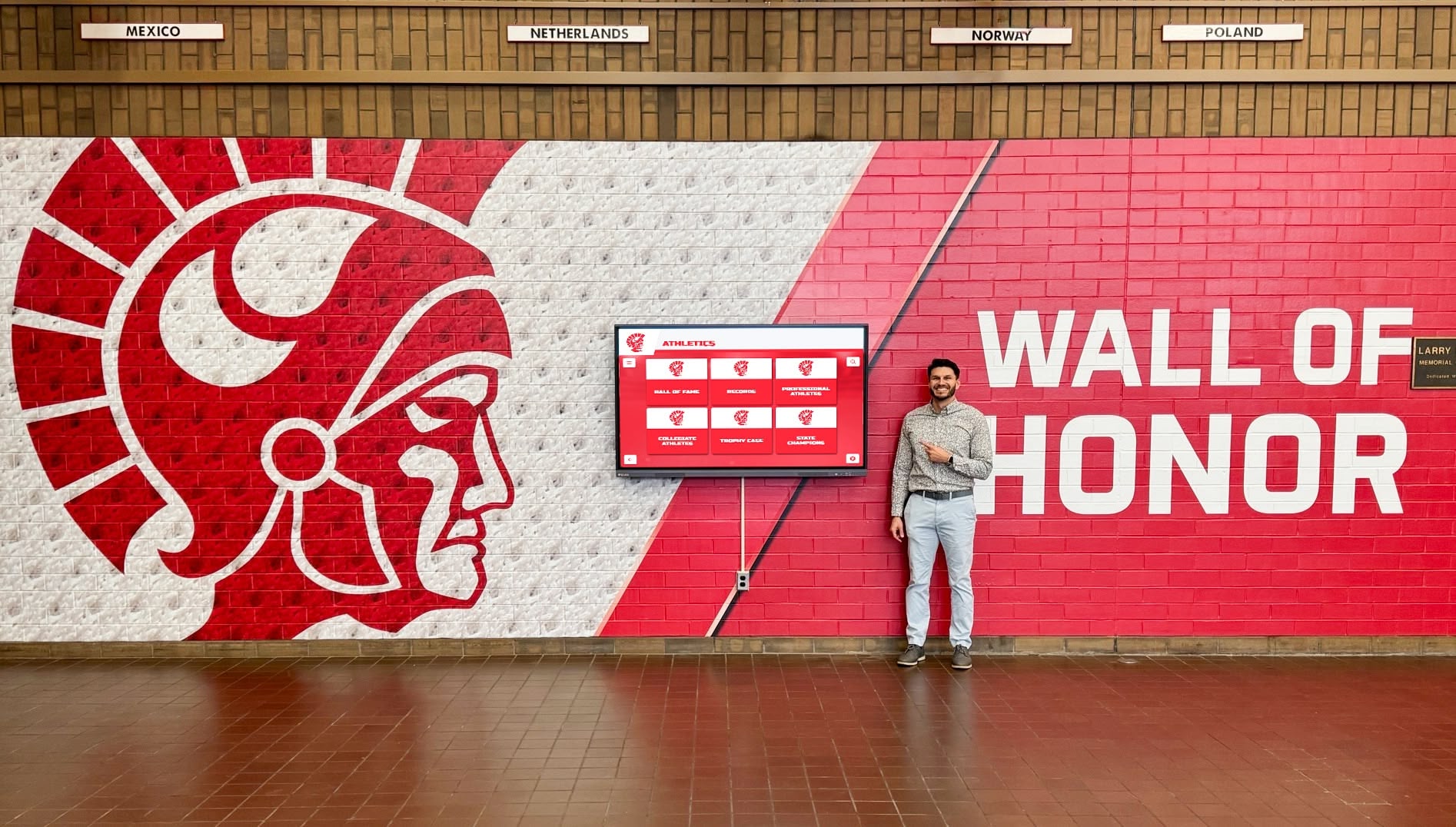
Wall of honor displays updated with ceremony content become ongoing reference points for students, families, and visitors throughout the year
Using Ceremony Data for Future Recognition
The senior awards ceremony dataset — names, photos, award criteria, and honoree stories — has value well beyond the current school year.
10-year reunion recognition: Reunion coordinators planning a 10-year class reunion will search for former award recipients to recognize as accomplished alumni. Programming and award recognition at class reunions depends on having ceremony records that identify who received what honors a decade earlier.
Hall of fame nominations: Academic and athletic halls of fame often consider prior award history as part of nomination criteria. A well-maintained ceremony archive makes it possible to verify a nominee’s high school recognition record without relying on self-reported information.
Scholarship fund reporting: Endowed scholarships require annual reporting to donors on recipient selection. Ceremony documentation provides the evidence of how each award was presented and who received it.
Academic all-star recognition: Schools that participate in academic all-American or all-conference recognition programs need historical ceremony records to verify student eligibility and track cumulative academic honor trends.
Digital hall of fame tools: Interactive tools built for hall of fame recognition draw directly from structured historical records — the same format produced by a well-documented senior awards ceremony.
Frequently Asked Questions
What is the most important piece of information to collect before a senior awards ceremony at high school? Full legal name spelling, verified directly from registrar records and confirmed by the student’s family. Name errors on plaques, programs, and displays are the most common and most visible mistakes — and the most damaging to the recognition experience.
How far in advance should we lock the award recipient list? Lock the list at least one week before printing programs and engraving awards. For digital display preparation, locking two weeks out is preferable, since display content often requires photo resizing, profile writing, and system uploads that take time even after the data is finalized.
Who should own the post-ceremony archive? Assign one named owner — typically the yearbook adviser, registrar, or communications director — to receive the complete package (verified list, photos, video, program) and file it. Without a single owner, assets scatter across multiple inboxes and drives and become unretrievable within a year.
Can we use student-submitted photos for display and yearbook use? Yes, with conditions. Specify minimum resolution, format, and framing requirements in your submission instructions. Obtain written permission from the student (and parent or guardian if the student is a minor) for display, publication, and alumni archive use. File those permissions alongside the photos.
How do we handle awards given to students who transfer before the ceremony? Confirm with your principal and registrar whether transferred students remain eligible. If they do, coordinate delivery of the award and documentation separately — do not omit their names from the program or archive record simply because they cannot attend in person.
What digital systems benefit most from senior awards ceremony data? Interactive touchscreen displays, digital yearbook platforms, alumni portal profiles, and recognition walls all benefit from structured ceremony exports. Schools that push data to these systems in the two weeks after the ceremony capture peak family and alumni engagement with the recognition content.
How should we store ceremony records for long-term access?
Use a consistent folder naming convention by academic year (e.g., 2025-2026-Senior-Awards) in a shared drive with at least two authorized administrators. Physical copies of the signed verification sheet and printed program should be filed in the school’s permanent records alongside other end-of-year documentation.
Senior awards ceremonies at high school represent a convergence of institutional memory and community celebration. The checklist and workflows above treat that convergence seriously — not by adding bureaucracy to a meaningful event, but by ensuring the work of recognizing your seniors produces records as durable as the achievements they represent.
Turn Your Senior Awards Data Into Permanent Recognition
Rocket Alumni Solutions helps schools transform ceremony documentation into interactive digital displays, searchable honor profiles, and lasting archives — without rebuilding content from scratch each year.
Request a Demo






























