
Museums and galleries face mounting pressure to engage visitors who arrive with smartphones offering instant access to information, expect personalized experiences adapting to interests, and value interactive exploration over passive observation. Traditional exhibit methods—static labels, glass-enclosed artifacts, and prescribed viewing paths—increasingly fail to capture attention or create memorable experiences for audiences accustomed to digital interactivity in every other aspect of daily life.
The consequences of this engagement gap extend beyond visitor dissatisfaction. Museums struggle to justify funding when attendance declines, find difficulty attracting younger demographics essential for long-term sustainability, face challenges demonstrating educational impact to grant providers and stakeholders, and watch visitors spend mere seconds glancing at exhibits representing years of curatorial effort. Meanwhile, collections remain largely inaccessible—most museums display only 5-15% of holdings due to space constraints, leaving reserve collections unknown to visitors despite their historical and educational value.
Interactive touchscreen displays transform museum and gallery experiences by bridging the gap between traditional exhibit integrity and contemporary engagement expectations. These systems enable unlimited content capacity without cluttering physical spaces, accommodate diverse learning styles through multimedia presentation, provide accessibility features serving visitors with varying abilities, generate valuable engagement analytics informing exhibit optimization, and update instantly as collections expand or research evolves—all while preserving the authentic artifacts and artworks that remain the heart of cultural institutions.
This comprehensive guide explores how museums, galleries, historical societies, and cultural organizations can implement interactive touchscreen technology that deepens visitor engagement, expands access to collections, and creates measurable educational impact while respecting the unique challenges and opportunities facing cultural institutions.
Understanding Interactive Touchscreens for Cultural Institutions
Interactive touchscreen displays represent technology solutions designed specifically to enhance museum and gallery experiences by providing visitors with intuitive access to contextual information, collection databases, multimedia content, and exploration tools that deepen understanding and engagement with exhibits.
Unlike standard digital signage that simply rotates predetermined content, interactive museum touchscreens respond to visitor input—enabling people to search collections, explore topics at appropriate depth levels, access content in multiple languages, zoom into high-resolution artifact images, watch curator videos, and navigate information based on personal interests rather than following prescribed paths.
The Museum Engagement Challenge
Cultural institutions operate in fundamentally different contexts than other organizations implementing digital technology. Understanding these unique challenges shapes effective touchscreen implementation strategies:
Physical Space Constraints
Museums face constant tension between preservation requirements and accessibility goals. Climate-controlled cases protect artifacts while limiting visitor proximity, security concerns restrict handling of valuable objects, fire codes and emergency access limit exhibit density, architectural preservation requirements constrain technology installation, and limited square footage forces difficult choices about which objects to display versus store.
Interactive touchscreens address space constraints by providing unlimited virtual access to comprehensive collections without requiring additional physical display area—a single 55-inch touchscreen can showcase thousands of artifacts that would require entire buildings using traditional methods.
Diverse Visitor Populations
Museum audiences span extraordinary diversity requiring flexible engagement approaches. School groups need curriculum-aligned educational content, international tourists require multilingual information, elderly visitors may have vision or mobility limitations, young children need age-appropriate simplified content, serious researchers want comprehensive documentation, and casual visitors prefer concise overviews rather than scholarly depth.
Traditional static exhibits force compromise solutions satisfying no audience segment fully. Interactive touchscreens accommodate all visitor types simultaneously through progressive disclosure—brief introductions for casual browsers, moderate detail for interested visitors, and unlimited depth for researchers.

Modern interactive touchscreen kiosks transform passive museum visits into active exploration experiences where visitors direct their own discovery
Limited Resources and Expertise
Many museums, particularly smaller institutions and historical societies, operate with constrained budgets and small staffs lacking technical expertise. Traditional exhibit updates require expensive professional design services, fabrication costs for physical installations, extended timelines from conception to completion, and specialized labor for installation and mounting.
Cloud-based touchscreen platforms designed for museum applications enable non-technical staff to create and update content independently using intuitive visual editors, eliminating ongoing costs for technical consultants while maintaining professional results. This democratization of museum technology makes sophisticated interactive exhibits accessible to institutions of all sizes.
Core Components of Museum Touchscreen Systems
Effective museum touchscreen installations integrate several elements working together seamlessly:
Commercial-Grade Display Hardware
Museum environments demand displays exceeding consumer specifications. Commercial touchscreen displays rated for 16-24 hour daily operation withstand continuous public use across years, anti-glare coatings maintain visibility under varied museum lighting including natural light, vandal-resistant housings protect equipment in unsupervised public spaces, multi-touch capability supports natural interaction patterns, and temperature tolerance accommodates climate variations in historic buildings.
Display sizing depends on application context—32-43 inches works for focused single-artifact stations, 55-65 inches suits comprehensive collection browsers in gallery centers, and 75+ inches creates dramatic impact in entrance lobbies and orientation areas.
Intuitive Content Management Platforms
The distinction between generic digital signage software and museum-specific platforms matters significantly. Purpose-built museum solutions provide collection-focused organization structures grouping content by artifact, artist, period, or theme rather than just chronological playlists, search functionality enabling visitors to find specific items or topics, timeline visualizations presenting chronological contexts, relationship mapping showing connections between objects, and integration capabilities connecting to existing collection management databases.
Cloud-based platforms eliminate server infrastructure requirements while enabling remote content management—curators can update exhibits from any location, facilitating collaboration among distributed staff and enabling quick responses to opportunities or issues.
Web-Accessible Digital Extensions
Interactive exhibits work most effectively when content remains accessible beyond physical museum visits. Web platforms extend engagement by enabling students to review content after field trips, supporting virtual field trips for distant schools, allowing researchers to access collections remotely, helping teachers incorporate museum materials into lesson planning, and providing prospective visitors with collection previews before visits.
Digital yearbook platforms provide integrated platforms where physical touchscreen displays and web access share content management, ensuring consistency while enabling location-appropriate delivery optimized for each context.
Types of Museum Touchscreen Applications
Museums implement interactive technology in various configurations serving different engagement objectives:
Collection Database Browsers
Comprehensive searchable catalogs enable visitors to explore entire collections including reserve holdings rarely displayed publicly. Visitors can search by keyword, filter by time period or medium, browse alphabetically by artist or creator, view high-resolution images with zoom capability, and access curatorial notes and provenance details.
Educational museums implementing digital archive systems report that making reserve collections digitally accessible increases visitor satisfaction while supporting research missions.

Intuitive touchscreen interfaces enable visitors of all ages and technical backgrounds to explore museum content independently
Artifact Deep-Dive Stations
Displays positioned adjacent to specific exhibits provide contextual information impossible to present through traditional labels—comprehensive historical background, conservation stories and technical analysis, related artifacts in other collections or institutions, 360-degree photography enabling virtual examination, video interviews with curators or conservators, and interactive 3D models showing construction or usage.
These stations solve the fundamental museum challenge of providing extensive information without cluttering exhibit spaces with lengthy text panels that interrupt visual flow and accommodate only surface-level content.
Timeline and Historical Context Displays
Interactive chronologies place artifacts within broader historical narratives, showing concurrent events providing context, biographical information about creators and subjects, comparative views showing evolution across periods, geographic context through interactive maps, and thematic connections across collections.
Institutions implementing museum history displays report significant increases in visitor comprehension when artifacts connect to broader historical narratives rather than existing as isolated objects.
Multimedia Storytelling Stations
Displays combining multiple media types accommodate diverse learning styles while maintaining engagement through variety. Video interviews with artists, historians, or community members provide human connections, oral histories preserve personal narratives, animated demonstrations explain complex processes or techniques, historical photographs and documents show contexts, and audio recordings including period music create atmospheric experiences.
Multiple media types accommodate diverse learning preferences—visual, auditory, and kinesthetic—ensuring all visitors can engage effectively regardless of preferred information processing methods.
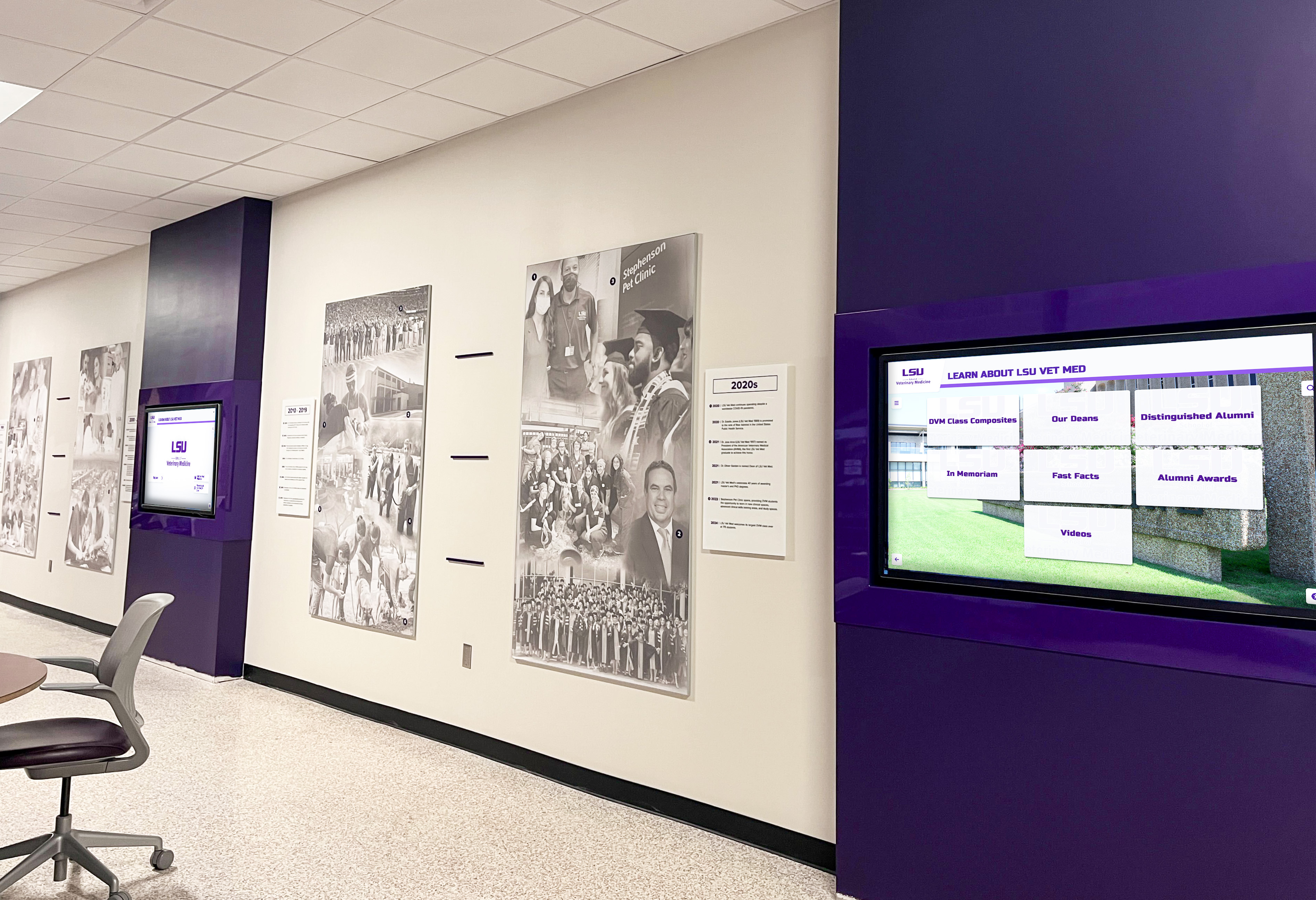
Strategic placement of interactive displays throughout museum facilities ensures visitors encounter exploration opportunities at natural points
Benefits of Interactive Touchscreens for Museums and Galleries
Understanding specific advantages helps cultural institutions prioritize investments and build compelling cases to boards, donors, and stakeholders for interactive technology adoption.
Enhanced Visitor Engagement and Learning Outcomes
Interactive displays fundamentally transform how visitors experience museums, shifting from passive observation to active exploration:
Self-Directed Discovery
Traditional museum visits position visitors as passive observers moving through curator-prescribed paths. Interactive touchscreens enable active learning where visitors direct their own exploration based on interests, choose information depth levels matching curiosity, and engage through multiple cognitive and sensory pathways.
Educational research consistently demonstrates that active learning produces superior retention and comprehension compared to passive information reception. When visitors choose what to explore and interact with content through touchscreen manipulation, they invest cognitive effort that strengthens memory formation and understanding.
Accommodation of Learning Style Diversity
Museum visitors bring diverse preferences for information processing that traditional text panels cannot accommodate effectively. Interactive displays serve all learning styles simultaneously through multimedia content—visual learners benefit from photo galleries and diagrams, auditory learners engage with audio narratives and interviews, reading learners appreciate detailed text descriptions, and kinesthetic learners respond to touchscreen manipulation and interactive elements.
Personalized Depth and Pacing
Different visitors want different information levels based on age, prior knowledge, interest intensity, and available time. Children need simplified explanations, experts want detailed analysis, casual visitors prefer concise overviews, and enthusiasts desire comprehensive exploration. Interactive displays enable everyone to access appropriate content depth rather than forcing compromise solutions that satisfy no one fully.
Museums implementing interactive display technology report average engagement times of 8-12 minutes at touchscreen stations compared to brief glances of 10-30 seconds at traditional text labels.
Unprecedented Access to Complete Collections
Physical space constraints force museums to display only small fractions of holdings. Digital touchscreens eliminate these limitations:
Reserve Collection Access
Most museums display only 5-15% of collections at any given time due to space constraints, conservation concerns, and rotating exhibit schedules. Interactive displays make entire collections explorable through photographs, detailed descriptions, and contextual information—dramatically expanding what visitors can discover during visits.
For smaller institutions, this capability proves transformative—a historical society with limited exhibit space can provide comprehensive access to photograph archives, document collections, and object databases that would otherwise remain inaccessible to public audiences.
Unlimited Contextual Information
Traditional text panels accommodate perhaps 100-200 words before becoming overwhelming and visually cluttered. Interactive displays support unlimited content depth organized in hierarchical structures preventing information overload while enabling those wanting comprehensive information to access it.
Curators can provide brief introductions for casual browsers, moderate detail for interested visitors, and comprehensive research documentation for scholars—all within the same exhibit space without compromising any audience’s experience.
Multilingual Content Delivery
Museums serving diverse communities struggle to provide exhibit information in multiple languages through physical labels—text panels become cluttered, translation costs multiply, and space limitations prevent comprehensive multilingual content. Digital displays easily accommodate unlimited languages with simple interface selection, making collections accessible to broader audiences while supporting English language learners and international visitors.
This capability particularly benefits institutions in tourist destinations or ethnically diverse communities where visitor language needs span multiple languages that would be impractical to support through traditional static signage.
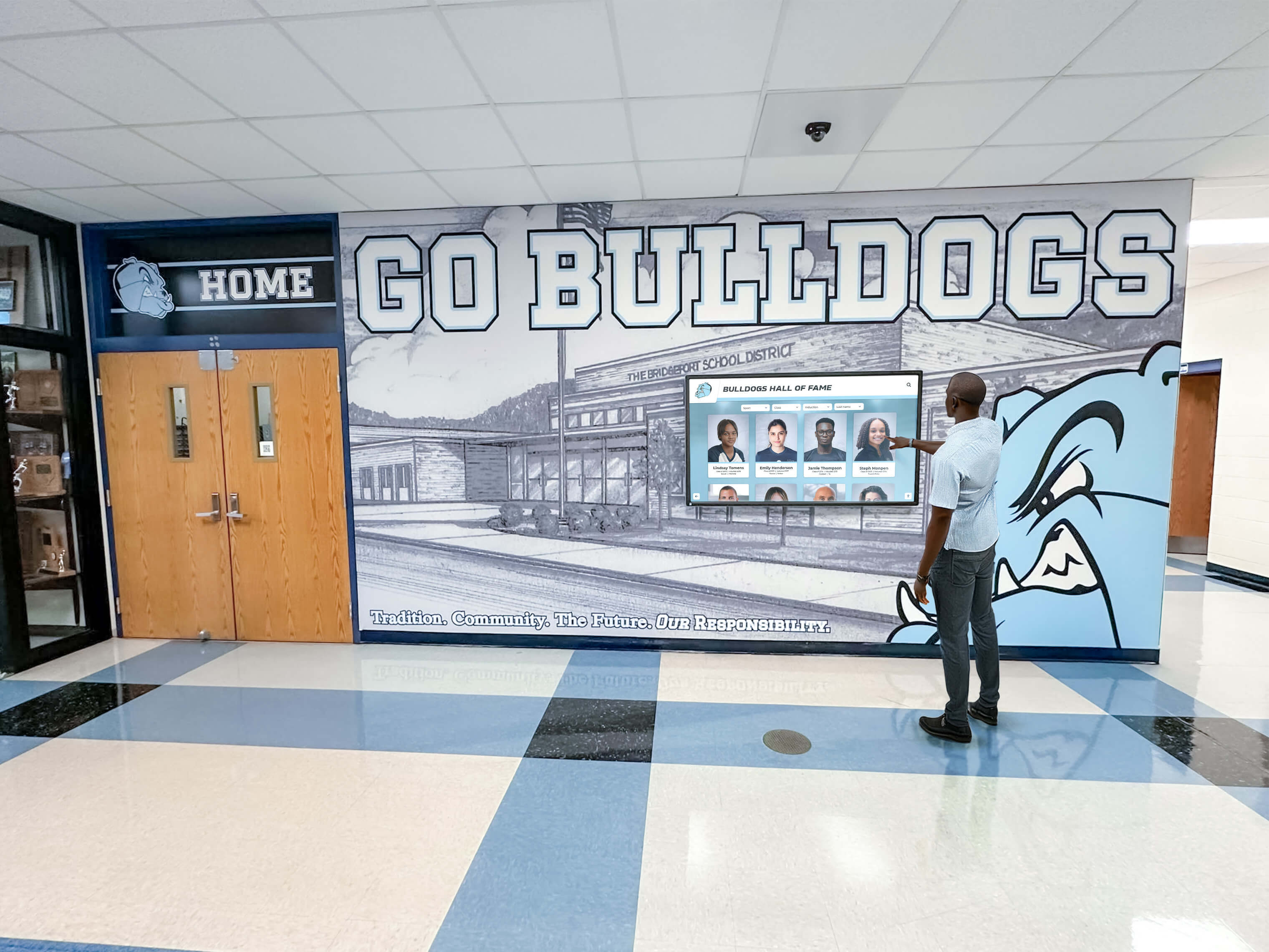
Interactive displays transform museum visits from passive observation to active participation and discovery
Accessibility and Universal Design
Digital interactive displays address accessibility challenges inherent in traditional museum exhibits, supporting visitors with varying abilities:
Vision Accessibility Features
Interactive displays can support text sizing adjustments for visually impaired visitors, high-contrast display modes improving readability, audio descriptions for exhibits and artifacts, screen reader compatibility following accessibility standards, and magnification capabilities for examining high-resolution images.
These features operate individually based on visitor needs without compromising experiences for other users—each person can configure interfaces matching personal accessibility requirements.
Physical Accessibility Improvements
Traditional exhibits often position information at single heights or behind glass cases difficult for wheelchair users or children to view. Interactive kiosks can be positioned at appropriate heights or angled for optimal accessibility, while content remains fully accessible regardless of physical artifact placement.
Wall-mounted displays at adjustable heights and freestanding kiosks with accessible approach spaces ensure compliance with ADA requirements while serving broader audiences effectively.
Cognitive Accessibility Support
Progressive disclosure architectures enable visitors with cognitive disabilities or processing differences to access information at appropriate complexity levels. Simplified content versions, clear visual hierarchies, consistent navigation patterns, and multimedia alternatives accommodate diverse cognitive needs while maintaining exhibit sophistication for all visitors.
Dynamic Content Management and Updates
Physical exhibits require extensive lead time for changes, limiting museums’ ability to respond to new research, acquisitions, or opportunities:
Instant Content Updates
When new research emerges correcting previous understanding, interactive displays update instantly across all stations. When collections expand with acquisitions, digital catalogs reflect additions immediately. When special events or temporary exhibits require promotional content, displays adjust in real time without physical signage production.
This flexibility enables museums to maintain current, accurate information while responding quickly to opportunities and correcting errors without expensive physical modifications.
Organizations implementing comprehensive museum displays can update content across entire networks from centralized interfaces, ensuring consistency while enabling rapid responses.
Seasonal and Special Exhibition Support
Museums can adjust interactive display content supporting special exhibitions, highlighting seasonal connections and anniversaries, featuring rotating “object of the month” showcases, promoting upcoming programs and events, and integrating community contributions and stories—all through simple content management rather than physical installation work.
This capability proves particularly valuable for institutions with limited exhibition budgets, enabling fresh visitor experiences without expensive physical reinstallations.
Valuable Visitor Engagement Analytics
Traditional museums receive minimal insight into visitor behavior beyond entrance counts and occasional surveys. Interactive displays generate comprehensive engagement data informing exhibit optimization:
Content Performance Metrics
Analytics reveal which exhibits generate highest engagement, what information visitors explore most deeply, average session duration and interaction patterns, search queries showing visitor interests, navigation paths revealing exploration behaviors, and demographic patterns when integrated with admission systems.
Exhibition Optimization
Understanding what content resonates enables curators to refine future exhibits, identify collection areas warranting expansion, recognize topics requiring additional context or presentation approaches, and demonstrate educational impact to funders and stakeholders through concrete data.
Museums implementing digital recognition technology use engagement analytics to continuously improve visitor experiences and justify technology investments through measurable outcomes.

Touch-optimized interfaces enable intuitive browsing of collections, profiles, and multimedia content
Planning Your Museum Touchscreen Implementation
Successful implementations require systematic planning addressing content strategy, technical requirements, visitor experience design, and long-term sustainability.
Define Educational Goals and Visitor Needs
Begin by clarifying what interactive displays should accomplish for your specific institution:
Primary Educational Objectives
Consider whether displays should deepen understanding of specific artifacts and contexts, provide broader thematic narratives connecting collections, enable independent research and exploration, support formal educational programs and school visits, or make collections accessible to wider audiences including remote visitors.
Clear objectives guide content development priorities and feature selection—different goals require different approaches to information architecture and interaction design.
Visitor Profile Analysis
Understanding who visits and what they need informs design decisions that determine effectiveness. School groups need curriculum-aligned content and teacher resources, families require age-appropriate content engaging both children and adults, serious researchers want comprehensive information with citations, casual tourists prefer concise overviews and visual content, and multilingual communities need translated content serving diverse language needs.
Museums serving diverse audiences benefit from systems supporting multiple content depths, languages, and interaction patterns rather than single approaches assuming homogeneous visitors.
Assess Collections and Content Readiness
Inventory existing materials and identify development needs:
Existing Digital Assets
Many museums possess more digital content than realized—collection photography from catalogs and insurance documentation, historical photographs in archives and donated collections, research and curatorial notes from previous exhibitions, conservation reports and technical analysis, and previous exhibition materials and interpretive content.
Gathering existing digital assets before new content creation prevents duplicative work and identifies gaps requiring development investment.
Content Development Priorities
Most institutions cannot digitize entire collections simultaneously. Prioritize based on visitor interest in popular exhibits and signature collections, educational value for school programs and curriculum connections, research significance for scholarly audiences, preservation urgency for fragile artifacts requiring limited physical display, and special exhibition opportunities providing promotional value.
Phased implementation allows starting with highest-priority content demonstrating value while building toward comprehensive coverage over time.
Organizations implementing public library archives face similar digitization challenges and can apply proven systematic approaches to content development.
Select Strategic Display Locations
Placement significantly impacts whether visitors discover and engage with interactive displays:
High-Traffic Orientation Areas
Museum entrance lobbies and orientation spaces serve as natural locations for comprehensive collection browsers helping visitors plan routes, featured exhibit highlights generating interest in galleries, wayfinding and facility information, multilingual welcome content, and introduction videos setting context for collections.
Exhibit-Specific Gallery Stations
Displays positioned within galleries adjacent to artifacts provide deep contextual information about specific objects, comparative content showing related pieces, conservation stories and technical analysis, and interactive exploration features like zoomable high-resolution photography or 3D models.
Dedicated Learning Spaces
Interactive areas with seating enable extended exploration for visitors wanting comprehensive engagement, support school groups conducting structured activities, provide research stations for serious scholars, and offer families comfortable spaces for learning together without blocking gallery circulation.
Determine Budget and Explore Funding
Comprehensive budgets include hardware costs for displays, kiosks, and mounting systems ($3,000-10,000 per installation depending on size and features), software platforms with annual licensing ($2,000-5,000 depending on capabilities and scale), content development requiring professional photography, videography, writing, and multimedia production, installation including electrical work and network infrastructure, training for staff on content management and system operation, and ongoing maintenance covering technical support and regular updates.
Typical total implementation costs range from $25,000-75,000 for small institutions with 2-4 touchscreen stations to $100,000+ for comprehensive museum-wide networks with extensive content development.
Funding Source Opportunities
Museums can explore grant programs from educational and cultural foundations prioritizing public access, government arts and humanities agencies supporting institutional improvements, corporate sponsorships particularly from technology companies, capital campaigns highlighting technological improvements, major donor cultivation positioning touchscreens as naming opportunities, and educational partnerships where schools or universities contribute toward costs in exchange for access.
Frame projects around educational mission and community access to position interactive displays as investments in serving core institutional purposes rather than simply technology purchases.

Commercial-grade touchscreen kiosks provide reliable, attractive platforms designed specifically for continuous public operation
Choose Appropriate Technology Platform
Evaluate potential providers on these critical factors determining long-term success:
Essential Capabilities
Content management ease of use—can non-technical staff add content independently without consulting technical experts?, multimedia support—does it handle photos, videos, audio, documents, and interactive elements?, search and navigation functionality—can visitors find content easily?, customization flexibility—can designs match museum branding and specific needs?, hardware compatibility—does it work with preferred display equipment?, multilingual content support—how easy is translation and language switching?, and analytics quality—what insights does it provide about visitor engagement?
Museum-Specific Features
Purpose-built museum platforms offer advantages over generic digital signage software, including collection-focused organization structures, integration capabilities with collection management systems, timeline and relationship visualization tools, scholarly citation support, and exhibit-appropriate design templates respecting museum aesthetic standards.
Operational Considerations
Cloud-based versus local systems present tradeoffs—cloud platforms enable remote management and automatic updates but require reliable internet connectivity, while local systems eliminate internet dependency but require on-site maintenance. Hybrid approaches combining local display with cloud content management often provide optimal balance.
During evaluation, actually create test content using administrative interfaces. If processes feel complicated or require technical expertise for routine updates, staff won’t maintain content consistently after implementation—simplicity matters more than feature completeness for many institutions.
Best Practices for Museum Touchscreen Content
Technology platforms enable interactivity, but content quality determines whether visitors engage meaningfully or navigate away frustrated:
Structure Information for Progressive Disclosure
Interactive displays should reveal information progressively, starting with accessible entry points enabling visitors to dive deeper based on interest:
Three-Tier Content Architecture
Level 1 - Overview (30-50 words): Brief introduction visible immediately providing basic identification, time period or context, and primary significance. This level serves visitors wanting quick orientation without detailed exploration.
Level 2 - Detailed Information (200-300 words): Comprehensive explanation for interested visitors including historical context and background, technical or artistic analysis, connections to related artifacts or themes, and interesting details or stories. This level satisfies most visitors wanting solid understanding without scholarly depth.
Level 3 - Research Depth (unlimited): Extensive documentation for serious scholars including detailed provenance and acquisition history, conservation reports and technical analysis, academic citations and references, high-resolution imagery for detailed examination, and links to related research and publications.
This architecture prevents overwhelming casual visitors while satisfying researchers—everyone accesses appropriate depth without forcing compromise solutions serving no one optimally.
Write for Diverse Audiences
Museum content should serve broad educational backgrounds and ages:
Clear, Accessible Language
Use straightforward vocabulary avoiding unnecessary jargon, define technical terms when essential for accuracy, keep sentences concise and focused on single ideas, break complex concepts into digestible segments, and provide examples illustrating abstract ideas through concrete references.
Remember that museum visitors include children, English language learners, and adults with varying educational backgrounds. Clear writing serves broader audiences without sacrificing accuracy or sophistication when content architecture enables access to scholarly detail for those wanting it.
Age-Appropriate Content Options
Interactive displays can provide parallel content versions—adult explanations using sophisticated analysis and terminology, youth versions simplifying concepts without condescension, and early reader options with controlled vocabulary and sentence structures appropriate for young children.
Many platforms enable age-based content filtering where visitors select appropriate levels when beginning exploration, ensuring each audience segment encounters content matching comprehension levels.
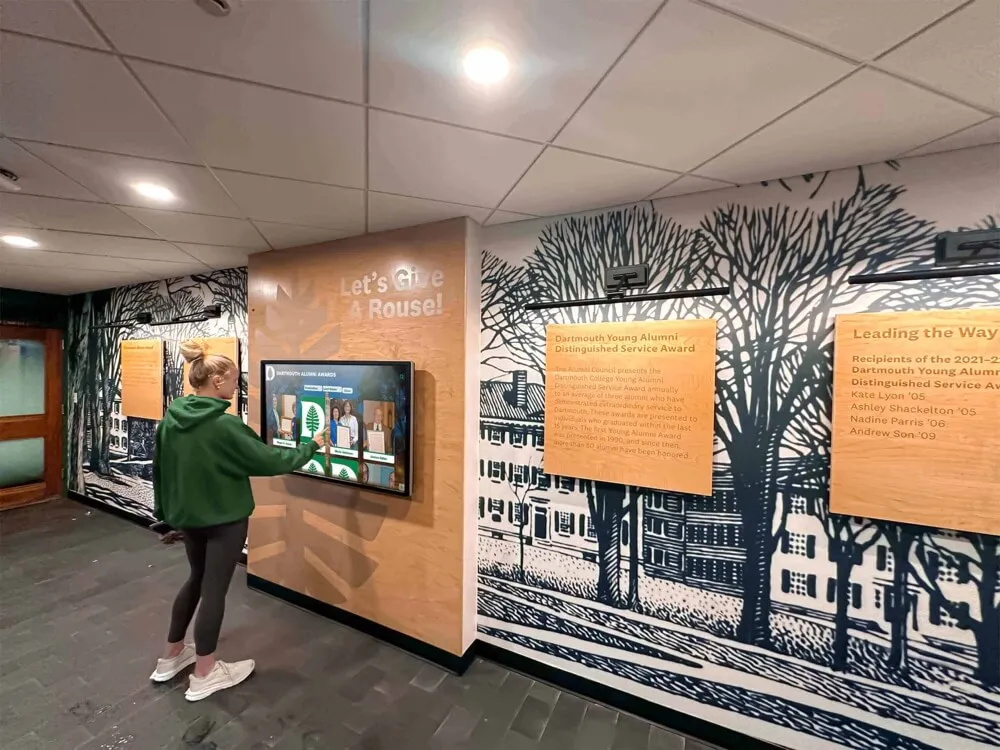
Well-designed touchscreen interfaces integrate seamlessly with physical museum spaces while providing unlimited content depth
Incorporate Rich Multimedia Content
Multiple media types accommodate diverse learning preferences while maintaining engagement:
Strategic Photography
High-quality images prove essential for engaging exhibits—high-resolution scanning at 300+ DPI for printed photographs, multiple angles showing artifacts from various perspectives, detail shots highlighting significant features and craftsmanship, contextual photos showing objects in use or original settings, and before-and-after imagery showing conservation work or historical changes.
Video Content Guidelines
Video creates emotional connections impossible with static content, but length matters critically. Keep videos brief—2-3 minutes maximum for general content, 5-7 minutes for in-depth scholarly content. Longer videos see dramatic engagement drop-offs as visitor attention wanes.
Effective video types include curator talks explaining significance or research, conservation demonstrations showing preservation techniques, historical footage providing period context, animated visualizations explaining complex processes, and community voices sharing personal connections to collections.
Audio Integration
Audio content serves visitors preferring auditory learning while enabling multitasking—visitors can listen while viewing physical artifacts rather than dividing attention between screen text and objects.
Consider oral history recordings from community members connected to collections, curator audio tours explaining gallery themes, language audio teaching pronunciation of foreign terms, ambient period music providing atmospheric context, and detailed audio descriptions supporting visually impaired visitors.
Design Intuitive Navigation
Poor interface design frustrates visitors regardless of excellent content quality:
Clear Visual Hierarchy
Use size, color, and position to communicate importance and relationships between content elements. Primary navigation should be immediately obvious, with secondary options visually subordinate. Visitors should understand available options and how to access desired information within seconds—confusion drives abandonment.
Touch-Optimized Interface Design
Design for large touch targets (minimum 44x44 pixels) accommodating fingers of all sizes and dexterity levels, provide clear visual feedback when elements are touched confirming interaction, use simple gesture vocabulary avoiding complex multi-touch interactions, maintain consistent interaction patterns throughout interface eliminating need to relearn navigation in different sections, and position navigation controls within comfortable reach zones.
Logical Content Organization
Structure information matching how visitors think about collections—chronologically for historical materials, geographically for location-based collections, thematically for concept-organized content, by artifact type for object-based browsing, or through multiple parallel paths accommodating different mental models and visitor interests.
Organizations implementing touchscreen software solutions discover that intuitive navigation determines engagement as much as content quality.
Measuring Success and Optimizing Engagement
Systematic assessment demonstrates value and guides continuous improvement ensuring interactive exhibits achieve intended educational goals:
Key Performance Indicators
Track specific metrics showing display effectiveness and informing optimization:
Usage and Engagement Metrics
Daily interactions and session counts revealing adoption rates among visitors, average session duration indicating engagement depth, content views showing which exhibits generate interest, search queries revealing visitor information needs, navigation paths showing how people explore content, and return visitor patterns when admission systems integrate with displays.
Educational Impact Indicators
Pre- and post-visit surveys measuring learning gains, teacher feedback on educational value for school groups, visitor comments about interactive experiences, social media mentions and shares extending reach, and repeat visitation rates suggesting satisfaction and continued interest.
Operational Efficiency
Staff time required for content updates and routine maintenance, cost per visitor interaction compared to printed materials, reduction in visitor services questions when information is readily available through self-service, and flexibility enabling rapid response to opportunities or emerging issues.
Museums implementing comprehensive digital systems use analytics to optimize content performance and demonstrate value to stakeholders through concrete data.
Collect and Act on Visitor Feedback
Systematic feedback collection provides insights complementing quantitative analytics:
Feedback Collection Methods
On-screen satisfaction surveys following display interactions, QR codes linking to detailed feedback forms, observation studies watching how visitors interact with displays, focus groups exploring specific questions in depth, comment cards in gallery spaces near installations, and social media monitoring for organic mentions and visitor posts.
Ask specific questions about navigation clarity and ease of use, content usefulness and relevance, whether visitors learned something new or discovered unexpected information, interest in exploring deeper content versus surface browsing, and suggestions for improvement or additional features.
Optimize Content Based on Data
Analytics and feedback reveal specific optimization opportunities:
Content Performance Analysis
Identify highly-engaged content and analyze what makes it successful—strong photography, compelling narratives, multimedia variety, or topic relevance. Recognize underperforming content requiring improvement or replacement. Discover popular topics warranting expansion. Find navigation bottlenecks causing visitor confusion. Notice demographic patterns suggesting different audience needs requiring targeted content development.
Continuous Improvement Cycle
Effective museums treat interactive displays as living systems requiring ongoing refinement—quarterly analytics reviews identifying trends and opportunities, A/B testing of different content approaches when possible, regular content updates maintaining freshness and visitor interest, and expansion based on successful patterns established through usage data.
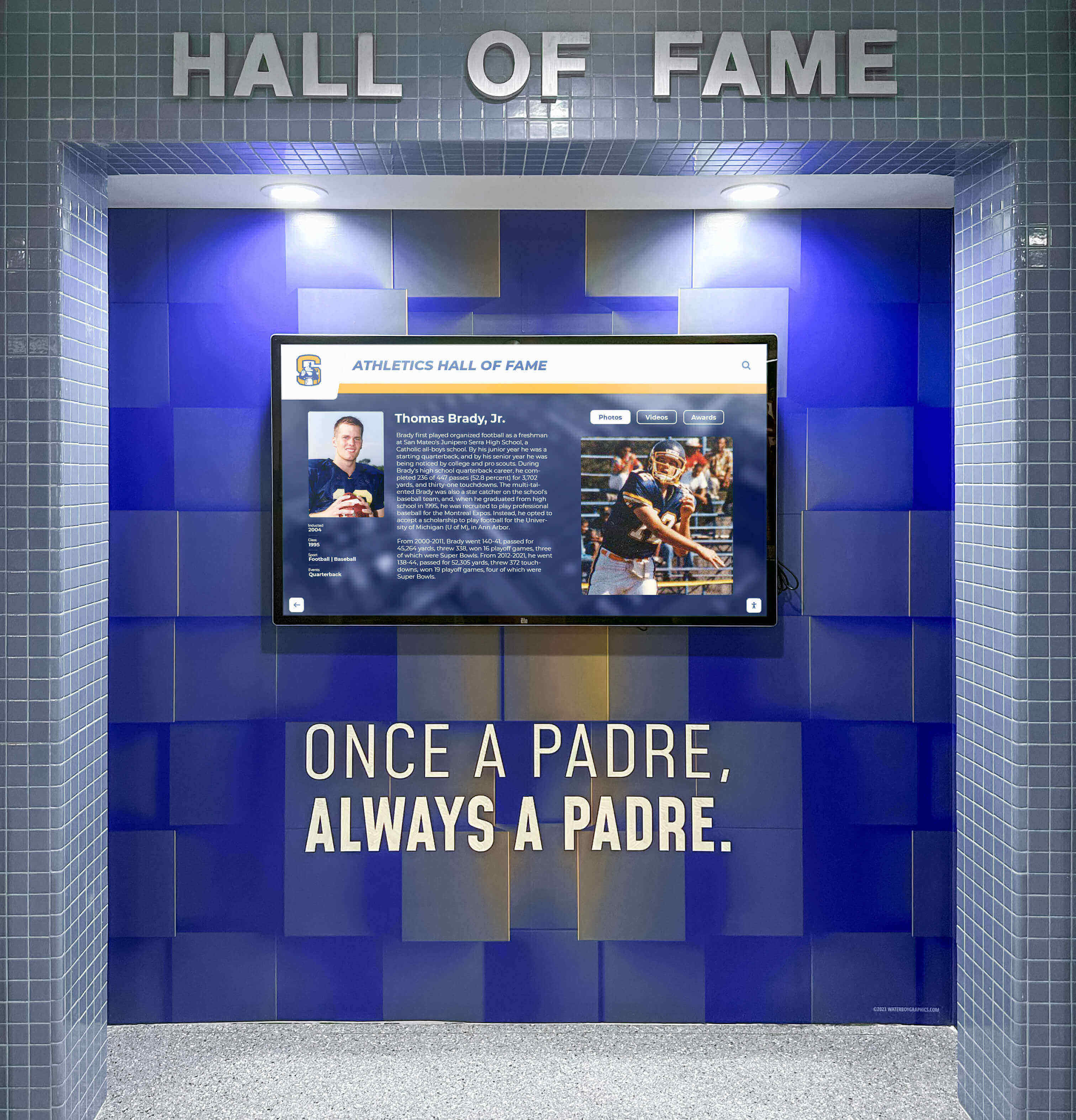
Effective integration of digital displays with museum architecture creates cohesive visitor experiences respecting institutional character
Special Considerations for Different Institution Types
Different cultural institutions face unique implementation considerations:
Art Museums and Galleries
Art museums prioritize visual content and aesthetic presentation requiring particular attention to interface design that respects artistic integrity, high-resolution image quality enabling detailed examination of artworks, artist biographical information and creative context, provenance documentation and exhibition history, conservation stories explaining preservation challenges and techniques, and comparative views showing artistic movements and influences.
Interactive displays in art museums work particularly well for explaining abstract concepts difficult to convey through traditional labels—artistic techniques, historical movements, symbolism and iconography, and relationships between artists and works.
History Museums and Historical Societies
Historical institutions focus on contextual narratives requiring timeline interfaces presenting chronological progressions, geographic context through interactive maps, biographical databases documenting community members, primary source documents with transcriptions, oral history collections preserving personal narratives, and thematic organization connecting artifacts to broader historical themes.
Organizations implementing museum history touchscreens discover that placing local stories within national and global contexts increases visitor comprehension and engagement significantly.
Science and Natural History Museums
Scientific institutions benefit from interactive displays explaining complex concepts through animated visualizations demonstrating processes, comparative anatomy and evolutionary relationships, environmental context and ecosystem connections, research methodology and scientific discovery stories, and interactive models enabling visitor manipulation and experimentation.
Science museums particularly benefit from touchscreen capability to present multiple layers of explanation—simplified overviews for children, moderate detail for general audiences, and comprehensive scientific documentation for advanced visitors and students.
Specialized and Community Museums
Smaller specialized institutions serving specific communities or topics often operate with the most constrained resources yet stand to benefit tremendously from touchscreen technology enabling comprehensive content presentation within limited physical spaces, professional presentation quality matching larger institutions, and accessibility for broader audiences including virtual visitors exploring collections online.
These institutions should prioritize cloud-based platforms eliminating technical infrastructure requirements, template-based content creation simplifying development, and phased implementation starting with highest-value content demonstrating impact before comprehensive expansion.
Conclusion: Transforming Museum Experiences Through Interactive Technology
Interactive touchscreen displays represent significant evolution in how museums and galleries present collections, engage visitors, and fulfill educational missions. When implemented thoughtfully with quality content, intuitive design, and continuous refinement based on visitor feedback and analytics, these systems solve fundamental challenges inherent in traditional museum exhibits while creating new opportunities for learning, accessibility, and community connection.
The most successful implementations balance technology and tradition—using interactive displays to enhance rather than replace authentic artifacts, focusing on visitor needs rather than technological capabilities for their own sake, and maintaining content quality while embracing new delivery mechanisms. Digital interactivity works best when it serves educational goals and visitor experience rather than existing as technology demonstration.
Museums and galleries ready to implement interactive touchscreen displays should begin by defining clear educational objectives and visitor needs that technology will serve, inventorying existing digital assets and identifying content development requirements, exploring funding sources and building stakeholder support through compelling value propositions, evaluating technology platforms matching institutional needs and available resources, and planning phased implementations demonstrating value while building toward comprehensive systems.
Cultural institutions preserve our collective heritage and enable learning across generations. Interactive touchscreen displays extend these fundamental missions by making collections more accessible to diverse audiences, providing context and depth impossible in physical exhibits alone, accommodating different learning styles and accessibility needs, and creating engaging experiences that inspire curiosity and deeper exploration of human culture, history, and creativity.
Whether managing major metropolitan museums with extensive collections, regional galleries serving local communities, specialized institutions focusing on particular topics or periods, or historical societies preserving community heritage, interactive touchscreen displays can transform how you serve visitors and fulfill educational missions—creating memorable experiences that inspire learning and strengthen connections to art, history, and culture.
Ready to explore how interactive touchscreen displays can transform your museum or gallery’s visitor experience and educational impact? Book a demo to see comprehensive solutions integrating touchscreen hardware, intuitive content management, and visitor engagement analytics designed specifically for cultural institutions and museums.































