
Selecting touchscreen kiosk software determines whether your interactive displays engage visitors meaningfully or frustrate users with clunky interfaces that go unused after initial installation. Schools implementing recognition systems, museums creating interactive exhibits, corporate offices modernizing visitor experiences, and organizations deploying public information kiosks face a software landscape ranging from purpose-built recognition platforms to general-purpose development frameworks—each offering distinct strengths for different applications and technical capabilities.
The interactive touchscreen market has matured significantly beyond basic slideshow players to encompass sophisticated platforms supporting database-driven content, responsive touch interfaces, analytics tracking user engagement, cloud-based management enabling remote updates, and integration with existing institutional systems. For organizations focused on recognition, wayfinding, engagement, or information delivery, understanding the differences between specialized platforms and general development tools profoundly impacts implementation success, user satisfaction, and long-term operational costs.
This comprehensive guide examines the leading interactive touchscreen kiosk software options for 2026, comparing purpose-built recognition platforms against flexible development frameworks, analyzing feature sets across pricing tiers, evaluating ease-of-use for non-technical teams, and providing systematic selection criteria ensuring your investment delivers sustained value aligned with organizational goals and technical capabilities.
Choosing the right kiosk software means balancing powerful capabilities with manageable complexity—platforms offering exactly the features your use case requires without unnecessary technical overhead that complicates content management or inflates costs.

Modern touchscreen kiosk software powers engaging interactive experiences from athletic recognition to museum exhibits, requiring platforms balancing capability with usability
Understanding Interactive Touchscreen Kiosk Software Categories
Interactive kiosk software falls into distinct categories serving different organizational needs, technical capabilities, and application requirements.
Purpose-Built Recognition and Engagement Platforms
Specialized solutions designed specifically for celebrating achievements and institutional storytelling:
Core Capabilities
- Pre-configured templates for athletic, academic, donor, and historical recognition
- Searchable profile databases with unlimited capacity
- Multimedia integration supporting photos, videos, and documents
- Timeline visualizations presenting chronological institutional evolution
- Both physical touchscreen and web platform accessibility
- Simple content management requiring minimal technical training
- Proven implementation frameworks based on thousands of deployments
These platforms excel when organizations prioritize ease-of-use, proven track records, and complete packaged solutions over maximum customization flexibility.
Interactive Development Frameworks
Sophisticated tools for creating fully custom interactive experiences:
Platform Characteristics
- Visual interface designers enabling pixel-perfect control without coding
- Advanced gesture support including multi-touch and proximity sensing
- Sensor integration capabilities (RFID, cameras, IoT devices)
- Database connectivity for dynamic content from external sources
- Cross-platform deployment to various operating systems
- Extensive customization potential requiring design investment
- Higher learning curves but maximum creative flexibility
Development frameworks serve organizations with unique requirements beyond standard recognition, wayfinding, or information delivery applications.
Cloud-Based Digital Signage with Interactive Features
General digital signage platforms offering touchscreen capabilities:
Typical Features
- Content scheduling and playlist management
- Multi-location fleet management from central dashboards
- Template libraries for common applications
- Basic touch navigation between content zones
- Real-time data widgets and external integrations
- Hardware-agnostic supporting various display types
- Subscription pricing per screen
These platforms work when organizations manage both passive signage and selective interactive applications through unified systems.

User-friendly interfaces ensure visitors can explore content intuitively without instructions or staff assistance
Specialized Niche Platforms
Industry-specific solutions addressing particular use cases:
Common Applications
- Donor recognition for nonprofits and educational fundraising
- Museum and exhibit interactive experiences
- Corporate visitor management and wayfinding
- Healthcare patient information systems
- Retail product information and ordering kiosks
- Real estate property showcase displays
Niche platforms provide domain expertise and pre-built features specific to particular industries.
Organizations implementing touchscreen kiosk solutions should evaluate which category aligns with their primary use case, available technical resources, and budget constraints.
Top Interactive Touchscreen Kiosk Software Platforms for 2026
Detailed examination of leading platforms reveals distinct strengths serving different organizational profiles.
1. Rocket Alumni Solutions: Purpose-Built Recognition Excellence
For schools, universities, athletic programs, nonprofits, and organizations focused on celebrating achievements and preserving institutional history, Rocket Alumni Solutions provides comprehensive purpose-built platforms combining specialized features with exceptional ease-of-use.
Recognition-Focused Features
- Unlimited searchable databases: Profile systems accommodating athletes, scholars, donors, alumni, and community members without capacity constraints or per-profile fees
- Rich multimedia integration: Photos, videos, statistics, biographical narratives, and career highlights creating compelling storytelling
- Multiple recognition categories: Athletic halls of fame, academic honors, donor walls, historical timelines, and custom categories with independent designs
- Advanced search and filtering: Find specific individuals, teams, years, or achievements instantly through intuitive interfaces
- Timeline visualizations: Chronological presentation of institutional evolution and milestone achievements
- Record tracking systems: Automatic ranking and updating when new achievements occur
- Team and group profiles: Celebrate collective accomplishments alongside individual recognition
Interactive Touchscreen Excellence
Commercial-grade touch interfaces designed specifically for public environments:
- Responsive navigation designed for users of all ages and technical abilities
- Easy discovery requiring no instructions or training
- Professional visual design reflecting institutional branding
- Portrait and landscape orientation support
- Reliable operation in high-traffic public settings
- Session management automatically resetting to home screens
- Accessibility features supporting diverse users
Learn about specialized touchscreen kiosk software approaches prioritizing recognition applications.

Purpose-built recognition platforms deliver polished experiences combining intuitive touchscreen interaction with comprehensive content management
Integrated Multi-Platform Access
Recognition extends beyond physical kiosks to worldwide accessibility:
- Cloud-based web platforms providing access from any internet-connected device
- Mobile-optimized responsive interfaces for smartphones and tablets
- Social sharing capabilities enabling viral promotion
- QR code integration linking physical spaces to digital content
- Website embedding widgets for institutional sites
- Consistent experiences across touchscreen and web platforms
Content Management Simplicity
Non-technical staff independently manage recognition content:
- Visual editing with real-time previews matching actual displays
- Drag-and-drop media uploads without format complexities
- Bulk operations efficiently updating multiple profiles
- Role-based permissions enabling distributed responsibilities
- Approval workflows ensuring appropriate oversight
- Template-based creation accelerating content development
Complete Implementation and Support
Full-service solutions eliminating technical barriers:
- Hardware packages including displays, computers, and installation
- Pre-configured templates based on proven implementations
- White-glove onboarding with initial content creation assistance
- Ongoing technical support and content guidance
- Regular platform updates incorporating new features
- Dedicated account management for larger institutions
Pricing Structure
Complete solutions typically range from $8,000-$15,000 for full systems including hardware, software, installation, and first-year support, with annual software subscriptions of $1,000-$3,000 afterward. Pricing reflects comprehensive packages rather than separate component purchases.
Best For
Organizations prioritizing ease-of-use, proven recognition templates, comprehensive support, and complete packaged solutions over maximum customization flexibility. Particularly well-suited for schools, athletic programs, alumni associations, and nonprofits without dedicated technical teams.
2. Intuiface: Advanced No-Code Interactive Platform
For organizations requiring sophisticated custom interactive experiences beyond standard recognition templates, Intuiface provides powerful development capabilities without traditional coding requirements.
Platform Capabilities
- Visual interface designer with pixel-perfect layout control
- Extensive multi-touch gesture support
- Sensor integration including RFID, proximity, computer vision, and IoT devices
- Database connectivity for dynamic content from external sources
- Cross-platform deployment (Windows, Android, web browsers)
- Offline operation ensuring function without network connectivity
- Advanced analytics tracking detailed user interactions
Content Management
- Cloud-based updates propagating to deployed experiences automatically
- Media asset management with version control
- Template systems for maintaining consistent designs
- Role-based access control for distributed teams
- Custom integrations via REST APIs and web services
Strengths
- Maximum creative flexibility for unique requirements
- Sophisticated interaction capabilities beyond basic navigation
- Professional-grade platform trusted by Fortune 500 companies
- Extensive documentation and learning resources
- Active user community sharing templates and solutions
Considerations
- Steeper learning curve requiring design planning investment
- Development time before deployment compared to turnkey platforms
- Higher per-screen costs reflecting advanced capabilities
- Best suited for organizations with design resources or unique needs
Pricing
Subscription model starting around $99/month for basic deployments, scaling to $500+/month for enterprise features. Per-screen pricing for multiple installations. Free trial available for evaluation.
Best For
Museums, corporate brand centers, specialized exhibits, and organizations with unique interactive requirements beyond standard recognition or information delivery where advanced customization justifies development investment.
3. PandaSuite: No-Code Interactive Creation
PandaSuite offers accessible no-code tools for creating interactive experiences across devices.
Platform Features
- Visual drag-and-drop interface requiring no programming
- Component library including galleries, videos, quizzes, and forms
- Animation and transition effects
- Offline content support for consistent function
- Multi-device publishing (iOS, Android, web, kiosks)
- Analytics tracking user engagement
- Integration capabilities with external data sources
Pricing
Free tier for testing, paid plans starting around $49/month for commercial deployments. Per-project pricing rather than per-screen model.

Touch-optimized navigation enables intuitive content exploration across profiles, timelines, and achievement categories
Strengths
- Lower cost than enterprise platforms
- Accessible to non-technical creators
- Cross-platform deployment flexibility
- Quick prototyping and iteration
Considerations
- Less sophisticated than Intuiface for complex interactions
- Smaller user community and ecosystem
- Limited enterprise features compared to established platforms
Best For
Organizations needing moderate customization beyond templates but without budget for enterprise platforms or development teams.
4. Novisign: Cloud-Based Digital Signage with Touch
Novisign provides cloud-based digital signage management with interactive touchscreen capabilities.
Platform Capabilities
- Cloud content management accessible from any browser
- Interactive app marketplace with pre-built widgets
- Touch navigation between content zones
- Scheduling and playlist management
- Multi-location fleet management
- Hardware-agnostic supporting various displays
- Real-time content updates
Interactive Features
- Button-based navigation between screens
- Web page embedding for external content
- Form collection capabilities
- Basic wayfinding applications
- Product catalog browsing
Pricing
Subscription starting around $20/screen/month with volume discounts. Free trial available.
Strengths
- Unified management of passive and interactive displays
- Cost-effective for multi-screen deployments
- No specialized hardware requirements
- Quick deployment and easy updates
Considerations
- Limited compared to purpose-built interactive platforms
- Basic touchscreen capabilities suitable for simple applications
- Less sophisticated search and database functionality
Best For
Organizations managing mixed environments of passive signage and basic interactive displays preferring unified platforms.
5. Touchpros: Kiosk Mode Software
Touchpros specializes in kiosk lockdown software securing devices for public use.
Core Functions
- Browser-based kiosk mode locking devices to specific applications
- Remote management and monitoring
- Security features preventing unauthorized access
- Automatic session reset and cleanup
- Multi-platform support (Windows, Android, iOS)
- Scheduled content and application launching
Pricing
Subscription around $10-30/device/month depending on features and volume.
Best For
Organizations requiring secure kiosk lockdown for existing web applications or custom software rather than complete interactive platform solutions. Often used in conjunction with other content platforms.
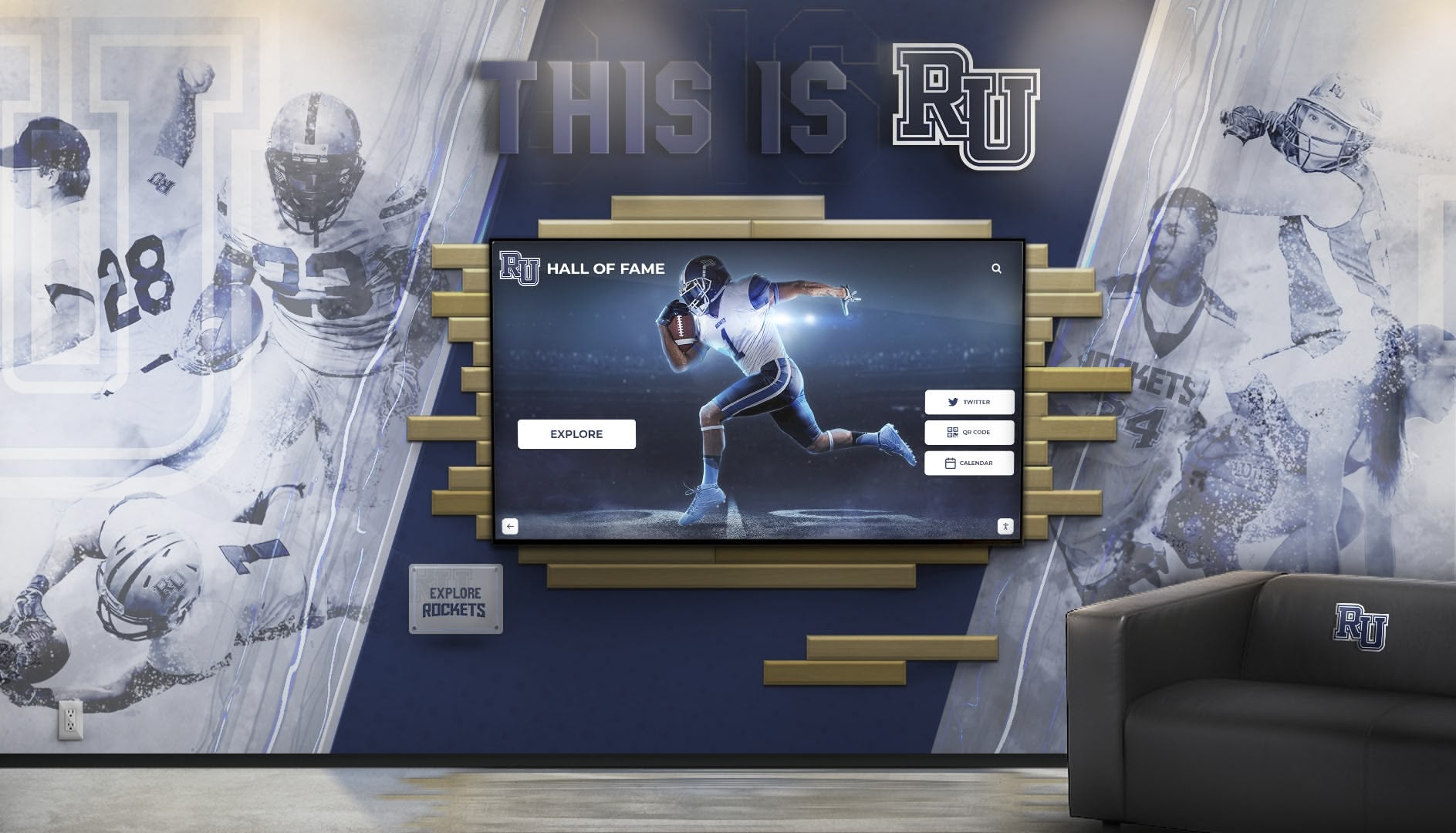
Professional installations integrate touchscreen software with environmental design creating cohesive recognition experiences
6. Arreya: Enterprise Digital Signage Platform
Arreya provides enterprise-grade digital signage with interactive capabilities for large organizations.
Platform Features
- Cloud-based content management
- Interactive touchscreen modules
- Advanced scheduling and targeting
- Multi-tenant architecture for distributed organizations
- Integration with enterprise systems
- Advanced analytics and reporting
- Professional services and support
Pricing
Enterprise pricing typically starting around $50+/screen/month with implementation fees. Custom quotes based on deployment scope.
Best For
Large institutions or corporate environments requiring enterprise features, extensive integrations, and dedicated support.
7. HallofFameWall.com: Specialized Recognition Platform
HallofFameWall.com offers niche solutions specifically for athletic and institutional recognition displays.
Platform Focus
- Pre-built templates for sports halls of fame
- Database systems for athlete profiles
- Simple content management for non-technical users
- Affordable entry points for smaller programs
- Focus on athletic recognition applications
Strengths
- Specialized understanding of recognition needs
- Lower complexity than general platforms
- Affordable for budget-conscious programs
Best For
Smaller athletic programs or schools wanting specialized recognition solutions without full-featured platform complexity.
Organizations exploring virtual hall of fame platforms should consider both physical touchscreen and web-based approaches.
8. TouchWall.us: Easy Recognition Displays
TouchWall.us provides streamlined solutions for institutional recognition with emphasis on ease-of-use.
Platform Characteristics
- Simplified interfaces for quick deployment
- Pre-configured recognition templates
- Focus on athletic and academic achievement
- Affordable pricing for educational institutions
- Minimal technical requirements
Best For
Organizations prioritizing simplicity and fast implementation over extensive feature sets.
9. DonorsWall.com: Fundraising Recognition Specialist
DonorsWall.com specializes in donor recognition and fundraising acknowledgment displays.
Platform Focus
- Donor wall and recognition specific features
- Integration with fundraising databases
- Giving level visualization
- Campaign progress displays
- Donor privacy controls
Best For
Nonprofits, educational advancement offices, and organizations focused primarily on donor recognition and fundraising acknowledgment.
Explore donor recognition screen solutions for comprehensive fundraising acknowledgment approaches.
Essential Features for Interactive Touchscreen Kiosk Software
Systematic evaluation across critical capabilities ensures selected platforms meet both current needs and future requirements.
User Interface and Experience
Touch Optimization
- Minimum 44×44 pixel touch targets ensuring accurate selection
- Generous spacing between interactive elements reducing errors
- Immediate visual feedback confirming touch registration
- Smooth animations and transitions
- Multi-touch gesture support when appropriate
- Forgiving input recognition tolerating imprecise touches
Navigation Design
- Clear information architecture using familiar organizing principles
- Multiple discovery paths: browsing, searching, featured content
- Clear visual hierarchy emphasizing primary content
- Breadcrumb trails showing location within hierarchies
- Always-accessible home buttons for starting over
- Logical categorization matching user mental models
Search and Discovery
- Robust search with autocomplete suggestions
- Advanced filtering by relevant criteria
- Full-text search across all content
- Search history and popular queries
- Related content recommendations
- Alphabetical and chronological browsing options
Schools implementing interactive kiosk solutions should test navigation with actual target audiences to confirm ease-of-use.
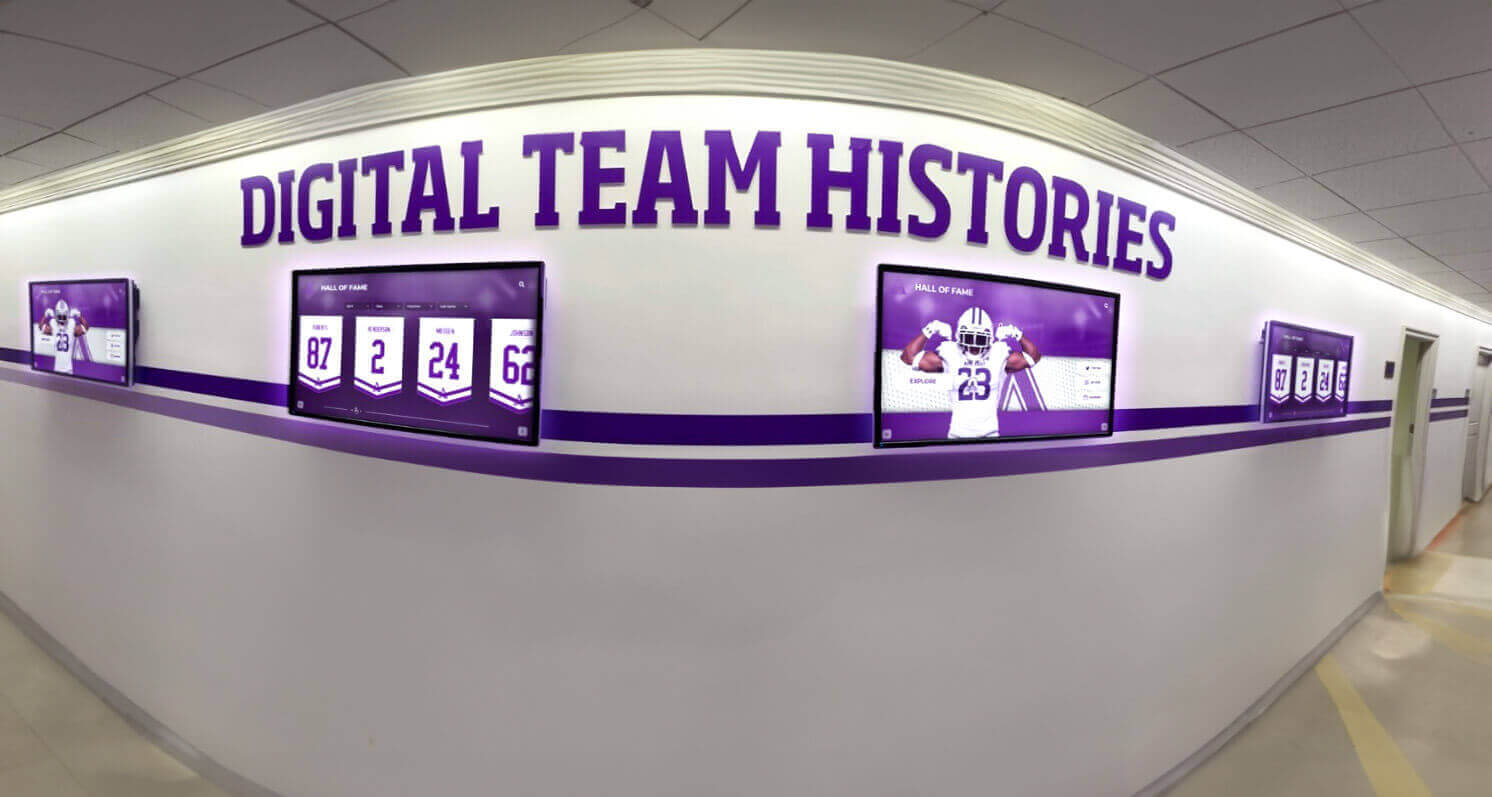
Multi-display installations benefit from centralized software management enabling consistent content across distributed touchpoints
Content Management Capabilities
Administrative Interface
- Visual editing with real-time previews
- Drag-and-drop media uploads
- Template-based content creation
- Bulk operations for efficiency
- Saved drafts preserving work-in-progress
- Undo/redo capabilities
Multi-User Collaboration
- Role-based access control
- Department-level permissions
- Approval workflows
- Audit logging tracking changes
- Comments and collaboration tools
- Scheduled publishing
Media Management
- Sufficient storage capacity (ideally unlimited)
- Support for diverse media types
- Automatic image optimization
- Video transcoding and streaming
- Media library organization
- Duplicate detection
Technical Infrastructure
Hardware Compatibility
- Operating system support (Windows, Android, Linux, Chrome OS)
- Screen size and resolution flexibility
- Portrait and landscape orientation
- Touch technology compatibility
- External peripheral support
- Reasonable minimum hardware specifications
Network and Deployment
- Cloud-based management enabling remote updates
- Offline operation continuing when networks unavailable
- Automatic content synchronization
- Bandwidth efficiency
- Graceful degradation when connectivity lost
- Remote monitoring and troubleshooting
Security and Reliability
- Kiosk mode lockdown preventing system access
- Role-based permissions controlling access
- Secure authentication
- Automatic failover for critical systems
- Session management and automatic reset
- Regular security updates
Analytics and Measurement
Engagement Tracking
- Session counts and visitor estimates
- Average session duration
- Most-viewed content
- Search queries and patterns
- Navigation paths
- Time-of-day usage patterns
- Interaction heatmaps
Reporting Capabilities
- Dashboard views presenting key metrics
- Historical trend analysis
- Comparative reporting
- Custom report builders
- Automated report delivery
- Data export for external analysis
Organizations implementing touchscreen kiosk solutions for schools use analytics to refine content and demonstrate value to stakeholders.
Selection Framework: Choosing the Right Platform
Systematic evaluation ensures alignment between platform capabilities and organizational needs.
Use Case Alignment
Recognition and Engagement
Purpose-built platforms excel when:
- Primary focus involves celebrating achievements and institutional history
- Searchable profile databases with rich multimedia content required
- Ease-of-use for non-technical staff is priority
- Proven templates accelerate implementation
- Complete packaged solutions including hardware and support appeal to resource-constrained teams
- Web accessibility extending beyond physical locations matters
Custom Interactive Experiences
Development frameworks excel when:
- Unique requirements differ significantly from standard applications
- Sophisticated sensor integration or custom interactions provide important value
- Internal teams possess relevant design and technical expertise
- Organizations can invest in development and ongoing maintenance
- Maximum creative control justifies complexity
Information Delivery and Wayfinding
General digital signage platforms excel when:
- Primarily passive display with selective interactive elements
- Mixed environments combining signage and touchscreens
- Multi-location fleet management required
- Budget constraints favor cost-effective per-screen pricing
Organizational Capability Assessment
Technical Resources
- IT staff availability and expertise level
- Existing technical infrastructure and systems
- Vendor support requirements and preferences
- Internal versus outsourced content management approach
- Long-term maintenance and update capabilities
Content Management Capacity
- Staff technical comfort with content systems
- Frequency of content updates required
- Number of content contributors and roles
- Approval workflows and governance needs
- Historical content migration requirements
Budget Considerations
- Initial implementation budget including hardware and software
- Ongoing operational costs (subscriptions, support, updates)
- Internal staff time allocation
- Total cost of ownership over 5-7 year timeframes
- Funding sources and budget approval processes
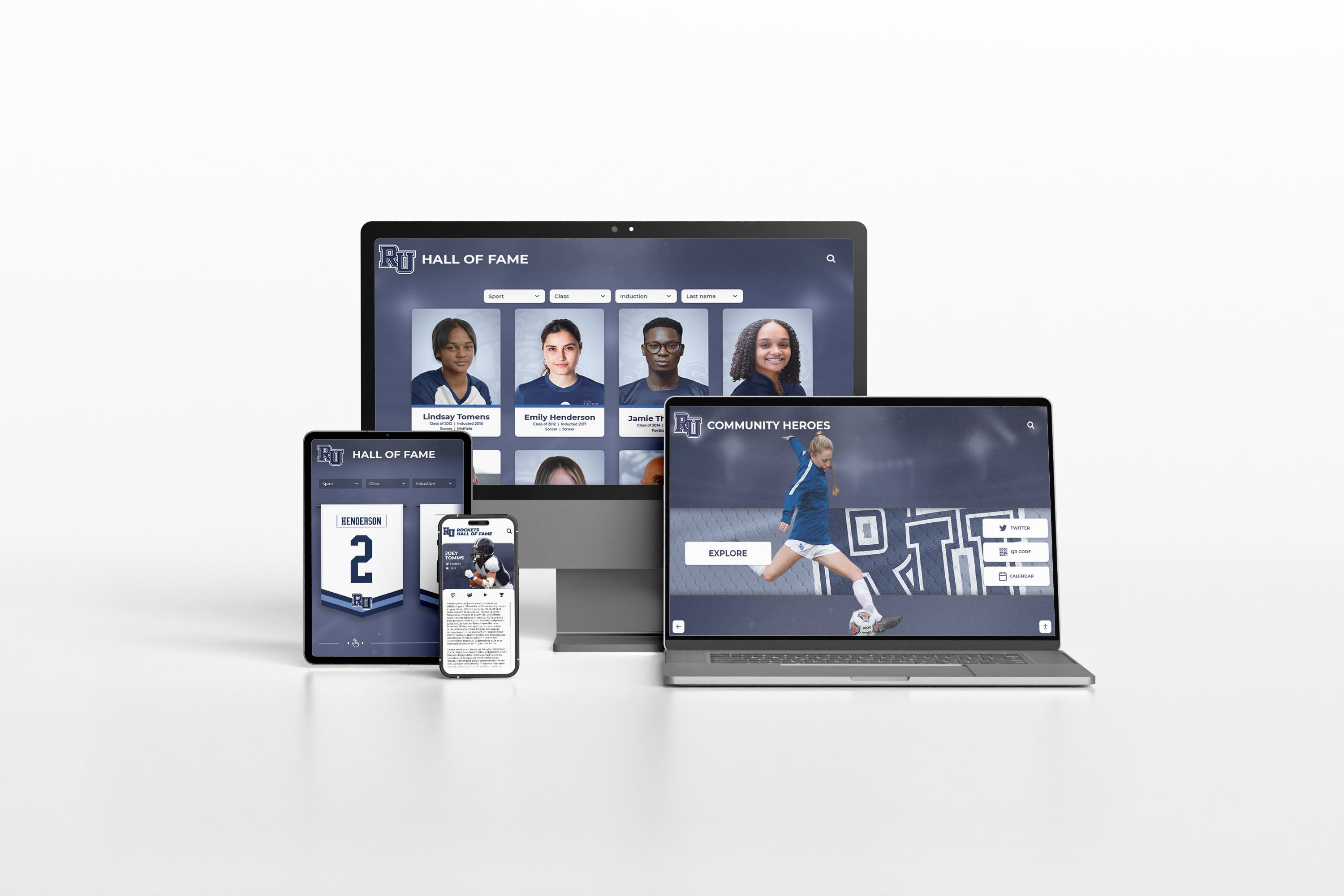
Modern platforms extend beyond physical kiosks to responsive web experiences accessible worldwide on any device
Implementation Best Practices
Following proven approaches ensures successful deployments delivering sustained value.
Planning and Requirements
Stakeholder Engagement
- Identify all departments and roles interacting with system
- Understand diverse content needs and priorities
- Determine approval workflows and governance
- Clarify success metrics and measurement approaches
- Establish realistic timelines accounting for content creation
Content Strategy
- Prioritize most important information
- Plan content collection workflows
- Develop style guides ensuring consistency
- Create content calendars for regular updates
- Identify data sources for dynamic information
Technical Infrastructure
- Verify network connectivity and bandwidth
- Confirm power availability at desired locations
- Evaluate mounting surfaces and structural requirements
- Plan for future expansion and scalability
- Consider security and physical protection needs
User Testing and Refinement
Usability Evaluation
- Recruit representative users matching target demographics
- Observe users completing typical tasks without intervention
- Note confusion points and abandoned tasks
- Collect subjective feedback
- Iterate based on findings before full launch
Common Issues to Address
- Navigation confusion preventing information discovery
- Touch targets too small causing selection errors
- Text size or contrast creating readability problems
- Loading delays appearing as broken functionality
- Missing navigation elements trapping users
- Session timeout interrupting tasks
Ongoing Management
Content Updates
- Establish sustainable update schedules
- Distribute responsibilities across departments
- Implement quality control workflows
- Archive outdated content
- Refresh featured content regularly
Performance Monitoring
- Review analytics identifying popular content
- Track system uptime and reliability
- Monitor user feedback and support requests
- Measure achievement of success metrics
- Benchmark against goals
Continuous Improvement
- Apply learnings from analytics
- Incorporate user feedback
- Adopt platform updates and new features
- Expand successful implementations
- Share best practices across teams
Organizations implementing digital hall of fame systems benefit from iterative improvement based on engagement data.
Future Trends in Interactive Touchscreen Software
Understanding emerging capabilities informs forward-looking decisions.
Artificial Intelligence Integration
Personalization Capabilities
- User behavior analysis suggesting relevant content
- Smart search anticipating queries
- Adaptive content ordering based on interests
- Session learning improving recommendations
Natural Language Interfaces
- Voice interaction enabling hands-free operation
- Conversational search using natural questions
- Multilingual voice recognition
- Intent recognition understanding goals
Computer Vision
- Touchless gesture recognition
- Demographic detection for anonymous analytics
- Accessibility features for diverse abilities
- Object recognition integrating physical items
Enhanced Connectivity
Integration Capabilities
- Building management systems
- Institutional databases and student information systems
- Social media platforms
- Calendar and scheduling systems
- Emergency notification networks
Cloud Architecture Evolution
- Real-time global content updates
- Automatic failover and self-healing
- A/B testing content variations
- Proactive maintenance monitoring
- Edge processing reducing latency
Organizations implementing best platforms for virtual halls of fame should prioritize vendors demonstrating ongoing innovation.
Conclusion: Selecting Your Interactive Touchscreen Kiosk Software
The best interactive touchscreen kiosk software for your organization depends on your specific use case, technical capabilities, and long-term vision. No single platform optimally serves every application—the right choice balances your engagement goals, budget constraints, and operational resources while remaining manageable within your team’s capabilities.
Purpose-built recognition platforms like Rocket Alumni Solutions excel when celebrating achievements and preserving institutional history form the primary focus, ease-of-use and comprehensive support outweigh maximum customization, proven templates and best practices accelerate implementation, and complete packaged solutions including hardware and support appeal to resource-constrained teams.
Development frameworks like Intuiface and PandaSuite excel when unique requirements justify custom development investment, internal design resources can plan and build experiences, sophisticated interactions beyond standard navigation provide important value, and organizations can maintain custom solutions long-term.
General digital signage platforms with interactive features excel when managing mixed passive and interactive displays through unified systems, budget constraints favor per-screen subscription pricing, and basic touchscreen capabilities meet application requirements.
Most educational institutions, athletic programs, museums, and organizations implementing recognition and engagement applications find purpose-built platforms provide optimal balances of functionality, usability, support, and value—delivering comprehensive capabilities through user-friendly interfaces backed by proven implementation experience.
The interactive touchscreen software landscape continues advancing with artificial intelligence, enhanced analytics, and deeper integrations creating increasingly sophisticated experiences. Yet fundamental principles remain constant—understanding your audience, designing for their needs, choosing appropriate technologies, selecting committed vendor partners, and maintaining fresh relevant content ensuring sustained engagement.
Your interactive displays deserve software supporting your institutional vision while remaining affordable and manageable within your capabilities. Whether implementing your first touchscreen or expanding existing programs, the platforms explored throughout this guide provide pathways transforming engagement goals into compelling experiences that educate, inspire, and connect communities for years to come.
Ready to explore how interactive touchscreen technology can transform your recognition and engagement programs? Discover comprehensive digital recognition solutions combining purpose-built software, professional hardware, and expert support designed specifically for schools, universities, and organizations celebrating achievements and preserving institutional heritage.































