




Intent: Preserve & Share — This comprehensive guide delivers a complete roadmap for digitizing your school’s yearbook collection, transforming fragile physical volumes into searchable digital archives that alumni can explore from anywhere.
Old yearbooks represent irreplaceable institutional memories. Each volume captures a snapshot of student life, academic achievements, athletic triumphs, and community connections that define your school’s heritage. Yet thousands of schools watch helplessly as these precious records deteriorate—pages yellow and crack, bindings fail, photos fade, and entire decades of history risk being lost forever.
The good news: modern digitization technology makes preserving and sharing yearbook collections more accessible than ever. Whether you’re looking to protect fragile historical volumes, create searchable alumni resources, build interactive recognition displays, or simply ensure future generations can access your school’s story, digitizing yearbooks offers practical solutions addressing all these needs.
This guide walks you through every step of the yearbook digitization process—from initial planning and copyright considerations through scanning specifications, OCR processing, quality control, and modern display options including interactive touchscreens and web-accessible archives.
Who This Helps
This digitization roadmap serves multiple stakeholders within educational communities:
- School archivists and librarians responsible for preserving institutional history and making collections accessible
- Alumni relations directors seeking to increase engagement through nostalgic yearbook exploration
- Athletic directors wanting to showcase program history through digital recognition displays
- Development professionals leveraging yearbook nostalgia for fundraising and donor cultivation
- IT administrators evaluating technical requirements and digital asset management systems
- School administrators considering yearbook digitization projects for anniversary celebrations or capital campaigns
Whether you’re digitizing five yearbooks or fifty years of institutional history, this guide provides the framework for successful implementation.

Modern yearbook digitization transforms static print volumes into dynamic, searchable archives that alumni can explore to find themselves and classmates
Phase 1: Planning Your Digitization Project
Successful yearbook digitization begins with systematic planning addressing scope, objectives, resources, and timelines.
Define Your Digitization Goals
Before touching a single yearbook, clarify what you hope to accomplish:
Preservation-Focused Goals
- Creating archival-quality digital backups protecting against physical deterioration
- Reducing handling of fragile historical volumes
- Ensuring institutional memory survives disasters like fire, flood, or building damage
- Meeting accreditation or historical society preservation standards
- Building comprehensive digital archives for research purposes
Access-Focused Goals
- Enabling alumni to search and find their appearances across multiple yearbooks
- Creating web-accessible yearbook collections available 24/7 worldwide
- Supporting reunion planning by helping classmates reconnect
- Facilitating research by historians, journalists, and community members
- Powering interactive touchscreen displays in school lobbies and athletic facilities
Engagement-Focused Goals
- Increasing alumni engagement through nostalgic content discovery
- Supporting fundraising campaigns with emotional yearbook connections
- Building school pride by showcasing institutional heritage
- Creating shareable content for social media and communications
- Enhancing admissions tours with visible institutional tradition
Your goals significantly influence technical specifications, budget requirements, and project scope. Schools prioritizing long-term archival preservation require higher resolution scanning and uncompressed file formats, while institutions focused primarily on web access can use more moderate specifications optimized for online delivery.
Assess Your Yearbook Collection
Conduct a comprehensive inventory of your yearbook holdings:
Collection Inventory
- Total number of volumes requiring digitization
- Year range spanning your collection (earliest to most recent)
- Physical condition assessment for each decade
- Binding types and fragility concerns
- Page sizes and whether dimensions vary across years
- Presence of color versus black-and-white printing
- Special features like tip-ins, fold-outs, or unusual formats
Prioritization Strategy
Most schools cannot digitize entire collections simultaneously and must establish priorities:
- Historical significance: Yearbooks from founding decades, championship seasons, or milestone anniversaries
- Physical condition: Volumes showing advanced deterioration requiring immediate preservation
- Alumni interest: Decades with large, engaged alumni populations
- Completeness: Years where you have complete volumes versus missing or incomplete editions
- Research value: Periods of particular historical or cultural significance
Many schools adopt phased approaches—digitizing 10-20 years initially to test workflows and demonstrate value before expanding to comprehensive collections.
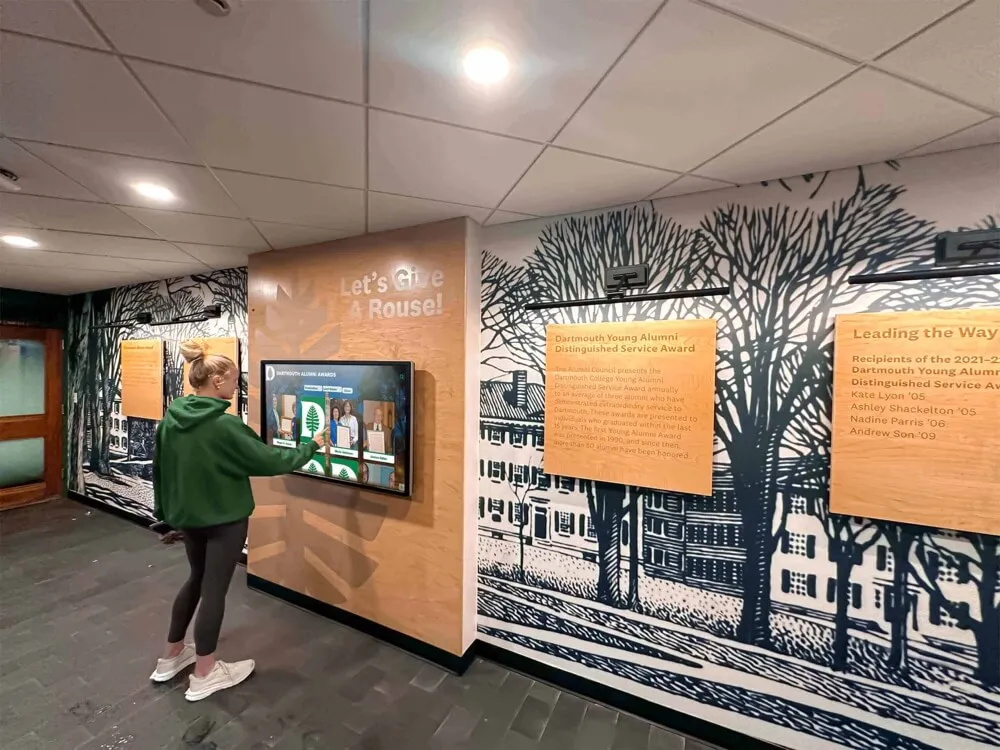
Digital yearbook archives become engaging when displayed on interactive touchscreens where visitors can search for specific individuals and explore different eras
Understand Copyright and Privacy Considerations
Yearbook digitization raises important legal questions requiring careful attention.
Copyright Status Assessment
In the United States, copyright protection varies based on publication date:
- Pre-1928 publications: Generally considered public domain and freely digitizable
- 1928-1963 publications: Copyright protection depends on whether proper notice appeared and whether copyright was renewed; many yearbooks from this era entered public domain due to failure to renew
- 1964-1977 publications: Protected for 95 years from publication if proper notice appeared
- Post-1977 publications: Protected for 95 years from publication regardless of notice
Schools generally own copyright for yearbooks they published, giving them authority to digitize their collections. However, individual photographs, contributed artwork, or licensed content may have separate copyright considerations requiring review.
Privacy and FERPA Compliance
The Family Educational Rights and Privacy Act (FERPA) protects student education records. While yearbooks generally qualify as directory information that schools may disclose without consent, providing opt-out mechanisms demonstrates respect for privacy preferences:
- Implement takedown request processes allowing individuals to have their images or information removed
- Consider restricting access to authenticated alumni rather than fully public access
- Add clear privacy policy statements explaining collection scope and usage
- Document any privacy complaints and responses
Schools implementing online yearbook archives should consult legal counsel about copyright and privacy frameworks appropriate for their specific circumstances and state regulations.
Determine Budget and Resources
Realistic budgeting prevents project abandonment midstream.
Digitization Cost Factors
- Professional scanning services: $10-30 per yearbook depending on specifications and volume
- In-house scanning: Equipment costs ($500-5,000) plus substantial staff time
- OCR processing: Often included with scanning services or available through software ($100-500)
- Storage: Cloud hosting ($50-200/month) or local server infrastructure
- Display platforms: Web hosting ($20-100/month) or interactive touchscreen systems ($8,000-15,000)
Resource Requirements
- Staff time: 30-80 hours for project management, quality control, and content organization
- Technical expertise: Basic to moderate depending on chosen approach
- Physical workspace: Secure area for handling yearbooks during digitization
- Equipment: If scanning in-house, appropriate scanner and computer setup
Most schools find that outsourcing scanning to specialized providers delivers superior quality and faster completion compared to in-house efforts, though costs run higher per volume.
Build Your Project Team
Successful digitization requires diverse expertise:
Essential Team Roles
- Project manager: Coordinates timeline, budget, and stakeholders
- Archivist/Librarian: Provides preservation expertise and collection knowledge
- IT representative: Addresses technical infrastructure and security
- Alumni relations staff: Ensures output meets engagement objectives
- Marketing/Communications: Plans promotion and community awareness
- Legal counsel: Reviews copyright and privacy considerations
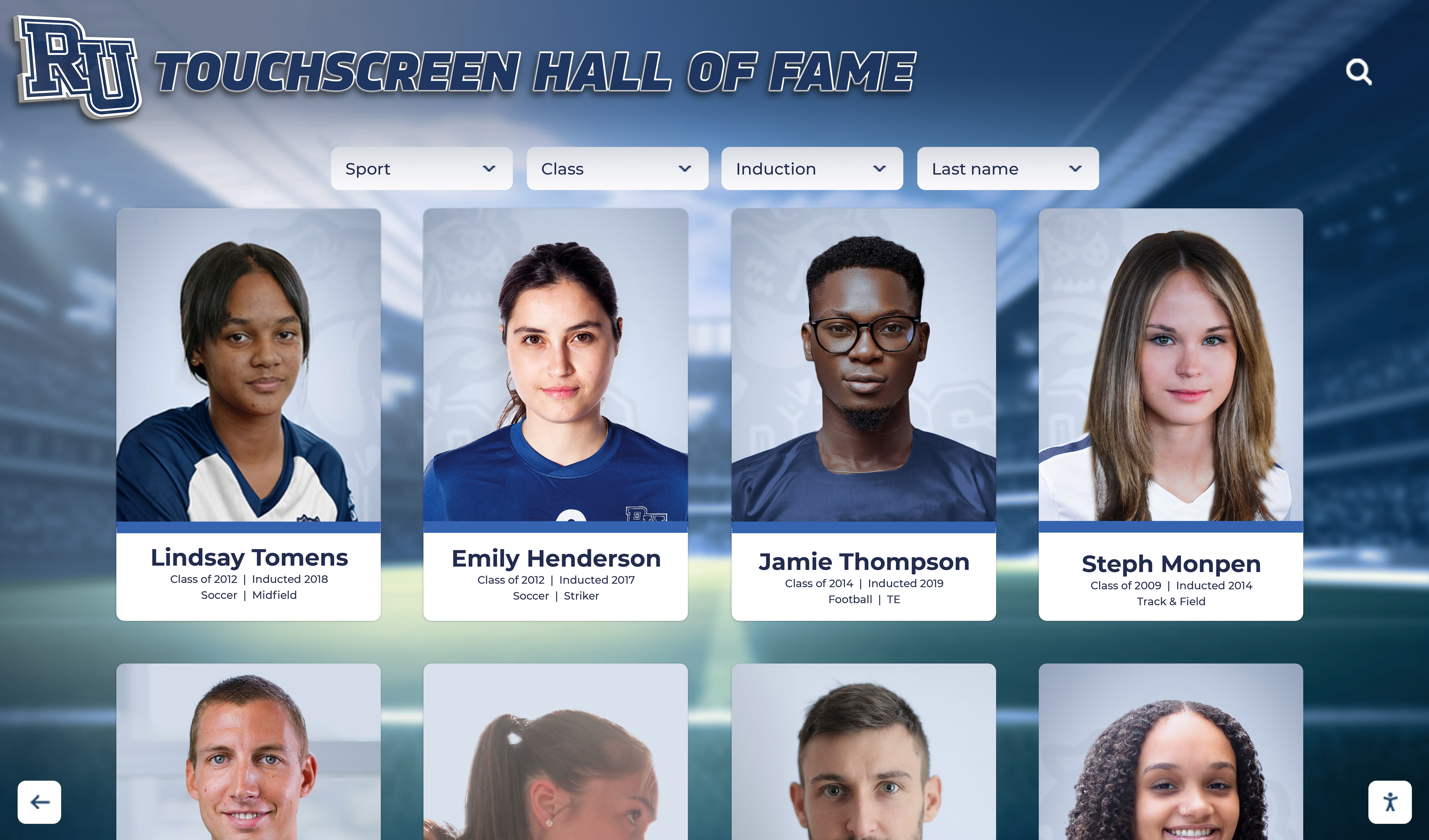
Modern platforms make yearbook content easily browsable through intuitive card-based interfaces that invite exploration
Regular team meetings throughout the project ensure alignment and address emerging challenges before they derail progress.
Phase 2: Digitization Technical Specifications
Technical decisions made during planning significantly impact long-term usability and quality.
Scanning Resolution Standards
Resolution determines how much detail digital copies capture from original pages:
Resolution Guidelines by Purpose
- Archival masters: 400-600 DPI captures fine text detail and photographic quality for long-term preservation, creating files suitable for any future use
- Access copies: 300 DPI provides excellent quality for screen viewing and printing while keeping file sizes manageable for web delivery
- OCR processing: 300 DPI represents the sweet spot for optimal text recognition—higher resolutions don’t significantly improve OCR accuracy while dramatically increasing processing time
Schools often create high-resolution archival masters that can be downsampled for web delivery, ensuring flexibility for future uses without requiring rescanning.
Color Depth and Bit Settings
Color depth determines how many colors or grayscale tones digital images can represent:
Color Yearbooks
- Use 24-bit color (8 bits per channel) striking an optimal balance between file size and color accuracy
- This standard captures 16.7 million colors—far exceeding what print yearbooks contain
- Suitable for both archival preservation and web delivery
Black-and-White Yearbooks
- Use 16-bit grayscale (not simple black-and-white) to capture tonal details and subtle shading that 1-bit scanning loses
- Preserves photographic quality and ensures good OCR results
- 16-bit provides 65,536 shades of gray—capturing nuances invisible to the eye but important for image quality
Mixed Content Yearbooks combining black-and-white and color pages should typically use color settings throughout for consistency, though this creates larger files than necessary for monochrome sections.
File Format Selection Strategy
Different formats serve different purposes in digitization workflows:
Archival Master Files
- TIFF (Tagged Image File Format): Uncompressed or lossless compression preserving maximum quality
- Suitable for long-term preservation and serving as source for all derivative copies
- Large file sizes (20-50 MB per page) requiring substantial storage
Access and Delivery Files
- PDF/A: Archival PDF format designed for long-term document preservation
- Supports embedded OCR text layers making content searchable
- Balances quality and file size (1-3 MB per page)
- Widely compatible across devices and software
Web Optimization
- Optimized PDF: Compressed PDF with lower resolution images for quick loading
- JPEG: Individual page images for web viewers or content management systems
- Targets 200-500 KB per page for responsive web performance
Many digitization workflows create TIFF masters, then generate PDF/A access copies with embedded OCR, and finally produce web-optimized versions for online delivery—ensuring appropriate formats for each use case.

Interactive displays in school lobbies enable alumni to explore digitized yearbooks during visits, reunions, and special events
Metadata Standards and Organization
Rich metadata transforms image collections into organized, discoverable archives:
Essential Metadata Fields
- Year of publication
- Volume/edition number
- School name and location
- Page numbers
- Section descriptions (seniors, athletics, clubs, etc.)
- Special features or inserts
- Scanning date and operator
- File format and technical specifications
Enhanced Metadata for Searchability
- Individual names extracted through OCR
- Class year associations
- Activity and organization participation
- Geographic information
- Subject tags and keywords
- Related yearbooks in series
Schools implementing comprehensive metadata strategies dramatically improve discoverability—enabling alumni to find specific individuals, teams, or activities across multiple yearbooks instantly.
Phase 3: The Digitization Process
With planning complete and specifications determined, actual digitization work begins.
Scanning Method Options
Option 1: Professional Scanning Services
Outsourcing to specialized providers offers significant advantages:
Benefits
- Professional-grade equipment producing superior quality
- Expertise handling fragile or unusual bindings
- Fast turnaround for large collections (weeks versus months for in-house)
- OCR processing typically included
- No equipment purchase required
- Insurance coverage protecting valuable originals
Considerations
- Higher per-volume costs ($10-30 each)
- Requires shipping yearbooks off-site (though some providers offer on-site services)
- Less direct control over process
- Potential delays if provider is backlogged
Reputable yearbook scanning services include Advantage Archives, Anderson Archival, and specialized providers focusing specifically on educational institutions.
Option 2: In-House Scanning
Schools with appropriate resources may digitize internally:
Benefits
- Lower per-volume costs after equipment purchase
- Complete control over scheduling and priorities
- Yearbooks never leave campus
- Opportunity to train student workers providing educational value
- Flexibility to pause and resume work as schedules allow
Considerations
- Significant time investment (2-4 hours per yearbook)
- Requires equipment purchase and workspace
- Learning curve for quality scanning
- Staff availability challenges
- Potential for inconsistent quality without proper training
Scanner Types for Yearbooks
- Flatbed scanners: Suitable for newer yearbooks with flexible bindings (avoid for valuable historical volumes as pressure damages spines)
- Book scanners with V-cradle: Specialized equipment holding books at optimal angles without spine pressure—ideal for fragile volumes
- Planetary scanners: Camera-based systems capturing pages from above without any book handling—preserves most delicate materials
Schools prioritizing preservation of fragile historical yearbooks should avoid flatbed scanning methods that stress bindings and accelerate deterioration.

Touch-optimized interfaces enable intuitive yearbook exploration with profiles and photos easily accessible
Scanning Workflow Best Practices
Preparation
- Clean workspace free from food, drinks, or contaminants
- Gentle dusting of yearbook covers and page edges
- Note any existing damage or missing pages before scanning
- Photograph yearbook cover and spine for documentation
During Scanning
- Handle books gently, never forcing bindings open beyond natural flex
- Scan left pages before right to reduce handling
- Check image quality every 5-10 pages rather than after complete books
- Document any pages requiring rescanning or special attention
- Use page markers to track progress in thick volumes
Quality Monitoring
- Verify focus sharpness on each spread
- Check for shadows or distortion near spine
- Ensure proper alignment and cropping
- Monitor exposure maintaining detail in both highlights and shadows
- Confirm no pages are missing or out of sequence
Many digitization failures occur from inadequate quality checking during scanning—discovering unusable images only after yearbooks have been returned to storage or returned to service providers.
OCR Processing for Searchability
Optical Character Recognition (OCR) converts scanned page images into searchable text—transforming yearbooks from visual-only documents into searchable databases.
OCR Software Options
Professional-Grade Solutions
- ABBYY FineReader: Industry-leading OCR supporting 198 languages with excellent accuracy for varied fonts and poor-quality originals ($200-600)
- Handles complex layouts, tables, and mixed content well
- Batch processing capabilities for large collections
- Produces searchable PDF/A with embedded text layers
Consumer Solutions
- Adobe Acrobat Pro OCR: Built into Acrobat Pro subscription, adequate for small projects ($15-20/month)
- Less accurate than ABBYY for challenging documents
- Limited batch processing capabilities
- Convenient if already using Adobe products
Free Options
- Tesseract: Open-source OCR engine with good accuracy for clean text
- Requires technical expertise to implement effectively
- Command-line interface less user-friendly than commercial alternatives
- Suitable for schools with developer resources
OCR Quality Factors
OCR accuracy depends on multiple variables:
- Original print quality and typeface consistency
- Scanning resolution (300 DPI optimal)
- Image preprocessing (contrast, brightness, deskewing)
- Layout complexity (columns, irregular text placement)
- Page condition (yellowing, stains, faded ink)
Realistic expectations: 95-98% accuracy for clean, well-printed yearbooks; 85-90% for historical volumes with poor print quality or unusual fonts.
Post-OCR Enhancement
While perfect accuracy remains challenging, several techniques improve results:
- Manual correction of obvious errors, particularly proper names
- Creation of custom dictionaries with school-specific terminology
- Multiple OCR passes using different engines, combining results
- Crowd-sourced corrections through community participation
Schools implementing searchable digital archives find that even imperfect OCR dramatically improves usability compared to non-searchable image-only yearbooks.
Phase 4: Organization and Quality Control
Scanning creates raw digital files—organization and QC transform them into useful archives.
File Naming and Folder Structure
Systematic organization prevents chaos as collections grow:
Recommended Structure
YearbookArchives/
├── 1950s/
│   ├── 1950_OriginalMasters_TIFF/
│   ├── 1950_AccessCopy_PDF/
│   ├── 1951_OriginalMasters_TIFF/
│   └── 1951_AccessCopy_PDF/
├── 1960s/
└── 1970s/
File Naming Convention
SCHOOLNAME_YEAR_SECTION_PAGERANGE.format
Example: LincolnHS_1965_Seniors_pp010-011.tif
Consistent naming enables sorting, searching, and automation while preventing confusion about file contents.
Quality Control Procedures
Implement systematic QC catching errors before archives go live:
Visual Inspection
- Review 10-15% of pages from each yearbook
- Check focus, alignment, and exposure
- Verify no pages are missing or duplicated
- Confirm correct page sequence
- Assess whether images meet technical specifications
OCR Accuracy Testing
- Sample 5-10 pages per yearbook
- Count errors per 100 words
- Calculate accuracy percentage
- Identify systematic problems suggesting batch reprocessing
- Document error types for process improvement
Metadata Verification
- Confirm all yearbooks have complete metadata records
- Check for typos in years, titles, or descriptions
- Verify internal links and page references
- Test search functionality with known names
- Cross-reference with physical yearbook inventory
Quality problems discovered after completion often prove expensive or impossible to fix—thorough QC during production prevents these issues.
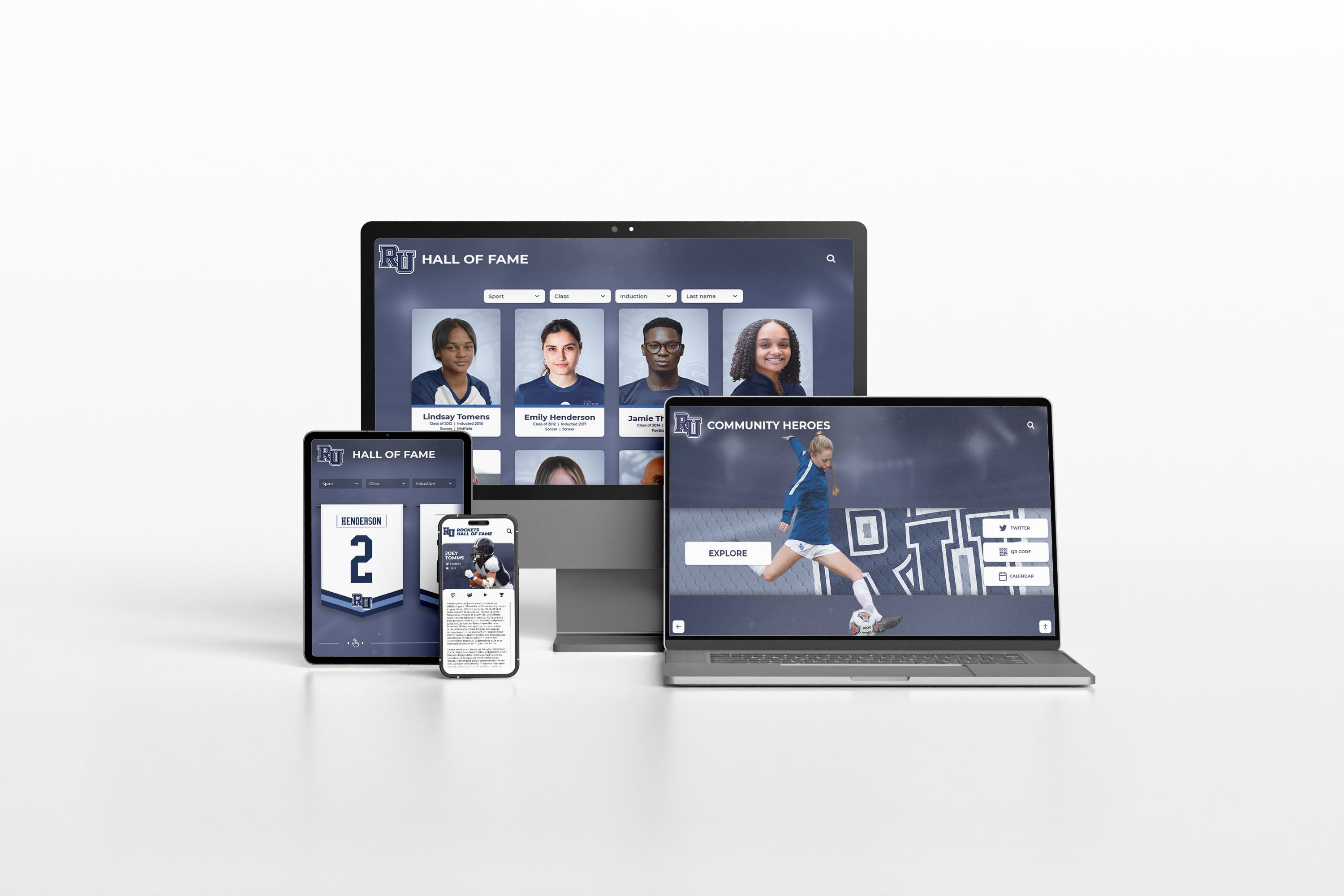
Modern yearbook platforms deliver seamless experiences across desktop, tablet, and mobile devices enabling access anytime, anywhere
Phase 5: Storage, Backup, and Access
Digital files require proper storage infrastructure and backup strategies protecting against data loss.
Storage Infrastructure Options
Cloud-Based Storage
Modern cloud platforms offer compelling advantages:
Benefits
- No local server hardware required
- Automatic redundant backup across multiple data centers
- Accessible from anywhere with internet connection
- Scalable storage growing as collections expand
- Professional-grade security and disaster recovery
- Typically includes automatic software updates
Popular Platforms
- Amazon S3: Industry-standard object storage, highly reliable ($23/TB/month)
- Microsoft Azure Blob Storage: Similar to S3 with Microsoft ecosystem integration
- Google Cloud Storage: Competitive pricing with excellent performance
- Dedicated yearbook platforms: Purpose-built solutions like Rocket Alumni Solutions providing storage integrated with display and search capabilities
Local Server Storage
Some schools prefer maintaining local control:
Benefits
- One-time hardware costs rather than ongoing subscriptions
- Complete data control without third-party access
- No dependency on internet connectivity for access
- Potential cost savings for very large collections
Considerations
- Requires IT expertise for server management
- Hardware failure risk without proper backup
- Security updates and patch management responsibility
- Physical space and environmental control requirements
- Limited off-site access capabilities
Most educational institutions find cloud storage offers superior reliability and lower total cost compared to locally managed infrastructure.
Backup Strategy Requirements
Digital archives need protection against multiple failure scenarios:
3-2-1 Backup Rule
- 3 copies of your data (production plus two backups)
- 2 different media types (cloud storage plus external drives, for example)
- 1 copy off-site protecting against local disasters
Backup Frequency
- During active digitization: daily incremental backups
- Completed collections: weekly verification backups
- Critical changes: immediate backup after updates
Backup Testing
- Quarterly restoration tests verifying backups actually work
- Documentation of restoration procedures
- Designated staff trained on recovery processes
Many digitization disasters occur not from initial data loss but from discovering that backups were incomplete or corrupted when restoration became necessary.
Access Platform Selection
How alumni interact with digitized yearbooks significantly impacts engagement and value.
Web-Based Yearbook Viewers
Purpose-built platforms provide intuitive yearbook exploration:
Features to Evaluate
- Responsive design working well on phones, tablets, and computers
- Page-flip interface mimicking physical yearbook experience
- Search functionality finding names across entire collections
- Zoom capabilities for reading small text or examining details
- Social sharing enabling alumni to share discoveries
- Download options allowing personal copies
- Authentication systems if restricting access
Solutions like Rocket Alumni Solutions offer comprehensive yearbook hosting with built-in search, interactive displays, and mobile access—providing turnkey platforms requiring no technical expertise to manage.
Generic Document Hosting
Basic approaches using general platforms:
- Hosting PDFs on school website downloads
- Using Google Drive or Dropbox for file sharing
- Embedding PDF viewers in web pages
These approaches cost less but provide inferior user experiences compared to specialized yearbook platforms—typically lacking search functionality, mobile optimization, and engaging interfaces.
Interactive Touchscreen Displays
Physical installations bring yearbooks to high-traffic campus locations:
Schools implementing interactive touchscreen systems in lobbies, libraries, or athletic facilities report significantly higher engagement than web-only access—the physical presence invites exploration during campus visits, tours, and special events.
Combined approaches offering both web access and physical touchscreens maximize reach—enabling worldwide exploration while providing prominent campus recognition.
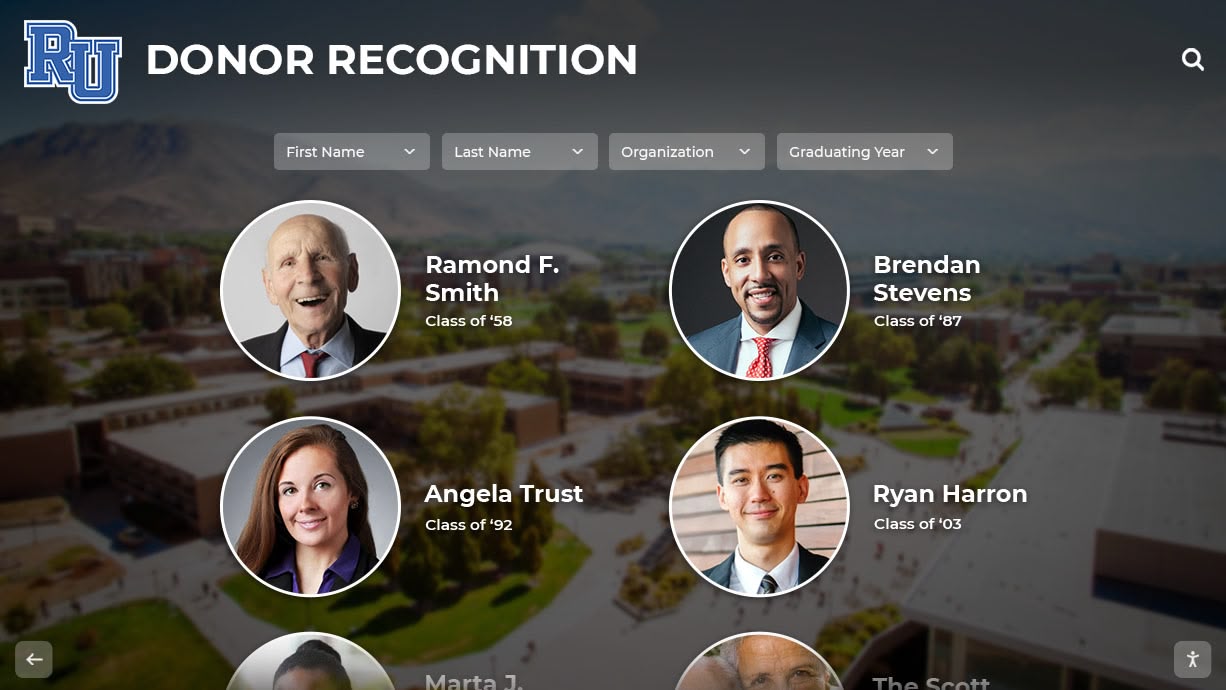
Yearbook digitization projects often connect with broader [recognition programs](https://touchwall.tv/blog/alumni-of-the-month-recognition-programs-guide/) showcasing alumni achievements alongside historical archives
Phase 6: Promotion and Community Engagement
The best digital yearbook archives fail without effective promotion driving awareness and usage.
Launch Communication Strategy
Pre-Launch Awareness Building
- Announce upcoming yearbook availability through alumni newsletters
- Share sample pages on social media creating anticipation
- Send targeted emails to reunion year classes
- Post updates about digitization progress building excitement
- Create countdown campaigns before official launch
Launch Event Coordination
- Schedule launch during high-visibility occasions (Homecoming, reunion weekends, alumni events)
- Host in-person demonstrations showing how to search and explore
- Livestream launch events for distant alumni
- Prepare press releases for local media
- Create video tutorials explaining platform features
Post-Launch Promotion
- Feature “flashback” content regularly on social media
- Highlight notable alumni discoveries and connections
- Encourage alumni to share memories and tag classmates
- Run contests incentivizing exploration (first to find specific pages, etc.)
- Collect and share alumni testimonials about rediscoveries
Building Community Contributions
Transform yearbook archives from static collections into living community resources:
Crowdsourced Enhancement
- Enable alumni to submit additional photographs from personal collections
- Create systems for adding names missing from original captions
- Accept corrections improving accuracy
- Allow alumni to share stories and memories about yearbook moments
- Encourage identification of unidentified individuals in group photos
Alumni Engagement Features
- Comment systems enabling conversations about yearbook memories
- Class reunion coordination through yearbook-based contact finding
- Memorial pages honoring deceased alumni
- “Where are they now?” updates from featured alumni
- Virtual reunion capabilities bringing scattered classmates together
Schools implementing comprehensive alumni engagement strategies through yearbook platforms report sustained interaction exceeding initial launch enthusiasm when community contribution features maintain ongoing relevance.
Measuring Success and ROI
Quantifying yearbook digitization impact demonstrates value and justifies investment.
Engagement Metrics
Usage Analytics
- Monthly unique visitors accessing yearbook archives
- Average session duration showing depth of engagement
- Search queries revealing what alumni seek
- Most-viewed yearbooks and pages identifying popular content
- Geographic distribution showing worldwide reach
- Device types informing mobile optimization priorities
Alumni Interaction Indicators
- Social media shares and mentions
- Comments and contributions submitted
- Contact information updates following yearbook discoveries
- Reunion attendance increases correlated with yearbook access
- Alumni survey responses about yearbook value
Institutional Benefits
Advancement Impact
- Alumni giving participation rates post-launch versus pre-launch
- Donor cultivation conversations sparked by yearbook connections
- Major gift prospects identified through engaged alumni
- Planned giving inquiries mentioning yearbook nostalgia
- Event attendance increases attributed to yearbook awareness
Admissions and Recruitment Value
- Prospective family tour feedback mentioning historical displays
- Admission yield rates for families engaging with yearbook content
- Social media reach extending brand visibility
- Media coverage generating positive institutional attention
- Differentiation from peer institutions in competitive markets
Preservation Achievement
- Institutional memory now protected against physical loss
- Research capabilities enhanced through searchable archives
- Accreditation requirements met for historical documentation
- Community connections strengthened through accessible heritage
- Future flexibility ensured through multiple format preservation
Ready to Digitize Your Yearbook Collection?
Discover how modern yearbook digitization can help you preserve institutional heritage, engage alumni worldwide, and create interactive recognition displays that celebrate your school's history. Schedule your custom Digital Yearbook mock-up today.
Schedule a Digital Yearbook Mock-UpCommon Digitization Challenges and Solutions
Understanding typical obstacles helps schools avoid preventable problems.
Challenge: Fragile or Damaged Yearbooks
Problem: Historical yearbooks with brittle pages, damaged bindings, or missing sections complicate digitization.
Solutions
- Use non-contact planetary scanners eliminating physical stress
- Employ conservation specialists for extremely fragile volumes before scanning
- Accept that some damage may be irreversible; document condition photographically
- Consider photographing damaged pages rather than attempting flat scanning
- Separate loose pages, scanning individually before reassembly
Challenge: Inconsistent Quality Across Years
Problem: Decades of yearbooks printed with varying quality result in inconsistent digitization results.
Solutions
- Adjust scanning parameters year-by-year rather than using universal settings
- Accept that faded or low-contrast originals will produce imperfect digital copies
- Use image enhancement carefully—aggressive adjustments introduce artifacts
- Document known quality limitations transparently
- Prioritize legibility over attempting to match modern quality expectations
Challenge: Overwhelming Time Requirements
Problem: Schools underestimate time demands, leading to abandoned projects.
Solutions
- Start with pilot projects (5-10 yearbooks) testing workflows
- Outsource scanning to professional services if timelines matter
- Recruit volunteers from alumni community willing to assist
- Build digitization into job descriptions with protected time
- Accept multi-year timelines for comprehensive collections
- Celebrate progress milestones maintaining momentum
Challenge: Copyright Uncertainty
Problem: Schools struggle to determine whether they can legally digitize specific yearbooks.
Solutions
- Consult with legal counsel specializing in copyright and educational law
- Research copyright renewal records for pre-1964 publications
- Implement authentication restricting access to verified alumni
- Create clear takedown policies respecting individual rights
- Document good-faith efforts to identify and respect rights holders
- Consider fair use arguments for educational and archival purposes
Schools facing complex copyright situations may find that historical preservation projects offer frameworks for navigating these challenges while respecting legal obligations.
Advanced Applications: Beyond Basic Digitization
Schools completing basic yearbook digitization often discover opportunities for enhanced value.
Integration with Digital Recognition Systems
Yearbook archives combine powerfully with ongoing recognition displays:
Unified Historical and Current Recognition
- Link yearbook appearances to current hall of fame recognition
- Show progression from student to distinguished alumni
- Create “then and now” features highlighting decades of change
- Connect athletic records to yearbook team photos
- Integrate graduation photos with lifetime achievement recognition
Schools implementing comprehensive digital recognition ecosystems report that combining historical yearbooks with current achievements creates compelling narratives impossible with either element alone.
AI-Powered Enhancement and Discovery
Emerging artificial intelligence technologies offer exciting possibilities:
Facial Recognition Applications
- Automatically identify individuals appearing across multiple yearbooks
- Create personal “digital scrapbooks” compiling all appearances
- Connect alumni with classmates even when names aren’t listed
- Discover unexpected connections and relationships
Automated Metadata Generation
- AI systems identifying activities, sports, and organizations from photos
- Automatic captioning suggesting descriptions for images
- Subject classification organizing content by theme
- Relationship mapping connecting related yearbook elements
Image Enhancement
- AI-powered restoration improving faded or damaged photographs
- Colorization of black-and-white historical images
- Resolution enhancement for better viewing experience
- Noise reduction improving OCR accuracy
While these technologies continue evolving, early implementations demonstrate significant potential for transforming how alumni interact with yearbook archives.
Creating Custom Historical Timelines
Yearbook content provides raw material for compelling institutional timelines:
Schools building interactive historical timeline displays pull yearbook images, quotes, and milestones into chronological presentations showing institutional evolution—creating engaging lobby installations that prospective families and returning alumni explore enthusiastically.
Conclusion: Preserving Your School’s Story for Future Generations
Digitizing yearbook collections represents far more than technical data conversion projects—it embodies institutional commitments to honoring the past while building bridges to the future. Each yearbook volume captures irreplaceable snapshots of student life, community connections, and shared experiences defining your school’s unique story. Without digitization, these precious records face inevitable deterioration and eventual loss.
The digitization roadmap outlined in this guide provides comprehensive frameworks addressing every phase from initial planning through successful launch and ongoing engagement. Whether you’re preserving a dozen historical yearbooks or digitizing a century of institutional memory, systematic approaches combining appropriate technical specifications, quality control, modern display platforms, and effective promotion ensure successful outcomes delivering lasting value.
Modern yearbook digitization technology has eliminated barriers that once made these projects seem impossibly complex or expensive. Professional scanning services digitize volumes affordably and quickly. Cloud storage protects archives reliably without requiring local server expertise. Purpose-built platforms like Rocket Alumni Solutions provide intuitive yearbook hosting with searchable databases, interactive touchscreen displays, and mobile-responsive web access—delivering comprehensive solutions previously requiring custom development.
The benefits extend throughout educational communities. Alumni reconnect with classmates and relive memories through searchable yearbook exploration. Development professionals leverage nostalgic connections for fundraising conversations. Admissions teams showcase institutional tradition during prospective family tours. Archivists protect irreplaceable materials while improving accessibility. Current students develop stronger connections to institutional heritage inspiring school pride.
Your yearbook collection contains thousands of stories worth preserving and sharing. Outstanding students who excelled academically, athletes who broke records, clubs that shaped campus culture, teachers who inspired generations, and everyday moments that defined school experience for decades of graduates—all deserve protection ensuring future generations can explore and appreciate your school’s remarkable legacy.
Start today. Even modest pilot projects digitizing a few important yearbooks demonstrate value while building expertise for larger efforts. Engage alumni early, building community support and potential volunteer assistance. Research grant opportunities supporting historical preservation. Evaluate both professional services and in-house options finding approaches matching your resources and timeline. Most importantly, begin before additional yearbooks deteriorate beyond recovery.
Ready to transform your yearbook collection from deteriorating physical volumes into accessible digital archives that engage alumni worldwide? Schedule your custom Digital Yearbook mock-up to explore how modern platforms can preserve your institutional heritage while creating interactive experiences that celebrate your school’s unique story for generations to come.
Your school’s history matters. The students, teachers, and community members who built your institution deserve recognition extending beyond fading yearbooks hidden in storage. With proper digitization and modern display technology, you can honor their contributions while inspiring current and future students to add their own chapters to your school’s continuing story.































