




Intent: Engage & Educate — This comprehensive guide explores cutting-edge digital tools transforming history education, from interactive touchscreen displays and virtual reality experiences to digital archives and augmented reality applications that make historical content accessible, engaging, and memorable for students and visitors.
History education faces a fundamental challenge: how do educators make distant events, unfamiliar cultures, and abstract historical concepts feel immediate and relevant to students who live in a digital world? Traditional teaching methods—textbook readings, lectures, and static images—struggle to compete with the interactive, multimedia experiences students encounter daily outside the classroom.
The gap between historical content and student engagement has profound consequences. Research consistently demonstrates that students disengage when they cannot connect personally with historical material. Memorizing dates and names without context produces superficial learning that students forget shortly after assessments. Historical illiteracy increases as fewer students develop genuine interest in understanding how the past shapes the present.
Digital tools offer transformative solutions to these challenges. Modern technology enables educators, museums, and cultural institutions to create immersive historical experiences that capture attention, enhance understanding, and foster lasting connections with the past. From virtual reality field trips that transport students to ancient civilizations to interactive touchscreen displays that bring archived photographs and documents to life, digital tools bridge the gap between historical content and contemporary learners.
This guide examines the most effective digital tools for bringing history to life, exploring practical applications in classrooms, museums, and cultural institutions. Whether you’re an educator seeking to enhance history instruction, a museum professional designing engaging exhibits, or a school administrator evaluating technology investments, you’ll discover proven strategies for leveraging digital tools that transform how learners experience and understand history.
Why Digital Tools Transform History Education
Before exploring specific digital tools, it’s essential to understand why technology-enhanced history education produces superior outcomes compared to traditional approaches.
The Engagement Challenge in Traditional History Teaching
Traditional history instruction faces inherent limitations that digital tools effectively address:
Passive Learning Experiences Conventional history teaching typically positions students as passive recipients of information:
- Lectures delivering facts students are expected to memorize
- Textbook readings presenting one-dimensional narratives
- Worksheets requiring rote recall without deeper analysis
- Assessment focusing on memorization rather than understanding
- Limited opportunities for exploration and discovery
- Minimal connection to students’ lived experiences
Research on learning retention consistently demonstrates that passive learning produces poor outcomes. According to cognitive science studies, students retain only 5-10% of information received through passive lectures, compared to 75% when actively engaging with material through discussion and practice, and 90% when teaching concepts to others or applying learning in authentic contexts.
Difficulty Visualizing Historical Context Students struggle to understand historical periods they’ve never experienced:
- Ancient civilizations feeling impossibly distant and irrelevant
- Historical events lacking emotional resonance
- Cultural practices seeming strange without context
- Geographic settings remaining abstract without visualization
- Social structures appearing confusing without immersive experience
- Historical figures feeling like names rather than real people
Traditional methods offer limited solutions—photographs provide static glimpses, documentary films offer curated perspectives, and textbook descriptions remain abstract. None create the immersive understanding that digital tools enable.

Interactive digital displays transform how visitors engage with historical content, enabling self-directed exploration at their own pace
Limited Access to Primary Sources Authentic historical materials remain inaccessible in traditional settings:
- Original documents preserved in climate-controlled archives
- Artifacts displayed in distant museums
- Historical sites requiring expensive field trips
- Rare photographs available only to researchers
- Audio recordings existing in specialized collections
- Cultural artifacts protected from handling
This limited access forces students to rely on secondary interpretations rather than forming their own conclusions from primary evidence—a fundamental limitation that diminishes historical thinking skills.
How Digital Tools Address Traditional Limitations
Modern technology transforms each traditional limitation into opportunity:
Active, Exploratory Learning Digital tools position learners as active investigators rather than passive recipients:
- Interactive exhibits inviting self-directed exploration
- Virtual reality experiences creating first-person perspectives
- Digital archives enabling independent primary source research
- Gamified learning experiences rewarding discovery
- Collaborative platforms enabling peer learning
- Personalized pathways adapting to individual interests
According to educational research published in the Journal of Educational Technology, students using interactive digital history tools demonstrate 30-40% higher engagement levels compared to traditional instruction, measured through time-on-task, voluntary participation, and self-reported interest.
Immersive Visualization and Context Digital technology makes historical periods tangible and immediate:
- Virtual reality transporting students to historical sites
- Augmented reality overlaying historical context on present-day locations
- Interactive timelines showing relationships between events
- 3D reconstructions visualizing ancient architecture
- Digital storytelling creating emotional connections
- Multimedia presentations combining visual, audio, and textual information
These immersive experiences help students develop mental models of historical periods that traditional methods cannot achieve, enabling deeper understanding and longer retention.
Democratized Access to Primary Sources Digital archives and platforms provide unprecedented access to authentic historical materials:
- Digitized document collections searchable from classrooms
- High-resolution artifact photography revealing fine details
- Oral history archives preserving first-person accounts
- Interactive touchscreen displays showcasing institutional archives
- Virtual museum collections accessible worldwide
- Collaborative annotation tools enabling deep analysis
This democratization transforms history education from interpretation-dependent to evidence-based, developing critical thinking skills fundamental to historical literacy.
Research-Based Benefits of Digital History Tools
Extensive educational research validates the effectiveness of digital tools for history education:
Improved Learning Outcomes Studies consistently demonstrate superior achievement when digital tools supplement traditional instruction:
- 25-35% higher test scores on historical content assessments
- Significantly improved retention measured months after instruction
- Enhanced ability to analyze and synthesize historical information
- Stronger development of historical thinking skills
- Better understanding of cause-and-effect relationships
- Improved ability to evaluate source credibility
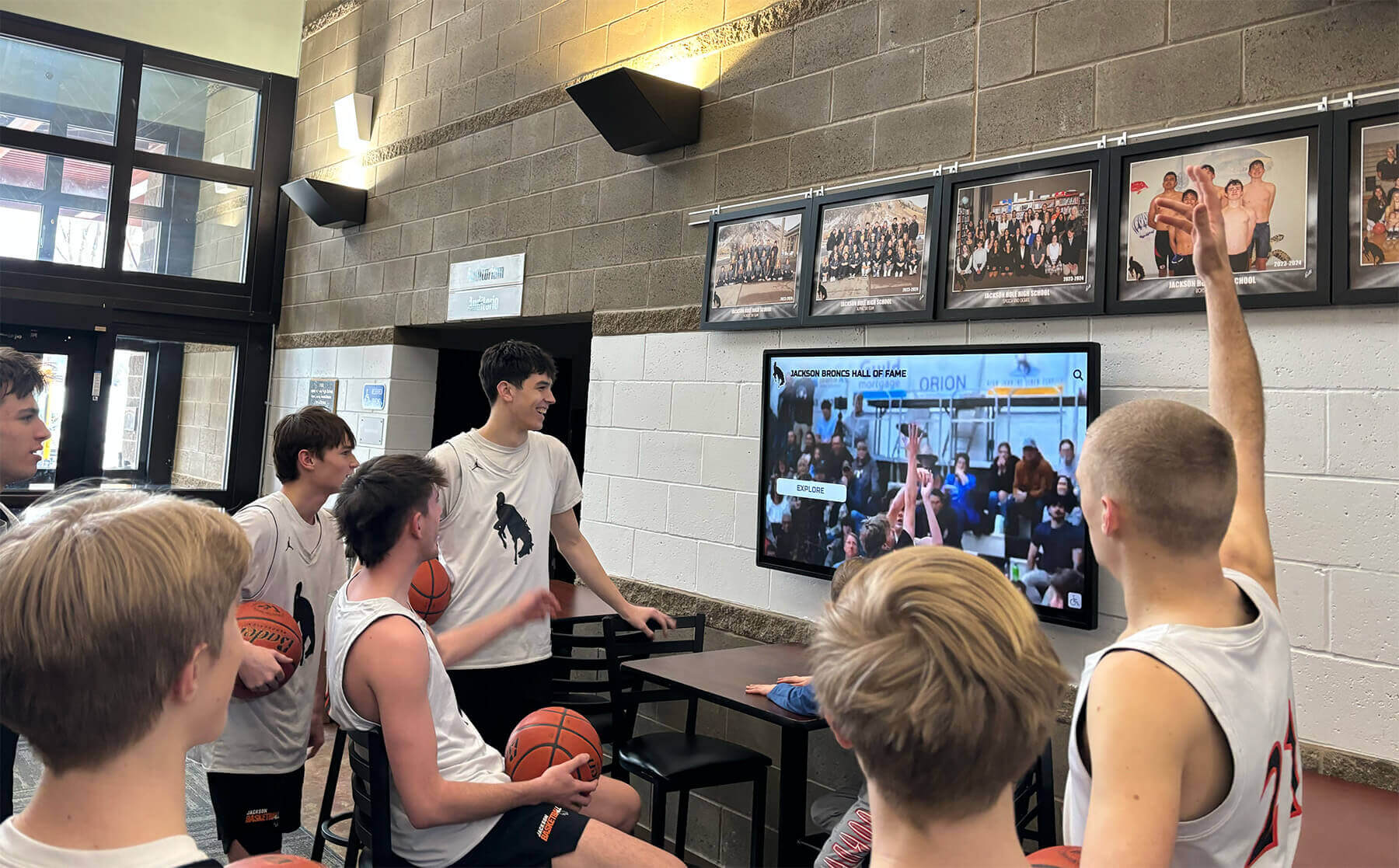
Digital displays capture student attention in ways traditional presentations cannot, encouraging deeper exploration of historical content
Increased Student Engagement Technology-enhanced history instruction produces measurably higher engagement:
- 40-50% more time voluntarily spent exploring historical content
- Reduced behavioral problems during history instruction
- Higher completion rates for history assignments
- Increased voluntary participation in history activities
- Stronger student-reported interest in historical topics
- Greater likelihood of pursuing history-related experiences
Development of Digital Literacy Skills Modern history tools simultaneously build content knowledge and technical competency:
- Research skills navigating digital archives and databases
- Media literacy evaluating digital sources
- Technical proficiency with diverse digital platforms
- Collaborative skills using online tools
- Information synthesis across multiple digital formats
- Ethical understanding of digital information use
These dual benefits make digital history tools valuable beyond subject-specific content, preparing students for digital citizenship and modern workplace requirements.
Virtual and Augmented Reality: Immersive Historical Experiences
Virtual reality (VR) and augmented reality (AR) represent the most transformative digital tools for history education, creating immersive experiences previously impossible.
Virtual Reality in History Education
VR technology transports students to historical sites, events, and time periods through computer-generated three-dimensional environments:
Virtual Field Trips to Historical Sites VR eliminates geographic and financial barriers to experiencing historical locations:
- Ancient Rome: Students walk through the Colosseum and Forum at their peak
- Ancient Egypt: Virtual tours inside pyramids and temples
- World War II sites: Immersive experiences at historical battlefields
- Colonial America: Exploration of recreated settlements and buildings
- Medieval Europe: Virtual visits to castles, cathedrals, and villages
- Historic museums: Virtual access to collections worldwide
According to research on VR in history classrooms, students who experienced VR historical field trips demonstrated 60% better spatial understanding of historical sites compared to students using traditional photographs and maps. Students also reported significantly stronger emotional connections to historical content after VR experiences.
Historical Event Reconstructions VR enables students to witness reconstructed historical events:
- Civil rights marches and protests providing perspective on social movements
- Historical speeches delivered in authentic settings
- Daily life reconstructions showing ordinary people in different eras
- Significant battles recreated with historical accuracy
- Industrial revolution factories demonstrating working conditions
- Ancient ceremonies and cultural practices brought to life
These reconstructed experiences create understanding impossible through text descriptions or still images, helping students develop empathy and comprehension for historical experiences far removed from their own lives.
Popular VR History Platforms
Several platforms provide accessible VR history experiences for schools:
Google Expeditions (now Google Arts & Culture VR)
- Free virtual field trips to hundreds of historical sites
- Teacher-led experiences with discussion prompts
- No expensive hardware required—works with Google Cardboard
- Pre-made tours aligned with curriculum standards
- Regular content updates adding new historical locations
HistoryView VR
- Specialized platform for history education
- Free virtual reality tours of national and international historic sites
- High-quality 360-degree photography and video
- Educational content accompanying each site
- Compatible with affordable VR headsets
TimeLooper
- Historical recreations of specific locations
- Shows same locations across different time periods
- Available for major cities and historical sites
- Particularly effective for local history instruction
- Brings archival photographs to three-dimensional life
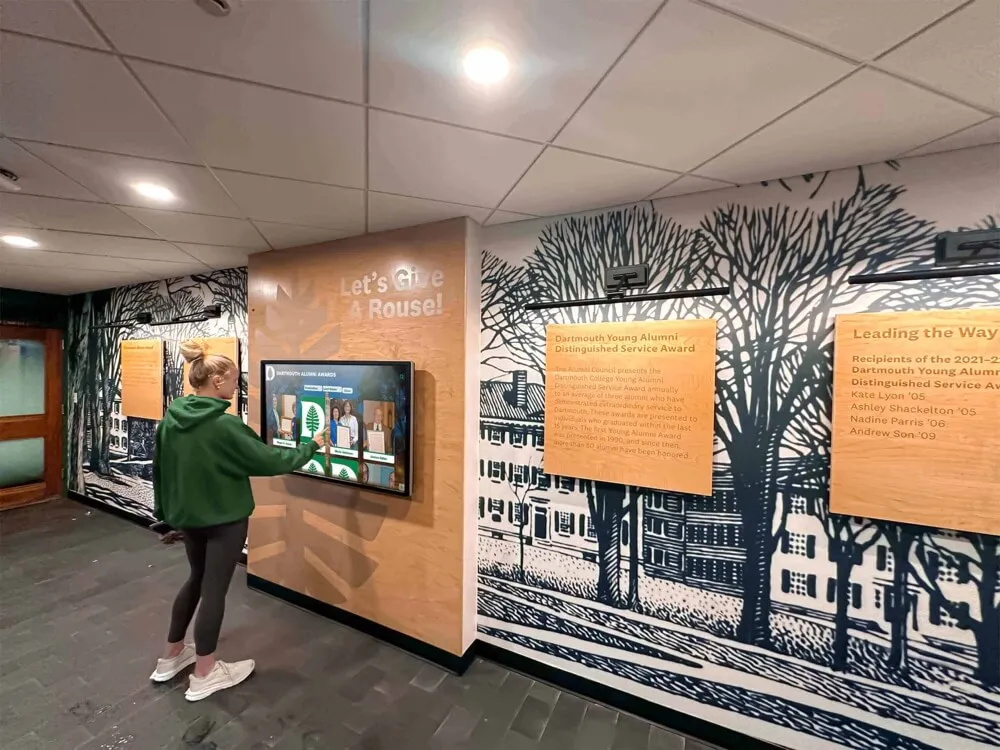
Interactive campus displays enable visitors to explore institutional history through intuitive touchscreen interfaces
Augmented Reality Applications
AR overlays digital information onto real-world environments, creating blended experiences particularly effective for history education:
Location-Based Historical AR AR applications transform present-day locations by revealing their historical layers:
- Point smartphones at buildings to see historical photographs
- Explore battlefields with AR markers showing troop positions
- Visit historic sites with AR recreations of removed structures
- Navigate cities with AR guides showing historical context
- Examine landscapes with AR explanations of historical events
- Access location-specific primary sources through AR triggers
This location-based AR proves especially powerful for local history instruction, helping students recognize that history happened in their own communities.
Artifact and Document AR Enhancement AR adds depth to physical historical materials:
- Point devices at artifacts to see creation demonstrations
- Scan historical photographs for additional context and information
- Examine documents with AR translations and annotations
- View museum exhibits with AR-enhanced storytelling
- Explore digitized yearbooks with AR interactive elements
- Access oral histories through AR markers on photographs
Popular AR History Applications
Google Arts & Culture AR
- AR experiences bringing artworks and artifacts to life
- Historical figure AR allowing conversations with historical personalities
- Artifact examination in AR revealing construction and purpose
- Integration with Google’s extensive museum partnerships
- Free access for educators and students
Civilisations AR (BBC)
- AR app bringing museum artifacts into classrooms
- Life-size artifact recreations viewable from all angles
- Educational information accompanying each artifact
- British Museum and other major collection partnerships
- Curriculum-aligned educational resources
AR Makr
- Platform for educators to create custom AR history experiences
- Upload historical photographs and add AR enhancements
- Create AR scavenger hunts at historical sites
- Student-created AR projects demonstrating learning
- Simple interface requiring no coding expertise
Implementation Considerations for VR and AR
Schools and institutions implementing VR/AR history tools should consider:
Hardware Requirements and Costs
- Basic VR: Google Cardboard ($5-15 per student) plus smartphones
- Mid-range VR: Oculus Quest headsets ($300-400 each)
- High-end VR: HTC Vive or similar systems ($600-1,000+ per station)
- AR: Students’ smartphones or tablets (no additional cost if BYOD)
- Classroom AR: Shared tablets ($300-500 each)
Many schools begin with smartphone-based solutions before investing in dedicated VR hardware, finding that even basic VR/AR experiences produce significant engagement benefits.
Technical Support and Training Successful implementation requires adequate educator preparation:
- Teacher training on VR/AR equipment operation
- Curriculum integration guidance aligning technology with learning objectives
- Technical troubleshooting support for classroom challenges
- Student orientation on appropriate and effective VR/AR use
- Ongoing professional development as platforms evolve
Interactive Touchscreen Displays and Digital Exhibits
Interactive touchscreen displays represent highly effective digital tools for bringing history to life in physical spaces—museums, libraries, schools, and cultural institutions.
Touchscreen History Displays in Educational Settings
Interactive touchscreens transform how students and visitors engage with historical content:
Self-Directed Historical Exploration Touchscreen interfaces enable personalized learning experiences:
- Browse historical timelines at individual pace
- Search for specific people, events, or topics of interest
- Filter historical content by category or time period
- Zoom into high-resolution historical photographs and documents
- Access detailed information about specific historical elements
- Create personal pathways through historical content based on curiosity
According to museum visitor studies, interactive touchscreen exhibits generate 5-10 times longer engagement than static displays. Visitors spend an average of 8-12 minutes actively exploring touchscreen historical content compared to brief glances at traditional text panels.
Multimedia Historical Presentations Digital displays integrate diverse content types impossible with static presentations:
- Historical video footage and film archives
- Audio recordings of speeches and oral histories
- Animated maps showing movement and change over time
- Interactive infographics explaining complex historical processes
- Photo galleries with hundreds of historical images
- Document collections providing primary source access
This multimedia approach accommodates diverse learning styles while creating richer, more complete historical understanding than any single medium could achieve.

Professional touchscreen kiosks provide robust platforms for comprehensive historical archives in high-traffic institutional spaces
Common Applications in Schools and Museums
Historical Timeline Displays Interactive touchscreens excel at presenting institutional history chronologically:
- Browse decades of school or institutional history
- Filter timeline by category (academics, athletics, leadership, facilities)
- Explore detailed profiles of significant people and events
- View historical photographs organized by era
- Understand relationships between events through linked content
- Create comprehensive digital timelines of school heritage
Schools implementing digital timeline displays report the ability to showcase 10-20 times more historical content than traditional wall-mounted displays could accommodate in the same physical footprint.
Digital Yearbook Archives Digitized yearbook collections become significantly more valuable when delivered through interactive touchscreens:
- Search for individuals across multiple yearbook years
- Browse yearbooks page-by-page with intuitive flip interface
- Zoom into details in group photographs
- Filter by graduating class, activity, or organization
- Share discoveries through social media integration
- Connect yearbook appearances to current hall of fame recognition
Learn more about creating searchable digital yearbook archives that maximize accessibility and engagement.
Hall of Fame and Recognition Displays Interactive displays transform how institutions celebrate historical achievements:
- Athlete profiles with statistics, photographs, and accomplishments
- Distinguished alumni recognition with career information
- Faculty and staff service recognition across decades
- Academic achievement documentation
- Athletic championship history and team rosters
- Integration of historical context with individual achievements
Museum Exhibit Enhancement Museums worldwide implement touchscreen displays enhancing artifact presentations:
- Detailed artifact information beyond what labels can accommodate
- Conservation demonstrations showing restoration processes
- Historical context placing artifacts in broader narratives
- Comparative analysis showing similar artifacts
- Interactive maps showing artifact origins and journeys
- Multilingual content serving diverse audiences
Platform Features for Effective Historical Touchscreens
Successful historical touchscreen implementations require specialized capabilities:
Intuitive Navigation
- Touch-optimized interfaces designed for casual users
- Clear visual hierarchies guiding exploration
- Search functionality finding specific content quickly
- Breadcrumb navigation showing location within content
- Quick-return home buttons resetting displays
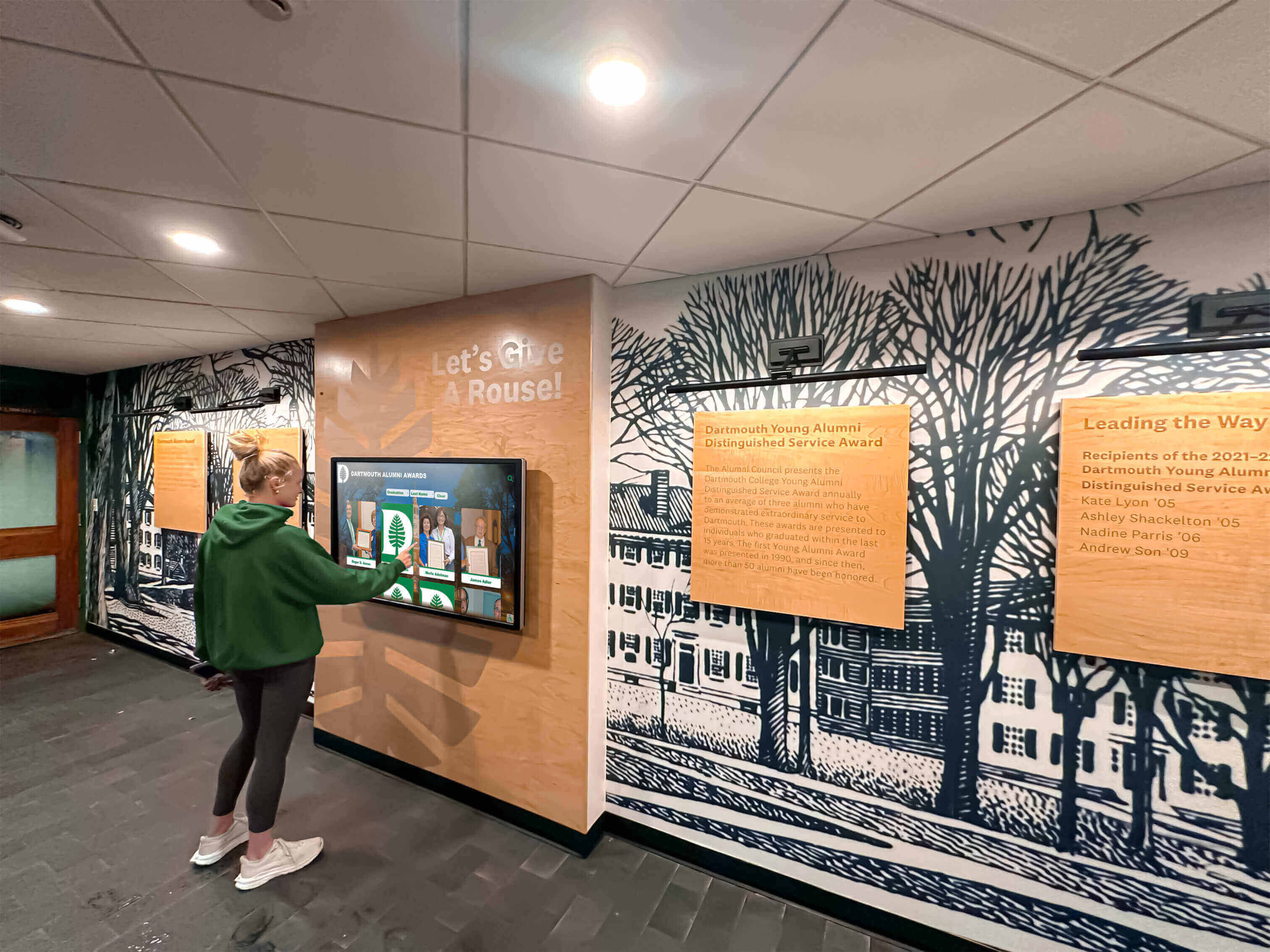
Strategically placed touchscreen displays in school hallways encourage spontaneous historical exploration during daily activities
Content Management Systems Effective platforms enable non-technical staff to maintain content:
- Web-based content management accessible from any device
- Intuitive interfaces requiring no coding or technical expertise
- Bulk upload capabilities for large historical collections
- Scheduled publishing for anniversary or milestone reveals
- Version control protecting against accidental content loss
- Media optimization ensuring fast, responsive display performance
Robust Hardware Physical displays must withstand continuous public use:
- Commercial-grade touchscreens rated for high-traffic environments
- Vandal-resistant housings protecting sensitive components
- Wide viewing angles maintaining visibility from multiple positions
- Anti-glare coatings ensuring readability in various lighting
- Reliable operation in temperature-variable environments
- Long product lifecycles minimizing replacement frequency
Solutions like Rocket Alumni Solutions provide comprehensive touchscreen platforms specifically designed for institutional historical recognition, combining intuitive content management with purpose-built display interfaces optimized for historical exploration.
Digital Archives and Online Collections
Digital archives democratize access to historical materials, transforming resources once available only to specialists into content accessible to students, researchers, and public audiences worldwide.
Major Digital History Archives
Numerous institutions provide free access to digitized historical collections:
National Archives and Records Administration (NARA) The U.S. National Archives offers extensive digital collections:
- Digitized historical documents including founding documents, treaties, and legislation
- Photograph collections documenting American history
- Military records including service records and unit histories
- Presidential papers and White House documents
- Audiovisual collections including historical films and recordings
- Educational resources with primary source analysis tools
Teachers integrating National Archives materials report students demonstrating stronger source analysis skills and deeper engagement with historical evidence compared to textbook-dependent instruction.
Library of Congress Digital Collections One of the world’s largest digital libraries:
- Over 50 million digitized items including manuscripts, photographs, maps, and recordings
- American Memory collections documenting U.S. history and culture
- World Digital Library featuring cultural materials from global institutions
- Chronicling America providing digitized historical newspapers from 1789-1963
- Veterans History Project preserving first-person military accounts
- Free educational resources with lesson plans and primary source sets
Europeana European digital library aggregating content from thousands of European institutions:
- Art, artifacts, books, videos, and sounds from European cultural heritage
- Collections spanning ancient history through modern times
- Multilingual access serving international audiences
- Thematic collections organized by historical period or topic
- Educational resources for teachers and students
- API access enabling integration into educational platforms
Google Arts & Culture Technology platform partnering with cultural institutions worldwide:
- Virtual tours of museums and historical sites
- High-resolution artwork and artifact images
- Curated collections organized by theme, movement, or historical period
- Interactive experiences including games and timelines
- AR and VR experiences bringing history to life
- Free access for educators and students
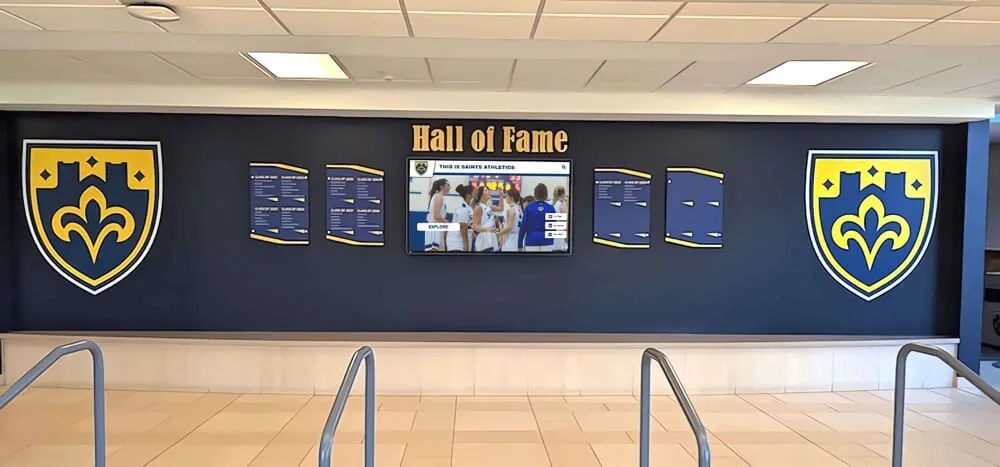
Effective historical recognition integrates traditional physical displays with digital screens for comprehensive, updatable content
Creating Institutional Digital Archives
Beyond accessing external archives, institutions benefit from creating their own digital historical collections:
Digitizing Historical Photograph Collections Systematic photograph digitization preserves and shares institutional history:
- High-resolution scanning of historical photographs
- Metadata creation enabling search and discovery
- Organization by date, topic, and individuals
- OCR processing for searchable text in image captions
- Copyright and privacy consideration documentation
- Backup and preservation strategies protecting digital assets
Many schools discover remarkable historical photographs in various storage locations—administrative offices, yearbook archives, athletic departments, and personal collections of long-tenured staff. Digitization protects these irreplaceable materials while making them accessible.
Document and Yearbook Digitization Historical documents become significantly more valuable when digitized:
- Scanning preserves fragile originals from handling damage
- OCR processing creates searchable text from printed documents
- Digital access eliminates geographic barriers
- Simultaneous multiple-user access impossible with physical materials
- Integration with interactive displays enhancing accessibility
- Long-term preservation protecting against physical deterioration
Learn comprehensive strategies for digitizing old yearbooks that transform static print volumes into searchable digital archives.
Oral History Projects First-person accounts provide irreplaceable historical perspectives:
- Video or audio recording of interviews with community members
- Documentation of personal experiences and perspectives
- Preservation of institutional memory before it’s lost
- Integration with digital displays and archives
- Transcription creating searchable text versions
- Contextual information connecting individual stories to broader history
Oral history projects create powerful educational resources while building community connections and documenting perspectives often missing from official records.
Digital Archive Platform Selection
Institutions creating digital historical archives should evaluate platform options:
Local Server vs. Cloud-Based Storage
- Local servers: One-time costs but require technical expertise and backup systems
- Cloud storage: Subscription costs but professional backup and accessibility
- Hybrid approaches: Local copies plus cloud backup for redundancy
Specialized Archival Platforms
- Omeka: Free, open-source digital archive platform designed for cultural institutions
- CONTENTdm: Comprehensive digital collection management system
- ResourceSpace: Digital asset management system with educational features
- Custom solutions: Purpose-built platforms for specific institutional needs
Access and Permissions
- Public access: Open to anyone with internet connection
- Authenticated access: Restricted to community members (alumni, students)
- Tiered access: Different permission levels based on user type
- Copyright compliance: Takedown procedures and privacy protections
Interactive Timeline and Mapping Tools
Specialized digital tools help students visualize historical change and relationships that linear narratives obscure.
Digital Timeline Platforms
Interactive timelines transform how students understand chronology and cause-and-effect relationships:
TimelineJS (Knight Lab) Free, open-source timeline creation tool:
- Simple spreadsheet interface requiring no coding
- Integration with Google Sheets for collaborative creation
- Media embedding including images, video, audio, and social media
- Customizable design matching institutional branding
- Responsive design working across devices
- Free hosting through Knight Lab or self-hosting options
Teachers report that students creating their own historical timelines demonstrate significantly stronger understanding of chronological relationships and cause-and-effect connections compared to traditional written assignments.
Tiki-Toki Premium timeline platform with advanced visualization:
- Beautiful, immersive timeline displays
- Multiple timeline views (3D, vertical, horizontal)
- Category filtering enabling focused exploration
- Collaborative creation with multiple contributors
- Import/export capabilities for data portability
- Education pricing making it accessible for schools
TimeMaps Historical atlas combining timelines with geographic visualization:
- Shows how civilizations, empires, and nations changed geographically over time
- Pre-built historical timelines covering major world history topics
- Interactive maps showing territorial changes
- Integration with curriculum standards
- Free educational resources with lesson plans
According to educational research, students using interactive timeline tools demonstrate 35-40% better understanding of historical cause-and-effect relationships compared to linear textbook narratives.
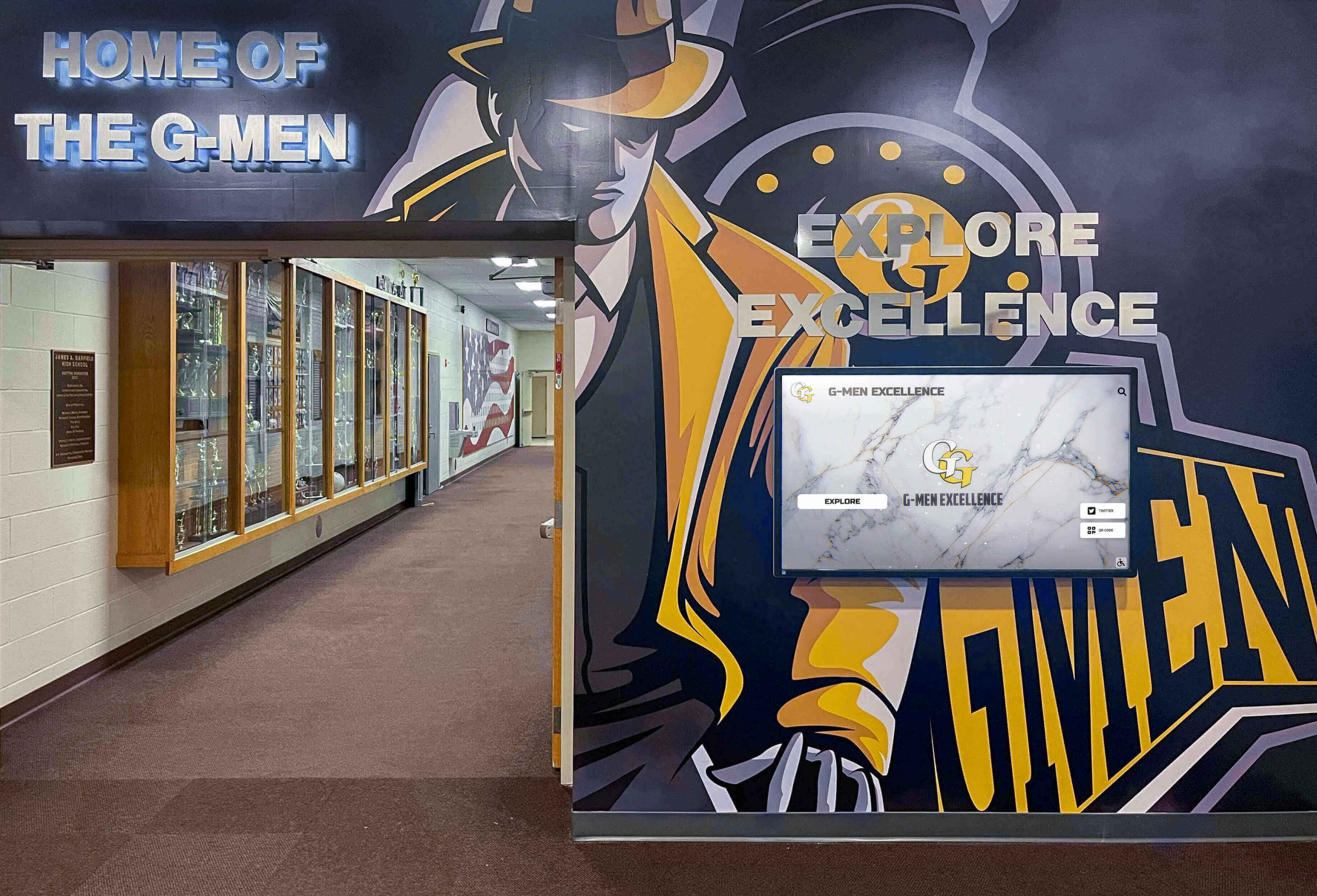
Comprehensive historical presentation combines traditional elements like murals and trophy cases with dynamic digital displays
Historical Mapping and GIS Tools
Geographic visualization helps students understand spatial dimensions of historical events:
StoryMapJS (Knight Lab) Free tool creating location-based historical narratives:
- Combine maps with text, images, and multimedia
- Show movement and journeys across geography
- Create location-based historical tours
- Simple interface requiring no GIS expertise
- Free hosting and responsive design
- Integration with modern map data
Google Earth Historical Imagery Powerful tool for examining geographic change:
- Historical satellite and aerial imagery showing landscape change
- Time-slider revealing development patterns
- Integration with historical photographs and information
- Virtual tours combining multiple locations
- Free access for educational use
ArcGIS Online (ESRI) Professional GIS platform with extensive educational resources:
- Historical map layers from libraries and archives worldwide
- Custom map creation showing historical data
- Spatial analysis tools revealing geographic patterns
- Story Maps combining narrative with geographic visualization
- Free educational licensing for schools
- Extensive learning resources and curriculum support
Gamification and Interactive Learning Platforms
Game-based learning leverages student motivation while building historical knowledge and skills.
Historical Simulation Games
Well-designed historical games create immersive learning experiences:
Mission US Free, story-driven games placing students in historical scenarios:
- “For Crown or Colony?” explores American Revolution tensions
- “Flight to Freedom” follows enslaved people seeking freedom via Underground Railroad
- “City of Immigrants” examines early 20th-century immigration
- “Prisoner in My Homeland” explores Japanese American internment
- Voice acting, animation, and decision-making creating emotional engagement
- Aligned with National History Standards
Research on Mission US implementation found that students using the games demonstrated 40% higher engagement with historical content and significantly improved understanding of historical perspective-taking compared to traditional instruction.
iCivics Free civics and history games founded by Justice Sandra Day O’Connor:
- Games teaching constitutional principles and democratic processes
- Historical simulation placing students in constitutional debates
- Primary source integration within game contexts
- Differentiated difficulty levels accommodating diverse learners
- Teacher dashboards tracking student progress
- Extensive supplementary resources supporting classroom integration
Assassin’s Creed Educational Modes Commercial game series offering educational exploration modes:
- Discovery Tour modes removing combat, enabling historical exploration
- Detailed historical recreations of ancient Egypt, Greece, and other periods
- Guided tours led by historians and archaeologists
- Primary source integration and historical context
- Beautiful graphics creating immersive experiences
- Educational pricing for schools
While commercial games require purchase, many schools find the immersive quality and student enthusiasm justify investment for history courses.
Historical Knowledge Games and Quizzes
Game-based review and assessment tools increase engagement:
Kahoot! and Quizizz Popular game-based learning platforms:
- Teacher-created historical quizzes with game-show format
- Competitive elements motivating participation and review
- Real-time feedback showing understanding
- Pre-made historical content libraries
- Student-paced practice modes
- Data showing individual and class performance
Teachers report significantly higher review session participation when using game-based platforms compared to traditional worksheet or lecture review.
History Blueprint (Legends of Learning) Standards-aligned history games:
- Content games teaching specific historical concepts
- Pre-assessment, instruction, and review game types
- Aligned with state standards and common curriculum
- Progress tracking showing mastery
- Extensive game library covering diverse topics
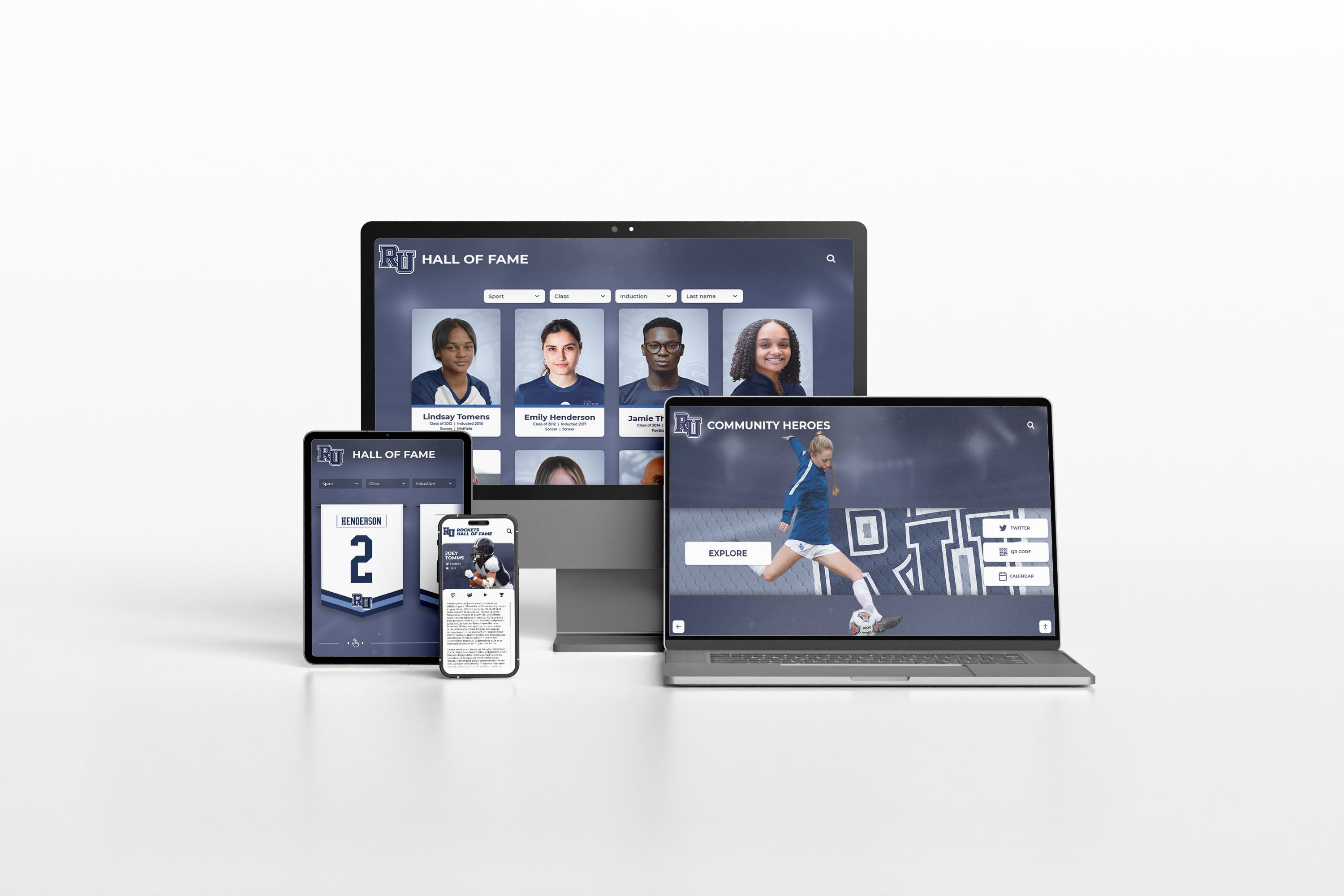
Modern digital history platforms deliver seamless experiences across all devices, enabling access anytime, anywhere
Collaborative Research and Creation Tools
Digital platforms enable students to become history creators rather than passive consumers.
Digital Storytelling Platforms
Students create multimedia historical narratives using accessible tools:
Adobe Spark (Adobe Express) Free platform for creating historical presentations:
- Video creation combining images, text, and narration
- Web page creation for research presentations
- Graphic design for historical infographics and posters
- Templates simplifying creation process
- Free educational accounts for teachers and students
- Integration with Adobe Creative Cloud for advanced users
Book Creator Simple platform for creating multimedia historical narratives:
- Combines text, images, audio, and video
- E-book creation ideal for historical research presentations
- Collaborative creation enabling group projects
- Publishing and sharing capabilities
- Works across devices including tablets
- Free basic version with educational pricing for premium features
ThingLink Interactive image and video annotation platform:
- Add clickable tags to historical photographs providing context
- Create interactive maps with historical information points
- Annotate historical videos with additional resources
- Student-created interactive resources demonstrating learning
- Free educational accounts available
Collaborative Research Platforms
Digital tools enable authentic historical research experiences:
Google Workspace for Education Collaborative tools supporting historical research:
- Google Docs for collaborative writing and research notes
- Google Slides for multimedia presentations
- Google Forms for historical surveys and data collection
- Google Sites for creating historical resource websites
- Real-time collaboration enabling group work
- Free for educational institutions
Padlet and Wakelet Collaborative curation platforms:
- Create visual collections of historical resources
- Collaborative walls where students contribute research findings
- Organize resources by theme, chronology, or perspective
- Embed multimedia content including videos and documents
- Share collections publicly or privately
- Simple interfaces requiring minimal training
Implementation Strategies for Digital History Tools
Successful integration of digital tools requires systematic planning addressing technology, pedagogy, and support.
Starting Small and Scaling Up
Effective implementation typically follows phased approaches:
Phase 1: Experiment with Free, Low-Barrier Tools Begin with accessible tools requiring minimal investment:
- Google Arts & Culture virtual tours during existing lessons
- Timeline creation using free platforms like TimelineJS
- Digital archive exploration for primary source analysis
- Game-based review using Kahoot! or Quizizz
- Student digital storytelling projects using Adobe Spark
These initial experiments build familiarity, demonstrate value, and inform larger investments.
Phase 2: Invest in Core Platform or Hardware Based on successful experiments, make strategic investments:
- VR headsets for immersive historical experiences
- Interactive touchscreen displays for institutional history
- Subscription platforms providing comprehensive content
- Digital archive creation systems
- Professional development for staff training
Phase 3: Integrate Systematically Across Curriculum Expand successful implementations institution-wide:
- Curriculum mapping identifying optimal integration points
- Shared resource libraries reducing duplication
- Cross-departmental collaboration leveraging tools across subjects
- Student progression ensuring skill development across grades
- Assessment integration measuring learning outcomes
- Continuous improvement based on implementation data
Professional Development Requirements
Technology alone doesn’t transform education—effective teacher implementation makes the difference:
Essential Professional Development Components
- Technical training on tool operation and troubleshooting
- Pedagogical guidance integrating tools with learning objectives
- Curriculum examples showing effective implementation
- Collaborative planning time designing technology-enhanced lessons
- Ongoing support as teachers experiment and refine practices
- Recognition and sharing of successful implementations
Research consistently demonstrates that technology investments without adequate professional development produce minimal impact on student outcomes. Schools achieving strong results from digital history tools invest 15-20% of technology budgets in professional development.
Transform How Your Institution Shares History
Discover how interactive digital displays and comprehensive digital yearbook platforms can help you preserve institutional heritage while creating engaging experiences that connect current students and alumni to your unique history.
Schedule a Digital Yearbook Mock-UpMeasuring Impact and Success
Systematic assessment ensures digital history tools achieve intended outcomes and justify continued investment.
Quantitative Impact Metrics
Student Learning Outcomes Measure educational effectiveness through multiple indicators:
- Assessment scores comparing digital tool usage to traditional instruction
- Retention testing measuring long-term learning
- Skill development in historical thinking and source analysis
- Completion rates for history assignments and courses
- Advanced course enrollment patterns in history and social studies
Schools implementing comprehensive digital history tools typically report 20-30% improvement in assessment outcomes, particularly for students who struggled with traditional history instruction.
Engagement Indicators Track student interaction and interest:
- Time-on-task measurements during digital history activities
- Voluntary exploration beyond assigned activities
- Participation rates in optional history programs
- Survey data about student interest and engagement
- Library circulation of historical materials
- Visit statistics for digital history platforms and displays
Research demonstrates that interactive digital history tools generate 40-50% longer engagement time compared to traditional materials, with students voluntarily spending additional time exploring historical content.
Institutional Reach and Access For museums and cultural institutions, measure audience expansion:
- Visitor counts at interactive displays
- Average session duration at touchscreen exhibits
- Web traffic to digital archives and collections
- Geographic distribution of online visitors
- Social media engagement with historical content
- Educational program participation rates
Museums implementing interactive touchscreen exhibits report 5-10 times longer average visitor engagement compared to traditional static displays, with visitors spending 8-12 minutes actively exploring digital content.
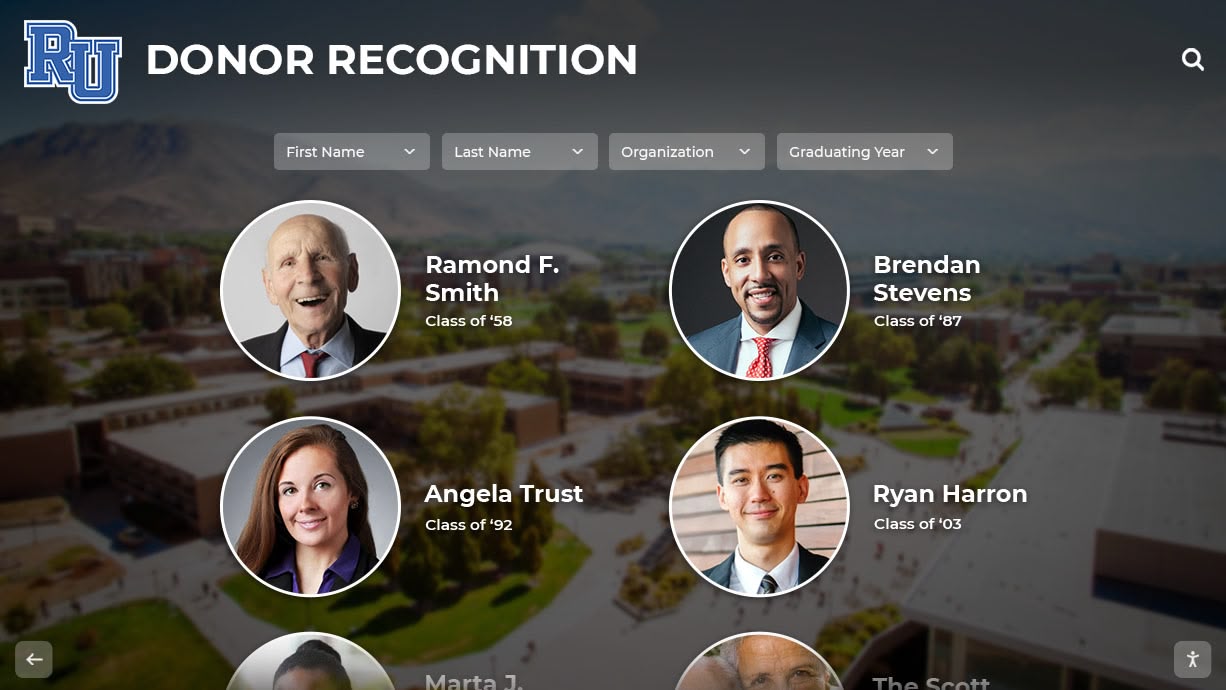
Comprehensive historical recognition integrates individual achievements with institutional narrative, creating engaging connections across generations
Qualitative Assessment
Stakeholder Feedback Gather perspectives from diverse community members:
- Student surveys about learning experience and engagement
- Teacher feedback on instructional effectiveness and support needs
- Parent observations about student interest and learning
- Administrator assessment of program outcomes and value
- Museum visitor interviews about experience and learning
- Community feedback on digital archive access and usefulness
Learning Quality Indicators Assess depth and sophistication of historical understanding:
- Quality of historical arguments in student work
- Sophistication of source analysis and evaluation
- Ability to recognize multiple perspectives and interpretations
- Understanding of historical context and causation
- Critical thinking demonstrated in historical discussions
- Transfer of historical thinking to contemporary issues
These qualitative measures often reveal impact that quantitative metrics miss, showing how digital tools transform not just engagement but the quality and depth of historical understanding.
Future Trends in Digital History Tools
Emerging technologies promise continued evolution in how we bring history to life.
Artificial Intelligence Applications
AI technologies will increasingly enhance history education:
Personalized Learning Pathways
- AI systems analyzing individual student knowledge and interests
- Customized content recommendations based on learning patterns
- Adaptive difficulty adjusting to student skill levels
- Intelligent tutoring providing personalized historical instruction
- Predictive analytics identifying students needing additional support
Enhanced Research Capabilities
- Natural language search finding relevant historical materials
- Automatic transcription of handwritten historical documents
- Facial recognition connecting individuals across historical photographs
- Pattern recognition identifying trends across large historical datasets
- Automated translation making global historical sources accessible
Interactive Historical Figures
- AI-powered chatbots enabling “conversations” with historical figures
- Natural language interaction answering historical questions
- Personality modeling based on historical writings and accounts
- Integration with VR creating immersive historical encounters
Advanced Immersive Technologies
Mixed Reality (MR) Experiences Blending physical and digital more seamlessly than current AR:
- Holographic historical figures appearing in physical spaces
- Interactive historical object manipulation combining real and virtual
- Collaborative MR experiences enabling shared historical exploration
- Persistent AR content remaining in locations for return visits
Haptic Feedback Integration Adding touch sensation to virtual historical experiences:
- Feeling textures of historical artifacts in VR
- Tactile feedback enhancing immersive realism
- Accessibility improvements for visually impaired learners
Social and Collaborative Features
Community-Created History Crowdsourcing expanding historical documentation:
- Community contribution systems adding local historical knowledge
- Collaborative annotation of historical photographs and documents
- Student-created historical content integrated with professional materials
- Alumni contributions expanding institutional historical archives
- Diverse perspective integration enriching historical narratives
Platforms like Rocket Alumni Solutions already enable community contribution to historical archives, with alumni uploading photographs, sharing memories, and contributing to institutional historical documentation.
Conclusion: Making History Accessible and Engaging for All
Digital tools have fundamentally transformed potential for history education, creating opportunities impossible just a decade ago. Students who once struggled to connect with distant historical periods can now walk through ancient Rome in virtual reality. Museums can display comprehensive collections online that physical space constraints previously prevented. Schools can preserve and share centuries of institutional history through interactive touchscreen displays. Primary sources once available only to specialists visiting major archives are now accessible to any student with internet connection.
The transformation extends beyond access to the nature of historical learning itself. Digital tools position students as active investigators rather than passive recipients, enable them to examine primary sources and form their own interpretations, create immersive experiences that build empathy and understanding for different historical perspectives, accommodate diverse learning styles through multimedia presentations, and develop digital literacy skills alongside historical content knowledge.
The benefits appear across all contexts—K-12 classrooms where teachers engage reluctant history students through interactive games and virtual field trips, museums where visitors spend minutes rather than seconds engaging with exhibit content through touchscreen interactivity, universities where students conduct sophisticated historical research using digital archives, and cultural institutions where comprehensive historical preservation ensures community heritage survives for future generations.
Implementation requires strategic planning addressing technology selection, professional development, curriculum integration, and assessment. Schools and institutions achieving the strongest outcomes start small with accessible tools, invest in professional development alongside technology, integrate systematically rather than haphazardly, and assess impact continuously to inform ongoing improvement.
The digital tools explored in this guide—virtual and augmented reality, interactive touchscreen displays, digital archives, timeline and mapping platforms, gamified learning experiences, and collaborative creation tools—represent proven approaches transforming history education. Whether you’re an educator seeking to engage students, a museum professional designing compelling exhibits, or an institution wanting to preserve and share your heritage, these digital tools offer accessible pathways to bringing history to life.
Your historical content—whether institutional archives, cultural heritage, or curriculum materials—deserves presentation that honors its significance while meeting contemporary audience expectations for interactive, engaging experiences. Modern digital tools make comprehensive historical preservation and presentation achievable for institutions of all sizes and budgets.
Ready to transform how your institution shares history? Schedule your custom Digital Yearbook mock-up to explore how digital platforms can preserve your heritage while creating interactive experiences connecting current and future community members to your unique story.
Every photograph documented, artifact digitized, and story preserved adds to the historical record that will educate and inspire future generations. The institutions that invest now in making history accessible and engaging create lasting legacies while building practical advantages in education, engagement, and community connection.
The past shaped who we are today. Digital tools ensure that understanding and appreciation of that past remains vibrant and accessible for generations to come.
Sources
- 7 Digital Tools That Help Bring History to Life | Edutopia
- Technology Brings Past to Life in Some History Classrooms | Government Technology
- Learning History Using Virtual and Augmented Reality | MDPI
- Museum Technology: 7 Examples of Next-Gen Exhibition Design | Bridgewater Studio
- Interactive Displays: The New Frontier in Museum Exhibits | Bluewater Technologies
- How VR and AR are transforming education | ISC Research































