



Intent: Preserve & Connect — This comprehensive guide delivers a complete framework for building, managing, and showcasing digital archives at schools, colleges, and universities, transforming scattered historical materials into searchable, accessible collections that engage current students, alumni, and future generations.
Every educational institution holds treasures worth preserving—decades of yearbooks documenting student life, photographs capturing milestone moments, official documents chronicling institutional evolution, athletic records celebrating championship seasons, and countless other materials that collectively tell your school’s unique story. Yet far too many institutions watch helplessly as these irreplaceable assets deteriorate in storage boxes, scatter across personal collections, or disappear entirely as knowledge holders retire without transferring institutional memory.
The challenge extends beyond simple storage. Traditional archival approaches—filing cabinets full of documents, boxes of photographs in climate-controlled rooms, physical yearbook collections requiring in-person access—fail to meet contemporary expectations for instant, searchable, mobile-accessible information. Students, alumni, and researchers expect to discover relevant materials through intuitive search interfaces, explore collections from anywhere in the world, and interact with archives through engaging digital experiences rather than requesting materials from storage.
This guide explores how educational institutions can build comprehensive digital archive systems that preserve institutional heritage while creating dynamic engagement opportunities connecting generations of community members through shared history.
Why Digital Archives Matter for Educational Institutions
Before implementing archival systems, schools and universities should understand the strategic value digital archives provide beyond preservation alone.
Preserving Institutional Memory and Heritage
Educational institutions accumulate decades or centuries of history requiring systematic preservation:
Protection Against Physical Loss Traditional archival materials face multiple threats—paper deterioration through aging and environmental exposure, photograph fading and chemical breakdown, physical damage from handling and storage conditions, disaster vulnerability including fire, flood, and natural events, and the inevitable loss as materials scatter across graduating classes and retiring staff.
According to Anderson Archival’s research on digital archives in education, digital preservation creates redundancy protecting against these physical threats while maintaining accessibility regardless of original condition. Schools implementing comprehensive digitization programs report preservation of materials that would otherwise be lost within a generation.

Modern digital archives transform static collections into engaging, accessible resources that students and alumni can explore through intuitive interfaces
Centralized Institutional Knowledge Educational institutions often struggle with decentralized information—yearbooks distributed across personal collections, official documents filed in various administrative offices, photographs scattered among departments, athletic records maintained separately from academic archives, and alumni memories residing only in individual recollections.
Digital archives create unified repositories where all institutional materials converge in searchable, organized systems. Solutions like Rocket Alumni Solutions provide platforms specifically designed for educational archives, enabling schools to consolidate yearbooks, photographs, documents, and recognition records in integrated systems accessible to authorized users worldwide.
Compliance and Accreditation Documentation Many accrediting bodies require educational institutions to maintain comprehensive historical records demonstrating mission consistency, programmatic evolution, and institutional stability. Digital archives simplify compliance by organizing materials in systematic frameworks with robust search capabilities, making required documentation readily accessible during accreditation reviews or institutional research.
Strengthening Alumni Engagement and Fundraising
Digital archives serve practical advancement purposes beyond historical preservation:
Nostalgia-Driven Engagement Alumni who discover themselves in searchable digital yearbooks, explore photographs from their student years, or trace institutional evolution since graduation develop renewed emotional connections to alma maters. Research on alumni engagement consistently demonstrates that nostalgia serves as powerful motivator for involvement—alumni experiencing positive emotional responses to historical content show significantly higher rates of event attendance, volunteer participation, and philanthropic support.
Schools implementing comprehensive digital yearbook platforms report alumni spending extended time exploring archives, sharing discoveries with classmates, and initiating renewed relationships with institutions after years of minimal contact.
Development and Major Gift Cultivation Development professionals leverage digital archives strategically for donor cultivation—identifying prospects through yearbook research and achievement documentation, crafting personalized outreach referencing specific experiences visible in archives, creating campaign materials featuring historical photographs demonstrating institutional impact, and recognizing donors by connecting gifts to institutional legacy through historical context.
According to advancement professionals, comprehensive digital archives supporting research and personalization efforts contribute measurably to campaign success by enabling authentic, specific donor conversations impossible without systematic historical documentation.
Reunion Planning and Class Engagement Digital archives provide reunion committees with powerful tools for event planning and promotion—identifying classmates through yearbook searches, creating reunion marketing materials featuring class-specific photographs, developing nostalgia-driven event programming around historical content, facilitating reconnection among scattered alumni, and documenting reunion events for ongoing engagement.
Schools offering reunion committees access to comprehensive digital archives report stronger attendance and increased giving associated with events that effectively trigger positive memories and renew alumni connections.

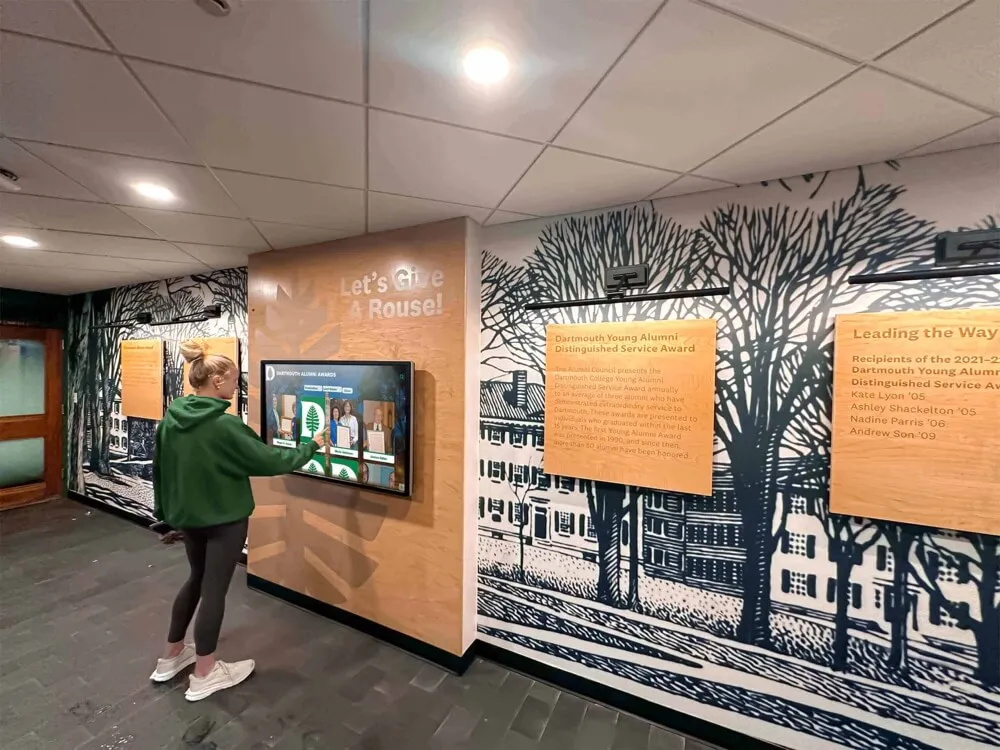
Interactive displays in campus locations enable alumni to rediscover their own experiences while exploring institutional evolution
Supporting Current Student Experience and Recruitment
Digital archives benefit current students and prospective families evaluating institutions:
Institutional Identity and School Pride Students who understand their place within larger institutional narratives develop stronger school pride and community connection. When schools provide accessible archives showcasing decades of tradition, achievement, and shared experiences, current students recognize themselves as links in chains extending backward to founders and forward to future generations.
This historical awareness contributes to institutional culture, with students showing greater participation in traditions, stronger identification with school identity, and increased likelihood of becoming engaged alumni after graduation.
Prospective Family Confidence Families evaluating educational options seek evidence of institutional stability, consistent values, and proven outcomes. Comprehensive digital archives demonstrate longevity and sustainability that build confidence—clear documentation of decades or centuries of successful operation, visible tradition and institutional consistency, graduate success patterns across multiple generations, and facility investment showing commitment to excellence.
According to enrollment management research, prospective families considering multiple schools show preference for institutions demonstrating strong historical foundations through accessible archival documentation.
Academic and Research Resources Digital archives support curricular objectives and student research across disciplines—local history studies using institutional archives as primary sources, research methodology instruction through archival exploration, interdisciplinary projects connecting institutional history to broader historical movements, journalism and media studies producing documentary content, and student engagement in ongoing archival work providing experiential learning opportunities.
Learn more about comprehensive approaches to preserving and digitizing old yearbooks that create accessible research resources.

Comprehensive digital archives preserve individual stories and achievements across generations, creating searchable databases of institutional memory
Planning Your Digital Archive Implementation
Successful digital archives require systematic planning addressing scope, technology, workflow, and sustainability.
Defining Archive Scope and Priorities
Educational institutions possess vast quantities of potentially archival material requiring prioritization:
Material Type Assessment Comprehensive archives typically include multiple content categories:
- Yearbooks: Complete collections spanning institutional history
- Photographs: Formal portraits, event documentation, campus life, facilities, athletics
- Official Documents: Board minutes, reports, policy documents, correspondence
- Publications: Student newspapers, literary magazines, newsletters, programs
- Athletic Records: Team statistics, championship documentation, individual achievements
- Recognition Materials: Honor rolls, award recipients, distinguished alumni
- Facility Documentation: Building plans, dedication materials, campus evolution
- Audio/Visual: Video recordings, audio interviews, film archives
Most institutions cannot digitize everything simultaneously and must establish phases addressing highest-priority materials first while planning systematic expansion toward comprehensive collections.
Stakeholder Input on Priorities Effective prioritization involves multiple constituencies:
- Alumni relations staff identifying materials most valuable for engagement
- Development professionals highlighting content supporting fundraising
- Admissions teams noting materials important for prospective families
- Academic departments requesting research-relevant collections
- Athletics seeking documentation of program history
- Current students identifying traditions and historical elements meaningful to them
This input ensures archives serve institutional priorities rather than preserving materials without clear purpose or audience.
Phased Implementation Timeline Most successful digital archive projects proceed in phases:
Phase 1 (Year 1): Core materials providing immediate value—recent yearbooks (past 10-20 years), significant historical photographs, major institutional milestones, athletic championships and records, and distinguished alumni documentation.
Phase 2 (Year 2): Expanded historical depth—earlier yearbook decades, comprehensive photograph collections, publication archives, facility history documentation, and tradition histories.
Phase 3 (Year 3+): Comprehensive completion—remaining yearbook gaps, document collections, oral history projects, specialized collections, and ongoing maintenance systems.
Phased approaches demonstrate value early while building sustainable long-term programs rather than attempting everything simultaneously and risking abandonment when projects prove overwhelming.
Technology Platform Selection
Archive effectiveness depends critically on platform capabilities and usability:
Essential Platform Features Digital archive systems should provide:
- Intuitive Search: Full-text search across all content types
- Metadata Management: Systematic tagging and classification enabling discovery
- Multiple Media Support: Photographs, documents, video, audio in integrated systems
- Chronological Organization: Timeline-based browsing by year, decade, or event
- Access Control: Permission systems balancing accessibility with appropriate privacy
- Mobile Optimization: Responsive design ensuring usability across all devices
- Cloud Infrastructure: Reliable hosting with automatic backup and disaster recovery
- Integration Capabilities: Connection with existing school systems and websites
Educational-Specific Solutions vs. Generic Platforms Schools face choices between purpose-built educational archive platforms and generic document management systems:
Purpose-Built Educational Platforms like SocialArchive and Rocket Alumni Solutions offer significant advantages—pre-configured for typical school content types, yearbook-specific features including composite photograph parsing, alumni profile systems linking individuals across years, recognition integration showing achievements and honors, templates based on educational institution needs, and specialized support understanding school contexts.
Generic Document Management Systems provide flexibility but require significant customization—configuration for educational use cases, custom metadata schemas, user interface design, integration development, and ongoing technical maintenance.
According to research on cloud-based archives in education, institutions implementing purpose-built educational platforms report 60-70% lower total cost of ownership and significantly faster deployment compared to customized generic systems, while achieving higher user satisfaction and engagement.
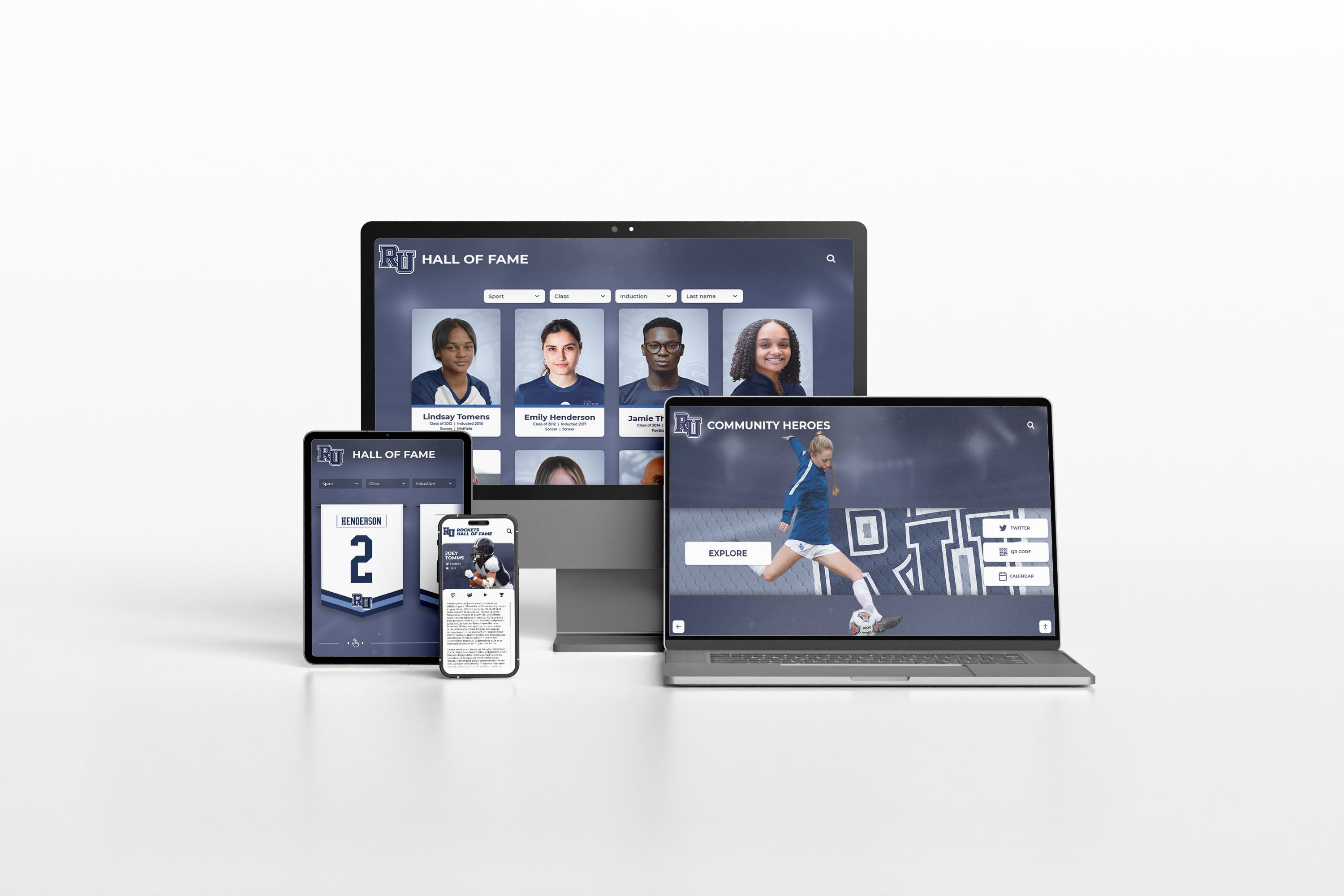
Modern archive platforms deliver seamless experiences across all devices, enabling access from anywhere at any time
Evaluation Criteria When assessing platforms, institutions should consider:
Technical Criteria
- Hosting reliability and uptime guarantees
- Security certifications and data protection
- Backup and disaster recovery procedures
- Scalability accommodating collection growth
- API availability for custom integrations
- Migration tools if changing platforms
Functional Criteria
- Search quality and relevance ranking
- Metadata capabilities and flexibility
- Bulk import tools for initial digitization
- User interface intuitiveness
- Mobile experience quality
- Multimedia handling capabilities
Support and Sustainability
- Training and implementation assistance
- Ongoing technical support quality
- Platform development roadmap
- Vendor stability and longevity
- Community of peer institutions using platform
- Total cost of ownership over 3-5 years
Digitization Workflow and Standards
Systematic digitization ensures quality and efficiency:
Scanning and Digital Capture Standards Technical specifications significantly impact long-term usability:
Photographs and Documents
- Resolution: 300-600 DPI depending on preservation vs. access priorities
- Color depth: 24-bit color for color images, 16-bit grayscale for black-and-white
- File formats: TIFF for archival masters, JPEG or PDF for access copies
- Metadata: Date, description, people, location, photographer when known
Yearbooks
- Individual page scanning enabling text recognition
- OCR processing creating searchable text layers
- Individual name extraction for person indexing
- Cover and spine documentation
- Special handling for fragile historical volumes
Audio and Video
- Digital conversion from analog formats (VHS, cassette, film)
- Standard formats ensuring long-term accessibility (MP4, MP3, WAV)
- Metadata including date, event, participants, context
- Transcript creation for accessibility and searchability
Outsourcing vs. In-House Digitization Schools must decide whether to digitize internally or contract professional services:
Professional Digitization Services offer advantages—superior quality from specialized equipment, faster completion for large projects, expertise handling fragile materials, insurance protecting valuable originals, and freeing internal staff for other responsibilities. Costs typically range from $10-30 per yearbook or $0.50-2.00 per photograph depending on specifications and volume.
In-House Digitization may suit institutions with—appropriate equipment and technical expertise, smaller collections manageable with available time, student workers providing labor, desire to maintain complete control over materials, and budget constraints limiting outsourcing options.
Many schools use hybrid approaches—outsourcing large-scale projects like comprehensive yearbook digitization while handling ongoing photograph scanning internally with student assistance.
Quality Control Procedures Systematic QC prevents quality issues discovered only after projects complete:
- Random sampling checking 10-15% of digitized materials
- Verification that file naming follows conventions
- Metadata completeness and accuracy review
- OCR quality assessment and correction
- Missing page or content identification
- Legibility verification for critical text
- Color accuracy for important materials
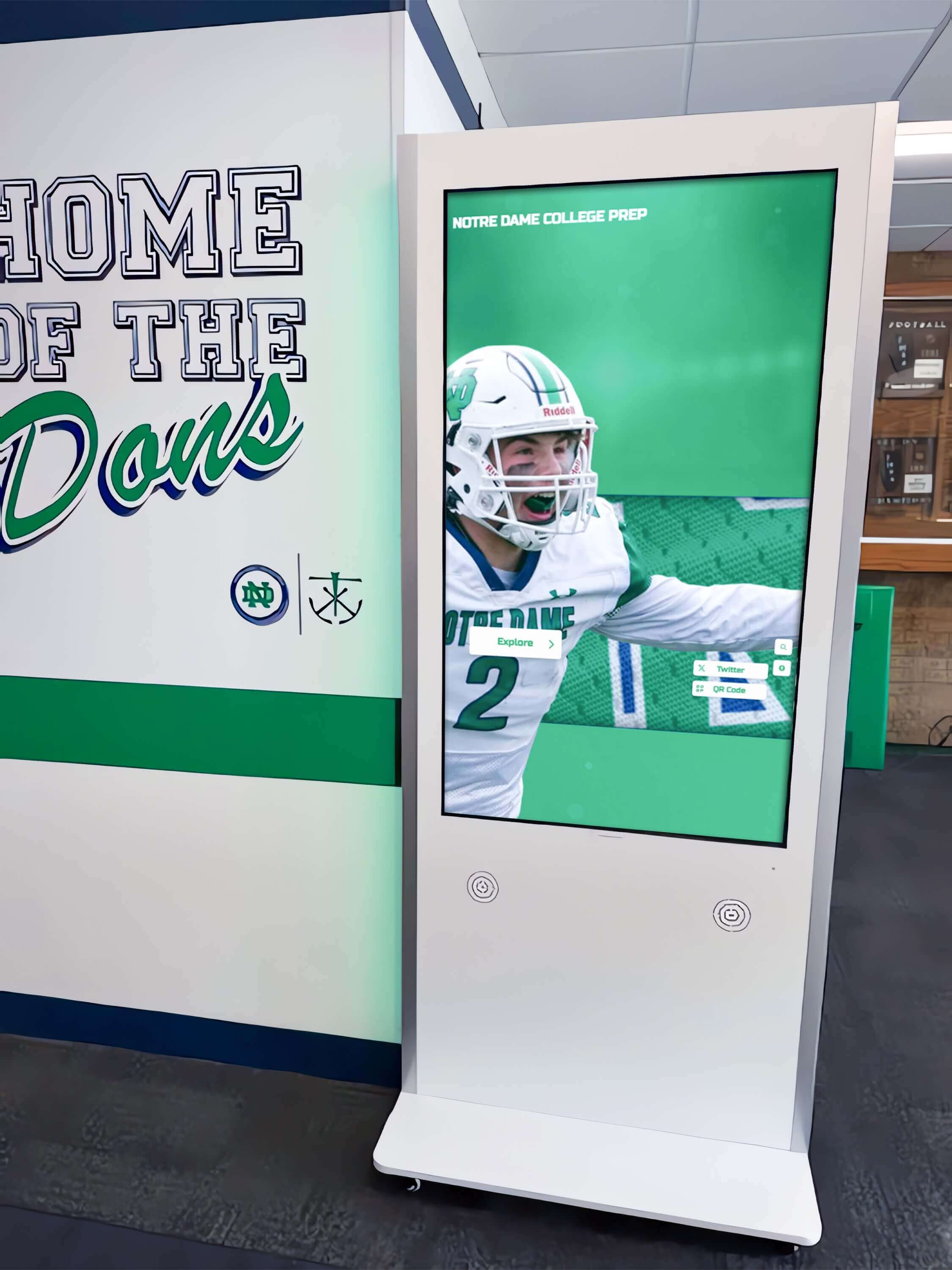
Physical touchscreen installations in high-traffic campus areas provide 24/7 access to digital archives for students, staff, and visitors
Metadata Strategy and Organization
Effective metadata transforms image collections into discoverable archives:
Core Metadata Fields Minimum information for all archived materials:
- Date: When created, published, or documenting
- Title/Description: Clear identification of content
- Creator: Photographer, author, or producing entity
- Subject: What material depicts or discusses
- People: Individuals appearing or mentioned
- Location: Where material created or depicts
- Format: Original and digital format information
- Rights: Copyright status and use permissions
- Source: Where material originated
Enhanced Discovery Metadata Additional fields improving searchability:
- Academic year and class year associations
- Department or program connections
- Event type categorization
- Theme or topic tags
- Related materials and collections
- Historical context notes
- Transcripts or full text for audio/video
Controlled Vocabularies and Taxonomies Consistent terminology improves search effectiveness:
- Standardized event names
- Department and program official names
- Geographic location conventions
- Subject heading systems
- Name authority files for individuals
- Thesauri for common terms
The Library of Congress provides extensive guidance on archival standards that educational institutions can adapt for digital archive metadata systems.
Content Development for Comprehensive Archives
Beyond technical infrastructure, archives require content development transforming raw materials into engaging collections.
Yearbook Digitization and Enhancement
Yearbooks represent core archival materials for most educational institutions:
Complete Collection Digitization Systematic yearbook preservation creates valuable resources—every volume from founding through present, maintaining chronological completeness, identifying and addressing gaps from missing years, soliciting alumni donations of missing volumes, and establishing ongoing digitization for current yearbooks.
Schools implementing comprehensive yearbook digitization programs report significant alumni engagement driven by ability to search and browse complete collections spanning decades or centuries.
Name Recognition and Individual Profiles Enhanced yearbook archives enable person-specific discovery:
- OCR text recognition making names searchable
- Individual extraction from composite photographs
- Person tagging across multiple years
- Alumni profile aggregation showing all appearances
- Class roster compilation and verification
- Maiden name and name change tracking
- Legacy connection documentation for families
This individual-focused organization transforms yearbooks from publications requiring page-by-page browsing into searchable databases where alumni instantly discover their own appearances and those of classmates, friends, and family members.
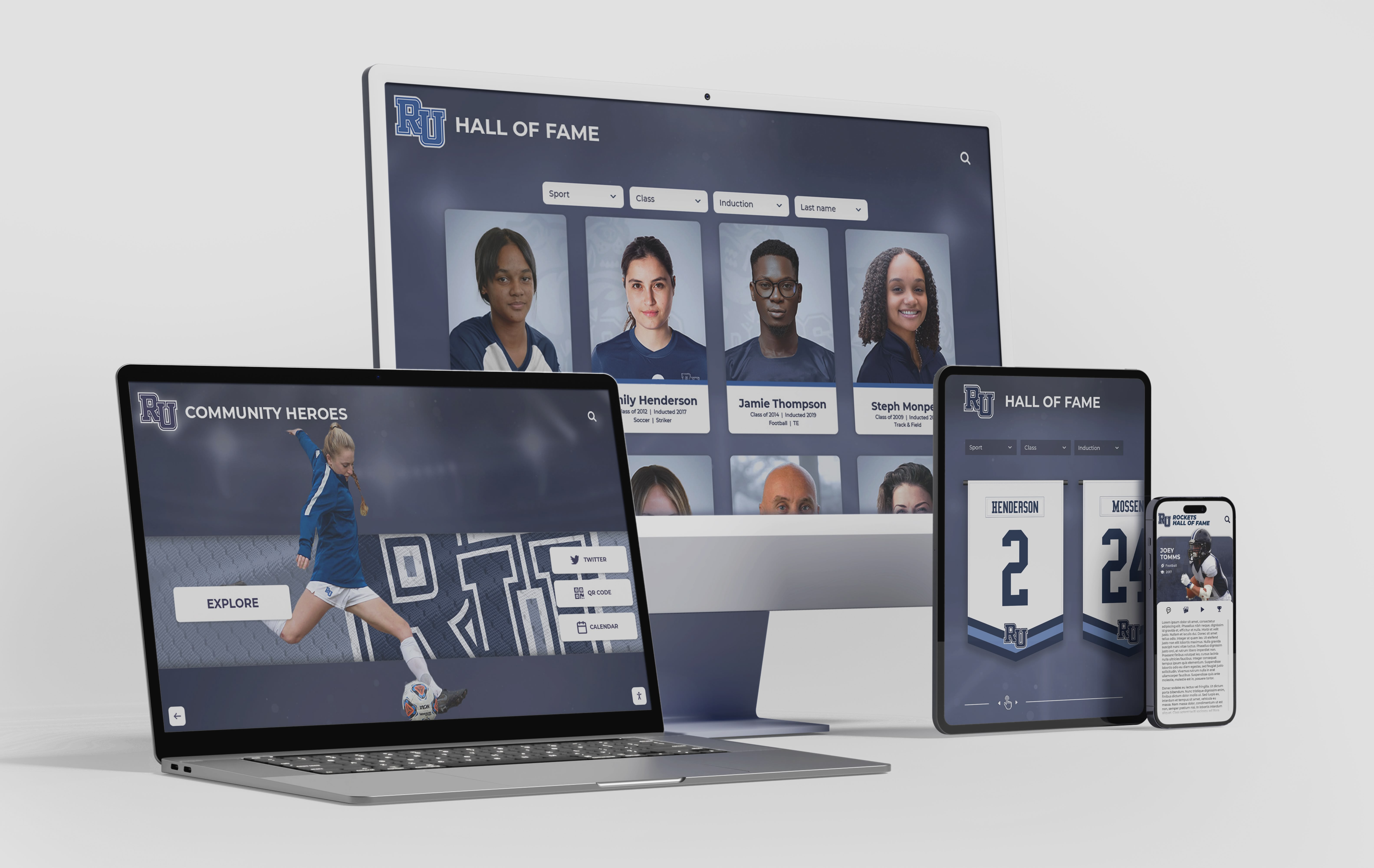
Purpose-built archive platforms provide intuitive interfaces enabling users to explore institutional history through multiple access points
Contextual Annotation and Storytelling Raw yearbooks benefit from contextual enhancement:
- Historical event context for particular years
- Tradition explanations for unfamiliar customs
- Facility identification for changing campus
- Significant achievement highlighting
- Notable alumni identification and updates
- Comparison features showing evolution over time
Photograph Collection Organization
Photograph archives require systematic organization enabling discovery:
Categorical Organization Systems Multiple classification schemes support different discovery paths:
Chronological Organization
- Decade-based browsing
- Academic year folders
- Event date sequences
- Era definitions for institutional periods
Topical Categories
- Academic programs and classes
- Athletics by sport and season
- Student life and activities
- Campus buildings and facilities
- Special events and ceremonies
- Community and partnerships
- Administrative and faculty
- Construction and development
People-Centered Organization
- Individual person tagging
- Group identifications
- Class year associations
- Team and organization membership
- Faculty and staff collections
Geographic Organization
- Campus location identification
- Building-specific collections
- Off-campus event locations
- Athletic facility documentation
Multiple organizational layers enable users to explore collections through preferred approaches—alumni browsing by their graduation year, researchers examining specific topics, current students exploring building histories, or development staff finding donor-relevant materials.
Crowd-Sourced Identification and Correction Community participation enhances photograph archives:
- Alumni identifying themselves and classmates in untagged photographs
- Name correction submissions fixing errors
- Date and location verification from participants
- Story and memory contributions adding context
- Missing detail completion by knowledge holders
Platforms enabling community contribution report substantially more comprehensive metadata than institutions can develop through internal efforts alone, while simultaneously creating engagement opportunities as alumni interact with archival content.
Similar approaches are explored in fraternity and sorority history preservation applicable to broader educational contexts.
Document Archive Development
Official documents require different handling than visual materials:
Document Type Prioritization Archives should address multiple document categories:
Governance and Administration
- Board of trustees minutes and resolutions
- Strategic plans and institutional reports
- Accreditation self-studies and reviews
- Policy manuals and official procedures
- Annual reports and communications
Academic Records
- Course catalogs and curriculum guides
- Program reviews and assessments
- Faculty handbooks and guidelines
- Academic ceremony programs
- Institutional research reports
Student Life Documentation
- Student handbooks and codes of conduct
- Club and organization records
- Event programs and schedules
- Student government documentation
- Publication archives (newspapers, literary magazines)
External Relations
- Media coverage and press releases
- Marketing and communication materials
- Donor correspondence and recognition
- Community partnership documentation
- Government reporting and compliance
Full-Text Search and OCR Processing Document archives require text searchability:
- OCR processing converting scanned documents to searchable text
- Manual transcription for handwritten materials
- Metadata extraction from document content
- Full-text indexing enabling comprehensive search
- Relevance ranking presenting most pertinent results
Research indicates that searchable document archives receive 5-10 times more usage than image-only collections where users cannot discover content through text queries.
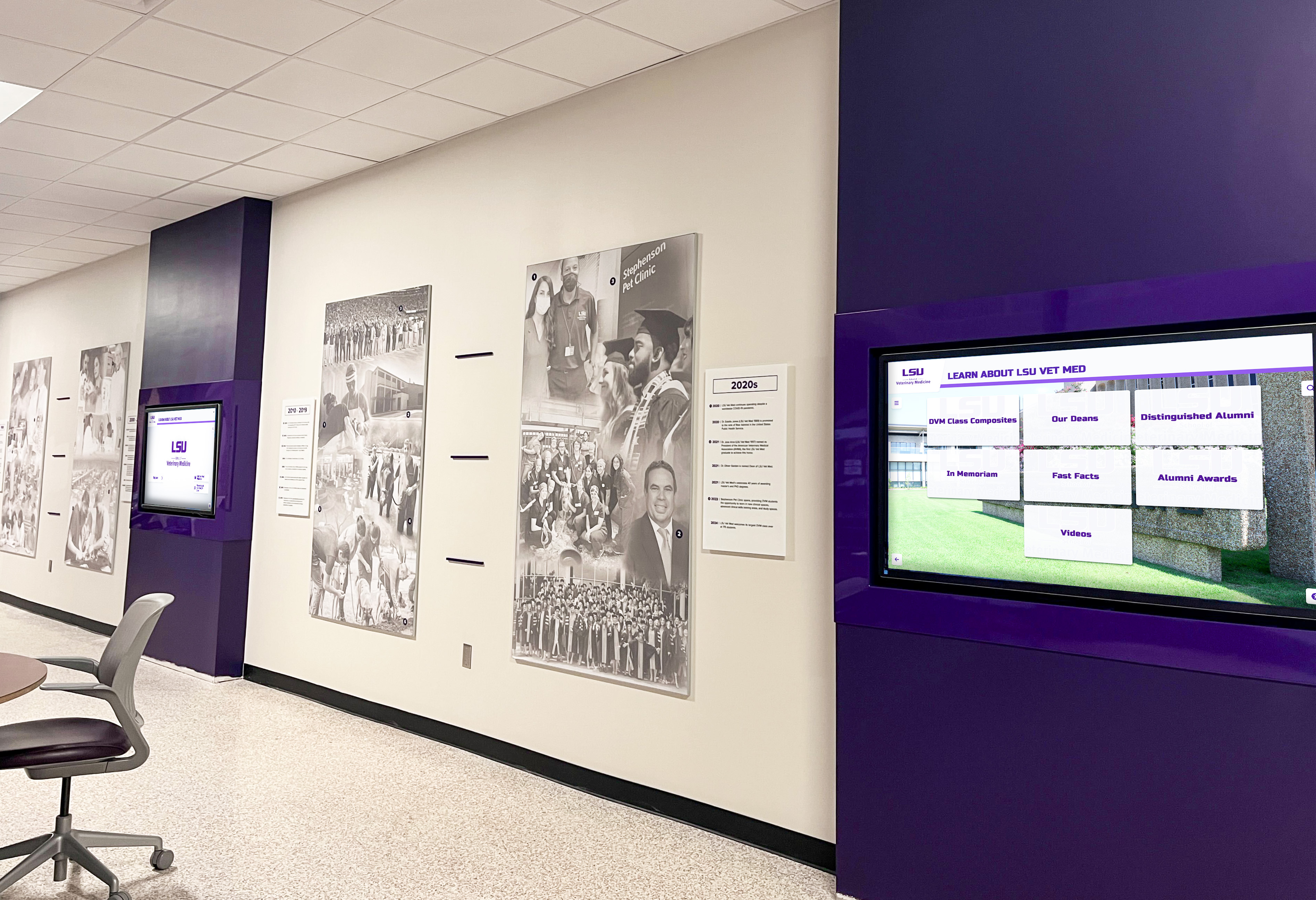
Strategic placement of digital displays throughout campus facilities keeps institutional history visible and accessible for daily engagement
Oral History and Multimedia Collections
Audio and video archives capture perspectives absent from written records:
Systematic Oral History Programs Structured interview initiatives preserve institutional memory:
Priority Interview Subjects
- Long-tenured faculty sharing decades of perspective
- Retired administrators with institutional knowledge
- Alumni from significant eras or achievements
- Community members involved with institution
- Founding family members or early participants
- Tradition bearers explaining customs and practices
Interview Framework Development
- Standard question sets ensuring consistency
- Biographical baseline information
- Era-specific questions about historical periods
- Open-ended exploration allowing unexpected information
- Follow-up interviews for complex topics
- Video or audio recording with transcription
Integration with Written Archives
- Timeline placement for chronological context
- Photograph association showing interview subjects
- Document connections referencing discussed materials
- Searchable transcripts enabling text discovery
- Highlight clips for featured content
- Educational resource integration
Educational institutions implementing historical timeline displays often integrate oral histories providing first-person context enriching statistical and photographic documentation.
Access, Discovery, and User Experience
Technical infrastructure and content development support user experience determining archive value and engagement.
Search and Discovery Optimization
Effective search determines whether users find relevant materials:
Multiple Search Approaches Archives should support diverse discovery methods:
Text Search
- Full-text search across all content
- Name-specific search finding individuals
- Advanced search with multiple criteria
- Boolean operators for complex queries
- Wildcard support for partial matches
Browse and Filter
- Chronological browsing by date range
- Category filtering by content type
- Tag-based exploration of topics
- Collection-level browsing
- Most-viewed popular content
Related Content Discovery
- “More like this” suggestions
- Same year or era materials
- Same people or places
- Topic connections
- Collection relationships
Search Quality Factors Effective search requires attention to:
- Relevance ranking presenting most pertinent results first
- Search term highlighting in results
- Metadata quality determining discoverability
- OCR accuracy affecting text search
- Synonym and variant term handling
- Search refinement options narrowing results
According to user experience research, archive users abandoning searches without finding relevant materials rarely return, emphasizing importance of search quality for sustained engagement.
Mobile and Remote Access
Contemporary expectations require anywhere, anytime access:
Responsive Design Essentials
- Automatic layout adaptation to screen size
- Touch-optimized navigation for tablets and phones
- Readable text without zooming on small screens
- Image optimization for mobile bandwidth
- Streamlined navigation for mobile contexts
Mobile-Specific Features
- Camera integration for contribution uploads
- Location awareness suggesting relevant content
- Social sharing to platforms and contacts
- Offline access for downloaded materials
- App options for frequent users
Remote Access Considerations
- Authentication for restricted materials
- Alumni verification systems
- Password protection for sensitive content
- Graduated access levels by user type
- Single sign-on integration with existing systems
Schools implementing cloud-based platforms report alumni accessing archives from around the world, with international traffic comprising 20-40% of total usage at institutions with significant out-of-area alumni populations.
Campus Physical Display Integration
Digital archives extend beyond web access to physical campus presence:
Interactive Touchscreen Installations Physical displays in high-traffic campus locations create visibility and engagement:
Strategic Placement Locations
- Main building lobbies welcoming all visitors
- Library and student center common areas
- Athletic facilities celebrating sports history
- Alumni centers and development offices
- Admissions tour routes for prospective families
- Reunion spaces during alumni events
Display Content Curation
- Featured historical content rotating regularly
- Current year highlights maintaining relevance
- Anniversary and milestone recognition
- Athletic achievement celebration
- Alumni spotlight features
- Tradition and history explanations
Solutions like Rocket Alumni Solutions provide integrated systems where web-based archives and physical touchscreen displays share content management, ensuring consistency while enabling location-appropriate curation.
Engagement Analytics Physical installations provide valuable engagement metrics:
- Interaction frequency and peak times
- Average session duration indicating engagement depth
- Most-viewed content informing interest areas
- Search terms showing discovery patterns
- User flow revealing navigation preferences
These insights inform content development priorities and display placement optimization for maximum community engagement.

Professional touchscreen installations create prominent institutional presence while providing intuitive access to comprehensive archives
Archive Management and Sustainability
Long-term archive success requires systematic management and continuous development.
Staffing and Responsibility Assignment
Sustainable archives need clear ownership and accountability:
Archive Manager Role Definition Formal position descriptions ensure consistent management:
Core Responsibilities
- Content acquisition and digitization oversight
- Metadata quality and standards enforcement
- Platform administration and maintenance
- User support and training
- Content curation and featured material selection
- Policy development and enforcement
- Stakeholder communication and reporting
Institutional Placement Archive management typically resides in—library and information services departments with archival expertise, information technology for technical platforms, alumni relations for engagement-focused archives, institutional advancement supporting development objectives, or dedicated archival departments at larger institutions.
Student and Volunteer Involvement Many schools supplement professional staff with:
- Student workers scanning and metadata entry
- Alumni volunteers identifying photographs
- Retired staff contributing knowledge
- Community members providing materials
- Academic internships in archive management
This distributed approach accomplishes more work while creating engagement opportunities as participants connect with institutional history through contribution.
Content Addition and Update Workflows
Archives require systematic processes for ongoing growth:
Regular Content Addition
- Annual yearbook addition upon publication
- Quarterly photograph collection updates
- Monthly recognition and achievement documentation
- Event-driven addition after major occasions
- Ad-hoc incorporation of donated materials
Community Contribution Management
- Submission portals for alumni donations
- Review and approval workflows
- Copyright and permission verification
- Integration into existing collections
- Contributor acknowledgment and communication
Quality Assurance Processes
- Periodic metadata audit and correction
- Broken link identification and repair
- Duplicate detection and consolidation
- Format migration for long-term preservation
- Security and access permission review
Privacy, Copyright, and Ethical Considerations
Responsible archives balance accessibility with appropriate protection:
Privacy Protection
- FERPA compliance for student records
- Takedown policies for requested removal
- Sensitive content access restriction
- Consent documentation for identifiable individuals
- Data protection and security measures
Copyright Compliance Most yearbooks and institutional materials qualify as institutional copyright, but considerations include—third-party contributed content with separate rights, licensed materials requiring permission, fair use analysis for educational purposes, public domain determination for historical materials, and clear rights statements informing users of permitted uses.
Ethical Collection Practices
- Representation balance across demographics
- Difficult history acknowledgment
- Community voice inclusion in interpretation
- Cultural sensitivity in description and display
- Donor intent respect for contributed materials
Learn about comprehensive approaches to academic recognition programs that connect to archival documentation while respecting privacy considerations.
Build Your Digital Archive System Today
Discover how modern digital archive platforms can help your school or university preserve institutional heritage, engage alumni worldwide, and create accessible collections that connect generations. Schedule your custom Digital Yearbook mock-up to explore comprehensive archival solutions.
Schedule a Digital Yearbook Mock-UpMeasuring Archive Success and Impact
Systematic assessment demonstrates value and guides continuous improvement:
Quantitative Usage Metrics
Digital platforms provide comprehensive engagement data:
Access and Engagement Statistics
- Unique visitor counts and trends
- Page views and content interactions
- Search query volume and terms
- Session duration indicating engagement depth
- Return visitor rates showing sustained interest
- Geographic distribution of users
- Device type patterns (mobile vs. desktop)
Content Performance Analysis
- Most-viewed materials identifying popular content
- Search term analysis revealing interest areas
- Download and share statistics
- Video view counts and completion rates
- User-contributed content volume
- Comments and community interaction
Institutional Benchmarking Peer comparison provides context:
- Usage per capita against institutional size
- Engagement rates compared to peer schools
- Growth trends over time
- Seasonal patterns around reunion and homecoming events
- Conversion to desired outcomes (event registration, giving)
Qualitative Impact Assessment
Beyond statistics, archives create qualitative value:
Stakeholder Feedback
- Alumni surveys about archive value and satisfaction
- Student focus groups on educational utility
- Faculty assessment of research support
- Development staff evaluation of advancement benefit
- Admissions team perspective on recruitment value
Anecdotal Impact Stories Compelling narratives demonstrate archive value:
- Alumni reconnections facilitated by archive discovery
- Major gifts inspired by nostalgic engagement
- Student research projects enabled by archival access
- Media coverage generated by historical materials
- Community connections strengthened through shared history
Institutional Culture Indicators Observable changes suggesting cultural impact:
- Increased historical awareness among students
- Growing tradition participation
- Enhanced institutional pride expressions
- Stronger alumni engagement overall
- Greater community appreciation of heritage
Regular assessment enables continuous improvement while providing evidence justifying continued investment in archival programs.
Future Trends in Educational Digital Archives
Emerging technologies will enhance archive capabilities and user experiences:
Artificial Intelligence Applications
AI technologies offer exciting archive enhancement possibilities:
Automated Metadata Generation
- Image recognition identifying content and context
- Facial recognition suggesting person identifications
- Natural language processing extracting themes
- Audio transcription for video and sound archives
- Pattern recognition finding related materials
Enhanced Discovery
- Natural language search understanding conversational queries
- Personalized recommendations based on interests
- Similar image finding by visual characteristics
- Automatic content clustering and organization
- Predictive search suggesting queries
Content Enhancement
- Historical photograph restoration and colorization
- Low-resolution image enhancement
- Handwriting recognition for manuscript materials
- Translation services for multilingual content
- Accessibility improvement through automatic captioning
Immersive and Interactive Experiences
Next-generation archives may incorporate:
Augmented Reality Integration
- Mobile AR overlaying historical campus images on current locations
- Timeline exploration through AR interfaces
- Virtual historical figure appearances
- Interactive archive exploration through AR glasses
Virtual Reality Experiences
- Immersive campus tours across different eras
- VR recreations of historical events
- First-person historical experiences
- Virtual archive rooms and exhibitions
Social and Collaborative Features
- Alumni storytelling contributions
- Community annotation of photographs
- Collaborative identification and correction
- Discussion forums around historical topics
- Memory sharing and preservation
Blockchain and Long-Term Preservation
Emerging technologies address preservation challenges:
- Decentralized storage preventing single-point failure
- Authenticity verification for digital materials
- Immutable audit trails for changes
- Digital rights management through smart contracts
- Long-term preservation assurance beyond platform lifecycles
While some technologies remain experimental, forward-thinking institutions monitor developments positioning archives to adopt beneficial innovations as they mature.
Conclusion: Building Archives That Connect Generations
Digital archives represent far more than nostalgic trips through institutional history—they preserve irreplaceable heritage protecting against inevitable physical deterioration and loss, create engagement opportunities connecting alumni across generations, support development and fundraising through emotionally resonant materials, enhance current student experience by connecting them to institutional legacy, and demonstrate stability and excellence attracting prospective families.
The comprehensive framework explored in this guide addresses every phase from initial planning through sustainable long-term management. Whether your institution approaches major anniversary milestones requiring historical documentation, seeks to strengthen alumni engagement and giving, or simply recognizes that decades of institutional memory deserve better preservation and presentation, systematic digital archive development creates lasting value serving multiple constituencies across institutional missions.
Modern platforms make comprehensive archive implementation achievable without massive resource commitments. Cloud-based systems eliminate local server requirements and technical complexity. Purpose-built educational solutions like Rocket Alumni Solutions provide templates and frameworks based on hundreds of school implementations, dramatically accelerating deployment while ensuring comprehensive functionality. Phased approaches enable starting with highest-priority materials demonstrating value while building toward complete collections over time.
Your institution’s history—from founding principles through decades of student achievement, faculty dedication, facility development, and community impact—deserves preservation ensuring future generations can explore and learn from experiences shaping your educational community. Scattered yearbooks in storage, photographs deteriorating in file cabinets, and institutional knowledge residing only in retiring staff members represent opportunities for preservation before irreplaceable materials and memories disappear permanently.
Start where you are with achievable first phases—perhaps recent yearbook digitization, significant photograph collection preservation, or athletic achievement documentation—then systematically expand toward comprehensive archives as resources permit. Engage stakeholders early understanding what materials matter most to different constituencies. Research available platforms understanding how purpose-built solutions simplify implementation. Most importantly, begin before additional materials deteriorate beyond recovery or knowledge holders retire without transferring institutional memory.
The schools, colleges, and universities investing in systematic digital archive development create lasting legacies honoring the past while building practical advantages in alumni engagement, institutional advancement, student experience, and community relations that will benefit institutions for generations to come.
Ready to begin building your digital archive? Explore comprehensive digital yearbook solutions that preserve institutional heritage while creating engaging experiences connecting current students, alumni, and future generations through shared history.































