School history, shared
Athletic Archive Scanner Calibration Log: Consistent Color and Detail for School History

An athletic archive scanner calibration log is a session-by-session record of the scanner settings, target values, and measured outcomes that your team uses to keep every scan—regardless of which volunteer ran the equipment or which decade of materials was in the tray—color-accurate, correctly exposed, and sharp enough for lobby displays and searchable online archives.
Without a calibration log, inconsistency compounds silently. The athletic director scans championship certificates at one brightness setting; a volunteer scans team photos three weeks later at a different contrast level; a facilities staffer handles the remaining yearbook pages at whatever defaults the scanner loaded after a firmware update. The resulting archive contains materials that look mismatched side by side, fail platform upload quality checks, or require individual color correction before any recognition display can use them.
A structured athletic archive scanner calibration log eliminates that drift by establishing a baseline reading at the start of each session, recording every deviation, and creating the institutional knowledge that survives staff turnover. This guide gives school administrators, athletic directors, advancement leaders, facilities teams, and IT staff a complete calibration log framework—organized by material type and session structure—along with guidance on connecting a consistently calibrated archive to the recognition programs and digital displays that depend on it.

A well-calibrated archive produces scans that look accurate side by side across decades of materials — the calibration log is what makes that consistency reproducible session after session
What a Scanner Calibration Log Records
A calibration log is not a scanning log. A scanning log tracks what materials were processed and how many files were produced. A calibration log tracks whether the scanner was producing accurate output at the time those files were created — and it provides the evidence needed to identify and correct systematic errors without rescanning an entire batch.
At minimum, each calibration log entry should capture:
| Field | What to Record | Why It Matters |
|---|---|---|
| Session date and operator | Date, full name, and role | Ties output quality to specific sessions and operators for troubleshooting |
| Scanner make, model, and serial number | Exact hardware identifier | Essential when a school operates multiple scanners or replaces equipment |
| Firmware and driver version | Version string from scanner software | Firmware updates can change default behavior; version helps isolate regressions |
| Warmup status | Minutes since power-on; whether warmup scan was run | Cold lamps produce cooler color temperatures and inconsistent exposure |
| Reference target used | Name and edition of calibration target (e.g., IT8 target, color checker card) | Different targets have different reference values; consistent target use enables consistent comparison |
| Target scan time and result | Time of calibration scan; pass or fail against reference | Documents whether calibration was verified or assumed |
| Color deviation (ΔE) | Measured color error against reference (acceptable: ΔE < 3) | Quantifies color drift so batches with high drift can be flagged for review |
| Shadow and highlight readings | Measured density values at shadow and highlight patches | Identifies exposure drift before it affects entire batches |
| Material type being scanned | Photographs, programs, certificates, yearbooks, negatives | Different materials require different settings; log confirms correct profile was active |
| DPI setting used | Exact dots-per-inch value | Confirms correct resolution was selected for material type |
| Color mode | 24-bit color, 48-bit color, 8-bit grayscale | Confirms correct bit depth was selected |
| File format | TIFF, JPEG (with quality value), PDF/A | Confirms lossless master or lossy derivative as appropriate |
| Post-scan adjustment | None / brightness / contrast / color correction applied | Flags batches where in-session corrections were applied so downstream review can assess impact |
| Next calibration due | Date or file-count trigger for next calibration check | Keeps calibration proactive rather than reactive |
Why Calibration Consistency Determines Archive Usability
Scanner color and exposure output drifts over time and across operating conditions. Lamp temperature, ambient light in the scanning room, scanner glass cleanliness, and even the order in which materials are processed within a session all introduce variation. For a school athletic archive, that variation is not merely aesthetic — it is a practical barrier to downstream use.
Recognition displays and hall-of-fame kiosks pull athlete portraits, certificate images, and program pages from a shared archive. When portrait scans from different sessions show noticeably different color casts, the display looks unprofessional regardless of how well the platform is designed. Visitors notice when an inductee’s portrait from 1989 has a different warmth than the portrait beside it from 1997. Interactive recognition displays are built to showcase institutional history — calibrated scans are what make that showcase look authoritative.
Platform upload quality checks at many recognition and digital yearbook platforms automatically reject images with excessive color deviation, clipped highlights, or exposure problems. A calibrated scan passes these checks on the first submission. An uncalibrated batch requires individual correction and resubmission, creating rework proportional to the number of sessions that ran without calibration.
Long-term archive integrity depends on knowing that the materials in storage reflect accurate color. An athletic director digitizing a collection of team portraits today may not need to use those files for five years. Without calibration documentation, there is no way to confirm — at that point — whether the files stored accurately represent the originals or contain systematic color drift that accumulated undetected.
Ten-Step Scanner Calibration Process for Athletic Archive Sessions
Follow these steps at the start of every scanning session, and after any interruption exceeding thirty minutes where the scanner lamp cools.
Power on the scanner and allow a minimum five-minute warmup. Scanner fluorescent and LED lamps produce different light temperatures when cold. Running a warmup scan — a blank white sheet or the scanner’s built-in warmup sequence — stabilizes the light source before any reference measurement is taken.
Clean the scanner glass. Dust, smudges, and residue from previous materials are the most common cause of scan artifacts that cannot be traced to calibration settings. Clean with a lint-free cloth and appropriate glass cleaner; never use paper towels. Inspect under raking light before proceeding.
Run a reference target scan. Place your calibration reference — an IT8.7/2 target card, a digital color checker chart, or a manufacturer-supplied calibration slide — on the scanner at your normal material placement position. Scan at your session’s target DPI with the color mode set to 24-bit color.
Measure color deviation against the reference file. Compare the scanned target against the manufacturer’s reference file using scanner profiling software or image analysis software. Note the average ΔE value. An average ΔE below 3.0 is acceptable for recognition display purposes; a ΔE above 5.0 indicates calibration correction is needed before production scanning begins.
Measure shadow and highlight density. Check density values at the reference target’s shadow and highlight patches. Record both readings in the calibration log. Shadow clipping (readings at or near 0,0,0 in RGB) and highlight clipping (readings at or near 255,255,255) indicate exposure settings that will lose detail at the extremes — a common problem when scanning certificates with both white backgrounds and dark embossed text.
Load the material-specific scanner profile. Most scanner software allows saving named presets for each material type. Load the correct preset for the materials in today’s session — do not rely on scanner memory of the previous session’s settings or on operator recollection. If your scanner does not support named presets, manually verify each setting against your documented baseline for the material type.
Scan a representative test sample from the session’s materials. Before processing the full batch, scan one representative piece from each material category — one photograph, one program page, one certificate — and review on a calibrated monitor. Compare against a known-good reference scan from a prior session if available. Assess: Is flesh tone accurate in portrait photographs? Is black print on certificate backgrounds rendering as true black rather than a warm or cool cast? Is printed text fully legible without blown-out surrounding paper?
Record the calibration results and confirm pass or fail. Enter all measurements and readings in the calibration log before beginning production scanning. Mark the session as calibration-confirmed (pass) or note the corrective action taken. Skipping this step — scanning without a logged baseline — makes it impossible to audit why specific batches look different from others when reviewing the archive months later.
Begin production scanning. Process the session’s materials using the confirmed settings. Do not adjust brightness, contrast, or color balance during the session without recording the adjustment and its reason in the log. Adjustments made mid-session without documentation create an undocumented boundary between files that reviewed consistently and files that may not.
Run an end-of-session verification scan. At the end of each session — particularly for sessions exceeding two hours — run a second calibration target scan and record the result. Drift between the session-start and session-end readings indicates lamp temperature changes or glass contamination that accumulated during scanning. If the end-of-session ΔE exceeds the session-start reading by more than 2.0, flag the session’s later batches for quality review.
Calibration Log Template
This template is designed to be maintained as a shared spreadsheet accessible to every team member who operates scanning equipment. One row per session; one supplementary row for end-of-session verification.
| Session ID | Date | Operator | Scanner Serial | Firmware | Warmup (min) | Target Used | Start ΔE | Start Shadow | Start Highlight | Material Type | DPI | Color Mode | Format | Mid-Session Adjustments | End ΔE | Pass / Flag |
|---|---|---|---|---|---|---|---|---|---|---|---|---|---|---|---|---|
| CAL-001 | — | — | — | — | 5 | IT8 target v2 | — | — | — | Team photos | 600 | 24-bit | TIFF | None | — | Pass |
| CAL-002 | — | — | — | — | 5 | IT8 target v2 | — | — | — | Programs | 400 | 24-bit | TIFF | None | — | Pass |
Keep the Session ID sequential and consistent. When an archive review asks why a specific batch looks different from the surrounding material, the Session ID links the file batch to the calibration record that was active when it was created.
Material-Specific Calibration Targets
Different material types in an athletic archive require different calibration priorities. A single scanner profile appropriate for color photographs may not handle the high-contrast text-and-white-paper combination in a printed certificate, or the aged yellow tones of a pre-1980 program page. The calibration log should document which profile was active for each material type.
Team Photographs and Athlete Portraits
Color accuracy is the primary calibration concern for portrait photographs. Skin tone rendering is the most immediate quality indicator — a warm cast makes portraits look oversaturated; a cool cast makes them look drained. If your reference target includes a skin-tone patch (most IT8 targets do), verify that patch against the reference file at each session start.
For photographs printed on glossy or satin paper, scanner exposure defaults often overexpose the highlights, clipping detail in white uniform elements, bright backgrounds, and embossed surfaces. Reduce exposure by half a stop from the default and verify against a representative sample before processing the full batch.
Game Programs and Athletic Publications
Programs printed on newsprint present a different calibration challenge: the paper itself is yellow or cream-toned, and scanner auto-exposure often attempts to correct this, producing a flat, bleached result that does not accurately represent the original. Disable automatic white balance correction for newsprint materials and record that setting in the calibration log. The goal is accurate representation of the original, including its aging characteristics — not a reconstruction of how the document looked when new.
For programs containing halftone photographs, moiré patterns from the halftone screen can interact with scanner resolution to produce interference artifacts. Test your scanner’s descreen filter setting against a program sample before processing an entire collection. Recognition programs built around printed publications — program archives, annual publications, and award booklets — benefit from this step because halftone interference degrades the portrait images that recognition workflows most frequently use.
Championship Certificates and Award Documents
Certificates typically require calibration adjustment for two competing challenges: rendering the white or cream paper background accurately without blowing out surrounding detail, and preserving legibility of the printed or engraved text. Shadow detail in embossed elements and foil stamps requires a slightly lifted shadow point — a scanner that clips shadows will render an embossed seal as a flat dark mass rather than a three-dimensional element.
Log the shadow-point adjustment for certificate scanning sessions separately from photograph sessions. Volunteers switching between material types in a single session without resetting profiles are a common source of calibration inconsistency in archives managed by rotating staff.
Yearbook Pages
Yearbook pages combine the challenges of all other material types in a single spread: halftone portraits, text columns, graphic elements, and full-bleed photographs. They also tend to have color casts that shift across decades as printing technology and paper chemistry changed.
Calibrate for the predominant material in each decade’s yearbooks. Pages from offset-printed yearbooks of the 1960s–1980s tend toward yellow-warm tones; pages from digitally typeset yearbooks of the 1990s onward are typically more neutral. Record the material era in the calibration log alongside the session date and settings so future reviewers can understand why calibration targets differ between sessions processing different decades.
Scanner Maintenance Practices That Support Calibration Accuracy
A calibration log records what the scanner measured — but calibration accuracy itself depends on equipment condition. These maintenance practices reduce the variance that calibration measurement has to account for.
| Maintenance Task | Frequency | Why It Matters |
|---|---|---|
| Clean scanner glass | Every session start | Dust and smudges are the most common scan artifact source |
| Clean document feeder rollers (if used) | Every 500 pages | Roller contamination transfers marks to documents and causes skew |
| Inspect platen edges for debris | Every session start | Edge debris creates streak artifacts across the scan width |
| Full lamp calibration (manufacturer routine) | Every 6 months or per manufacturer recommendation | Compensates for lamp aging that shifts color temperature over time |
| Glass replacement inspection | Annually or after physical contact | Scratched glass creates permanent horizontal streak artifacts |
| Reference target condition check | Every 3 months | Reference targets fade and collect handling damage; a degraded target produces false calibration readings |
Connecting a Calibrated Archive to Digital Recognition Programs
Consistent calibration produces a usable archive. Usability is realized when that archive feeds the recognition programs and displays that give athletic history a public presence.
Lobby recognition kiosks and hall-of-fame displays draw portrait photographs, program covers, and certificate images from the same archive. When scan sessions are calibrated consistently, the display experience is visually coherent — an inductee’s portrait looks credible alongside others regardless of when the original was scanned. Schools upgrading existing lobby installations often find that digital signage kiosk systems surface calibration inconsistencies immediately because display platforms render all images at the same size and brightness, making color drift visible in ways that file storage conceals.
Award ceremony and recognition event materials frequently draw from the same archive as lobby displays. Printed programs, projection slides, and screen backgrounds for award ceremonies require image quality that holds at large scale. A calibrated archive provides that quality; an uncalibrated archive requires per-image correction at the moment of greatest time pressure — the day before the event.
Hall-of-fame induction documentation benefits particularly from calibration consistency. When a school nominates an athlete for induction and the archive photograph accompanying the nomination has accurate skin tones, legible jersey numbers, and no color cast, the submission package presents as professional. Guides to recognition night and hall-of-fame induction events consistently note that the quality of supporting materials shapes how seriously a nomination is received.
Digital yearbook archives that incorporate historical editions need calibrated scans to serve as navigable, usable records rather than reference-only files. A portrait grid page where individual faces can be identified — because the scan was calibrated for correct exposure and sufficient resolution — supports the name-search functionality that makes a digital yearbook archive genuinely useful for alumni searching for their own records or those of former teammates.
Student and alumni recognition displays for programs like student of the month, academic achievement recognition, and activity leadership archives all pull from the same scanning infrastructure. Student recognition display systems that surface new honorees alongside archived historical records benefit from a consistent visual standard across the full library. An athletic archive scanner calibration log is what maintains that standard when the archive spans decades of materials scanned across years of sessions.
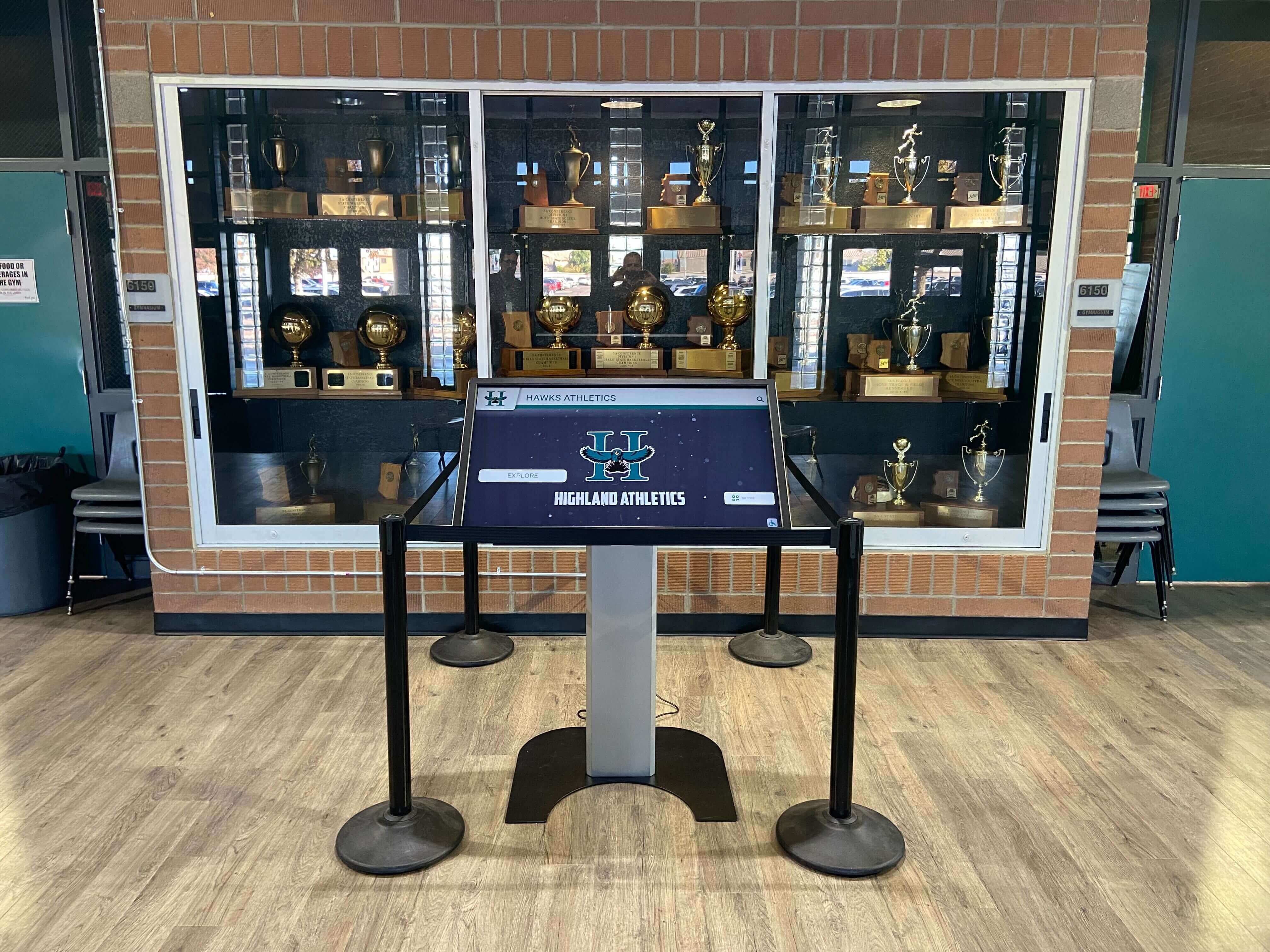
Recognition kiosks in school trophy cases pull directly from the athletic archive — consistent scanner calibration determines whether the portrait and document images look accurate when displayed at full kiosk scale
Role Assignments for Calibration Log Maintenance
Athletic archive scanning projects typically involve multiple contributors — staff, volunteers, student workers, and outside service providers. Clear role assignments prevent the calibration log from being skipped when the primary archive coordinator is unavailable.
| Role | Calibration Responsibilities |
|---|---|
| Archive coordinator (athletic director or designee) | Creates and maintains the master calibration log; sets material-specific baseline profiles; reviews flagged sessions; approves archive batches for recognition platform upload |
| Scanner operator (staff or trained volunteer) | Runs the session-start calibration routine; records all required fields in the log before beginning production scanning; flags mid-session adjustments; runs end-of-session verification scan |
| IT or facilities lead | Ensures scanner firmware is current; performs scheduled maintenance tasks; maintains reference target inventory; provides calibrated monitor for quality review |
| Advancement or communications staff | Provides downstream quality requirements (platform upload specifications, display resolution minimums); reviews flagged batches before use in major recognition materials |
| Outside digitization vendor (if used) | Provides calibration certification for each delivery batch; includes scanner model, firmware version, calibration target used, and ΔE readings in the delivery documentation |
For schools where booster club volunteers participate in archive projects, a laminated quick-reference card with the session-start calibration checklist at each scanner station reduces the likelihood of steps being skipped when the archive coordinator is not present.
Integrating Calibration Logs with the Broader Archive Management System
A calibration log is most useful when it is integrated with the archive’s file management system rather than maintained as a separate document. The Session ID in the calibration log should correspond to a folder or batch identifier in the file archive, so that any scan file can be traced back to the session record documenting the conditions under which it was produced.
This integration matters most in two scenarios:
Quality review after the fact. If a recognition platform flags an uploaded batch for color inconsistency six months after scanning, the Session ID on each file enables the archive coordinator to pull the relevant calibration log entry, identify whether the session passed or was flagged, and determine whether the issue was a calibration problem or a platform-side rendering difference.
Rescanning decisions. When an athletic director or advancement leader asks whether a particular batch of materials needs to be rescanned to meet a new display platform’s requirements, the calibration log provides the evidence to answer that question based on documented settings rather than visual inspection of stored files. A session that passed calibration at ΔE 2.1 with correct DPI and color mode does not need rescanning; a session flagged at ΔE 6.4 with midpoint corrections warrants review before those files are used in a major recognition installation.
For schools building toward interactive class and program history displays where materials from multiple decades are presented side by side, the calibration log provides the quality assurance layer that prevents the finished display from revealing the inconsistencies of the underlying archive.
Connect Your Calibrated Archive to a Recognition Platform Built for School History
Consistent scanner calibration produces an archive that is ready for display. Rocket Alumni Solutions builds custom interactive recognition systems — hall-of-fame walls, lobby kiosks, and digital yearbook platforms — that surface the athletic history your calibration work has preserved. Schedule a demo to see how a verified, calibrated archive translates into a permanent, living recognition presence for your school.
Frequently Asked Questions
What is the difference between a scanner calibration log and a scanning log?
A scanning log records what was processed: how many items, which materials, file names, and storage locations. A calibration log records whether the scanner was producing accurate output during a given session — the settings active, the reference measurements taken, and the pass or fail outcome against a baseline. Both records are useful; they answer different questions. When a quality problem surfaces in a specific batch, the scanning log identifies which files are affected and the calibration log explains why.
How often should the calibration baseline be re-established?
The baseline — the reference measurements against which session readings are compared — should be re-established whenever equipment changes: a new scanner, a firmware update, or replacement of the lamp assembly. For stable equipment under consistent operating conditions, annual re-establishment of the baseline is appropriate for most school archive projects. More frequent re-establishment is warranted when the scanning environment changes (a room with varying ambient light) or when reference target condition deteriorates.
Can a school use a smartphone app instead of a dedicated calibration target?
Several smartphone-based color calibration apps can produce reasonable ΔE measurements for basic calibration verification. These tools are useful for quick session-start checks when a physical IT8 or color checker target is unavailable. However, smartphone camera sensors introduce their own color response characteristics and vary by device, making app-based calibration less reliable than a physical reference target with a manufacturer-supplied data file. For archives destined for permanent display in recognition platforms, a physical reference target is the appropriate investment.
What should we do with batches that were scanned before we implemented a calibration log?
Audit a sample from each historical batch against a currently calibrated reference scan. For portrait photographs, compare flesh tone rendering and highlight detail. For programs and certificates, compare paper color and text legibility. Batches that fall within an acceptable visual range for their intended use do not require rescanning. Batches that show significant color cast, exposure problems, or detail loss should be prioritized for rescan if those materials will appear in a high-visibility recognition installation such as a lobby hall-of-fame display.
Do calibration requirements change when scanning materials for OCR text extraction?
OCR accuracy depends primarily on resolution and contrast rather than color fidelity. For text-heavy materials scanned specifically for OCR — game programs, award citations, roster sheets — the calibration priority shifts toward contrast accuracy and shadow detail rather than color balance. Ensure that black text on white or cream paper is rendering with sufficient contrast for the OCR engine to distinguish letterforms reliably. Scanner settings that minimize noise in light areas — slightly elevated exposure with shadow-end anchoring — typically improve OCR accuracy on aged printed materials.
How should a school handle calibration when using a vendor for part of the collection?
Require vendors to provide calibration documentation with every delivery batch: scanner model and serial number, calibration target used, ΔE measurements at session start and end, and a pass-fail summary. Treat this documentation as part of the acceptance criteria for the delivery — parallel to the approach described in athletic archive digitization acceptance criteria frameworks for vendor-managed projects. Calibration documentation from a vendor that cannot provide it is a quality risk equivalent to a delivery without file count verification.
Ready to see this for your school?
Picture your collection in a custom mockup
Start with your yearbook collection and digitization goals, then request a custom digital mockup for your school.