School history, shared
Athletic Archive Metadata Remediation Plan: Fix Inconsistent Legacy Records

An athletic archive metadata remediation plan is a structured workflow for auditing, scoring, and repairing the inconsistent field values that accumulate in school athletic records over years of staff turnover, platform migrations, and ad-hoc data entry. The plan works through your archive systematically — athlete names, season labels, team names, event dates, award text, and media file references — identifying every field that contains variants, blanks, or errors, then correcting each one against a verified primary source before the archive is connected to a searchable display, a digital yearbook, or a hall-of-fame nomination system.
Metadata inconsistency is the most common reason an athletic archive that appears complete on inspection fails to function correctly in practice. An athlete entered as “Mike Johnson” in the roster, “Michael D. Johnson” in the awards database, and “M. Johnson” in the photo caption directory appears three times in a search result — or zero times, depending on how the search is configured. A season labeled “2021” in one table and “2020-21” in another cannot be joined automatically. An award described as “All-State” in one record and “1st Team All-State” in a second cannot be aggregated into a career summary without manual intervention.
This guide gives school athletic directors, archive coordinators, and IT administrators a complete remediation plan — including an issue-priority table, four-phase workflow, field-level repair procedures, and a post-remediation validation checklist — that can be started immediately using the records your school already holds.

A touchscreen hall-of-fame display that functions correctly depends on metadata that is consistent, complete, and verified — athlete names, seasons, and awards must match exactly between the archive and the display system
Why Metadata Inconsistency Accumulates in Athletic Archives
Before working through the remediation phases, it helps to understand the most common sources of metadata inconsistency in school athletic archives. Knowing where the errors come from shapes where you look first and what repair approach applies.
Staff turnover with no documented standards. When a new athletic secretary, archive coordinator, or registrar begins entering records, they adopt whatever format seems intuitive — which often differs from the format used by the previous person. “Boys Varsity Basketball” becomes “Boys Basketball” becomes “Basketball-Boys” over the course of three staff changes, and no single search query finds all three variants.
Platform migrations that import without normalization. Moving records from one system to another — from a spreadsheet to a database, from an old recognition platform to a new one, from a student information system export to a dedicated archive — almost always introduces inconsistencies. Columns formatted differently are mapped to a single field. Date formats differ between systems. Award codes from the source platform do not match the label vocabulary of the destination.
Retroactive additions from physical records. When older seasons are digitized from printed programs, team photos, or paper rosters, the person doing data entry may use conventions that differ from records already in the system. A 1988 yearbook may list an award as “Conference Champion”; the existing database uses “Conference Title Holder” for the same honor.
Booster and volunteer contributions. When booster associations, parent volunteers, or student workers contribute to the archive, they bring their own formatting habits. Photos arrive with inconsistent filename conventions, athlete names are entered as they appear on banners or plaques rather than in official school records, and award descriptions are typed from memory rather than from a controlled list.
These sources do not represent negligence — they represent the normal operation of a working archive maintained by multiple people over many years. A metadata remediation plan addresses them systematically rather than leaving them to accumulate until they break a recognition program launch.
Issue-Priority Table
The table below lists the most common metadata issues in school athletic archives, scored by priority based on their impact on searchability, display accuracy, and system functionality. Use this table to scope your audit and direct remediation effort first toward the issues that affect recognition programs most directly.
| Issue | Examples | Priority | Impact If Unresolved | Remediation Approach |
|---|---|---|---|---|
| Athlete name variants | “Mike Johnson” / “Michael D. Johnson” / “M. Johnson” | High | Same athlete returns multiple search results or zero results | Standardize to full legal name; add optional nickname field |
| Sport name variants | “Boys Basketball” / “Basketball-Boys” / “Varsity Basketball” | High | Records cannot be grouped or filtered by sport | Define controlled sport name vocabulary; batch-update all variants |
| Season label format | “2022-23” / “2022” / “Fall 2022” / “2022–2023” | High | Season-based queries and timelines fail | Adopt single season-year format (e.g., “2022-23”); batch update |
| Missing graduation year | Blank, “0”, or placeholder value | High | Athlete profile cannot be located by class year; display gaps | Cross-reference original rosters; add verified year |
| Award label inconsistency | “All-State” / “All State” / “1st Team All-State” / “All-State First Team” | High | Career award summaries cannot be aggregated; display labels inconsistent | Build controlled award vocabulary; map all variants to standard labels |
| Date format inconsistency | “01/15/2019” / “2019-01-15” / “Jan 15 2019” | Medium-High | Sort by date fails; timeline views display out of order | Standardize to ISO 8601 (YYYY-MM-DD) across all date fields |
| Broken or missing media file references | Image path points to deleted file; photo field is blank | Medium-High | Profile appears with no photo on display; broken image placeholders visible | Audit all media field references; re-link or flag for replacement |
| Team/program name changes | School renamed, mascot updated; old name still in records | Medium | Historical records display under incorrect name; alumni cannot find their era | Add display-name and historical-name fields; preserve original for search |
| Award year vs. season year mismatch | Award dated “2019” when season was “2018-19” | Medium | Award appears in wrong season on timeline displays | Establish convention; standardize award year to season end-year |
| Inconsistent capitalization and punctuation | “all-state” / “All State” / “ALL STATE” | Medium | Faceted search and filtering produce incomplete results | Normalize case across all text fields |
| Missing record source documentation | No citation for achievement; cannot be verified | Low-Medium | Records cannot be verified for hall-of-fame nominations or dispute resolution | Add source-citation field; flag unverified records |
| Accession number gaps | Records migrated from prior platform lack accession IDs | Low | Audit trail broken for migrated records | Assign retrospective accession numbers per your school’s numbering scheme |
| Rights/licensing metadata absent | No copyright or usage-rights entry for photos | Low | Unclear whether photos can be published on a web-facing display | Add rights field; apply default rights value per archive policy |
High-priority issues affect search, display, and system function directly and should be addressed in Phase 3 before content is loaded into a recognition display or published archive. Medium-priority issues affect data quality and long-term maintainability. Low-priority issues should be addressed as part of ongoing archive hygiene rather than delaying an initial launch.
Phase 1 — Audit: Map Every Field and Surface Every Variant
Estimated time: 1–2 days for most school-scale archives
The audit phase produces a complete picture of what metadata exists, what is missing, and what is inconsistent — before any repair work begins. Starting repairs without a full audit wastes effort because early corrections may establish a standard that later audit findings would change.
Step 1.1 — Export a complete record set from every system holding archive data.
Pull records from every platform that holds athlete or event data: your athletic department database, your recognition display platform, your student information system export, any spreadsheets maintained by individual staff, and any booster-maintained records. Bring all exports into a single working spreadsheet with one row per athlete record and one column per metadata field.
Step 1.2 — List every field present across all records.
You may find that some systems capture fields others do not — one export includes a “notes” column, another includes a “jersey number retired” flag that others lack. Build a unified field inventory before deciding which fields are in scope for remediation.
Step 1.3 — Run a value-distribution check on high-priority fields.
For each high-priority field (athlete name, sport name, season label, award label), produce a list of every distinct value currently in the data. A sport name field that contains 23 distinct values across 400 records is the evidence that a controlled vocabulary is needed. A graduation year field with 47 blanks identifies the scope of the missing-year problem. This value-distribution list becomes the input for Phase 2’s prioritization step.
Step 1.4 — Flag records from different source systems that appear to represent the same athlete.
Using the name-variant detection approach described in a thorough athletic wall of honor recognition guide, match records across systems by name similarity and graduation year. These cross-system matches are candidates for merge during Phase 3 — flag them now so they are in the work queue.
Phase 1 Checklist
- Export records from every system holding athletic archive data
- Build a unified working spreadsheet: one row per record, one column per field
- Compile a field inventory listing every field present across all exports
- Run value-distribution check on all high-priority fields
- Document the total count of records, distinct athletes, and seasons in scope
- Flag cross-system records that likely represent the same athlete
Phase 2 — Prioritize and Triage: Create the Remediation Queue
Estimated time: 2–4 hours
Phase 2 converts the audit findings into a prioritized work queue. Not all issues can be remediated simultaneously, and some issues block others: you cannot standardize award labels until sport names are standardized, because many award labels include the sport name.
Step 2.1 — Score each issue type using the priority table.
Apply the issue-priority table above to your specific audit findings. If your audit found 12 sport name variants affecting 600 records, that issue scores higher than a date format inconsistency affecting 30 records from a single import batch.
Step 2.2 — Identify dependency chains.
Some fields depend on others being remediated first. Common dependency chains in athletic archives:
- Sport name → Award label (awards reference the sport name)
- Athlete name → Photo caption (captions reference the athlete name)
- Season label → Award year (award years reference the season format)
- Graduation year → Profile display (profiles group by class year)
Remediate fields in dependency order — upstream fields before downstream fields.
Step 2.3 — Assign records to staff based on verification source.
Different records require different verification approaches. Award records require a source document (printed program, official release). Athlete names require a primary source (original roster, official school records). Assign each record category to the staff member best positioned to access the verification source — not simply the person with the most available time.
Step 2.4 — Set a remediation-complete threshold for launch.
Define what “good enough to publish” means for your initial launch. Completing 100% of high-priority remediation before loading content into your display platform is a reasonable standard. Medium-priority issues can be addressed in a second pass after initial launch; low-priority issues can be tracked as ongoing archive hygiene tasks.
Schools preparing to display athletic history on a touchscreen hall of fame benefit from setting this threshold explicitly — it prevents both the trap of delaying launch indefinitely while chasing every imperfection, and the trap of publishing a display that immediately draws complaints from athletes and families who find incorrect records.
Phase 3 — Repair: Field-by-Field Correction Workflow
Estimated time: 1–3 weeks, depending on archive size and issue volume
Phase 3 is the main body of remediation work. The workflow below applies to each high-priority field type.
Athlete Names
The authoritative source for an athlete’s name is the official school roster from the season in question — the document produced by the registrar or athletic office, not the yearbook caption or a newspaper article. Work through the value-distribution list from Phase 1:
- For each name variant, locate the official roster from the athlete’s first season
- Record the official full legal name as it appears on the roster
- Update all records to the official name
- Add a “known variants” or “nickname” field if the archive platform supports it, so that searches on common shortened names still return the correct record
Do not change names without a source document. If a roster cannot be located for a given athlete, flag the record as “unverified — name pending” rather than making an assumption.
Sport Names
Build a controlled sport name vocabulary before making any changes. A standard vocabulary for a typical high school program includes approximately 20–30 distinct sport names, covering varsity and JV levels and boys/girls variants. Your vocabulary should:
- Use a consistent structure (“Boys Varsity Basketball,” not “Boys Basketball Varsity”)
- Distinguish levels consistently (Varsity, JV, Freshman, Club)
- Align with your state athletic association’s official sport names where applicable
Once the vocabulary is established, map every existing variant to its correct standard term and batch-update all records. This is the one field type where automated find-and-replace is reliable — the mapping is deterministic, not judgment-dependent.
Season Labels
Choose a single season-year format and apply it across all records. For sports that span a calendar year, the “YYYY-YY” format (e.g., “2022-23”) is most common and avoids ambiguity. For fall sports that fall within a single calendar year, a single-year label (“2022”) is also acceptable, but use it consistently.
Once the format is chosen, the conversion from legacy formats is mostly mechanical. Build a conversion table mapping every existing variant to the standard format, then batch-update. The only judgment cases are records where the season year is unclear from the existing data — these should be flagged and verified against a source document.
Award Labels
Award labels are more complex than sport names because award names can be legitimately different across conferences, years, and associations. A “First Team All-Conference” selection in 2005 may have been called “All-League First Team” in 1998 when the conference was structured differently. Both are correct descriptions of their respective records.
The approach here is to build a hierarchical award vocabulary that includes both a “canonical label” (the standard term your archive uses) and a “historical label” (the term as it was used at the time). This allows the display to show the historically accurate term while enabling aggregation and search to work correctly against the canonical term.
Consistent award labeling also matters for the certificates and recognition graphics that schools produce from archive data — a certificate that pulls the award label directly from the archive will reflect any inconsistency in the data, making field-level standardization a prerequisite for printed recognition programs as well as digital displays.
Media File References
Media field remediation is a two-step process: audit, then repair.
Audit step: Export all media field values (image paths, video URLs, document references) and test each one for accessibility. A file reference that points to a deleted file, a renamed folder, or an expired external URL is a broken reference. Build a list of all broken references before beginning repairs.
Repair step: For each broken reference, determine whether the underlying file exists somewhere in the archive under a different path, has been deleted and needs to be sourced again, or never existed and should be removed from the record. Do not leave broken file references in the data — a record with a broken image path displays as a missing photo on every platform that uses it.
| Field Type | Source for Verification | Batch-Updateable? | Common Repair Time |
|---|---|---|---|
| Athlete name | Official roster | No — requires per-record review | 2–5 min per variant group |
| Sport name | Controlled vocabulary (one-time build) | Yes — find-and-replace after vocabulary is set | 1–2 hours for full batch |
| Season label | Conversion table | Yes | 1 hour for full batch |
| Graduation year | Original roster | No — requires per-record check | 3–5 min per blank record |
| Award label | Award vocabulary + historical label map | Partial — canonical mapping automated; historical labels manual | 2–4 hours per award type |
| Date format | Existing dates (format conversion only) | Yes | 30 min for full batch |
| Media references | File system audit | No — broken links require individual resolution | 5–10 min per broken reference |

When a visitor selects an athlete profile on a touchscreen display, the accuracy of what they see depends entirely on the metadata in the underlying archive — a remediated archive means every field reflects a verified, consistent record
Phase 4 — Validate and Publish: Verification Before Going Live
Estimated time: 2–3 days
Phase 4 confirms that the remediation work from Phase 3 is complete and correct before the archive is connected to a public-facing display or loaded into a recognition platform.
Step 4.1 — Rerun the value-distribution check from Phase 1.
For every high-priority field, generate the same value-distribution list produced during the audit. A sport name field that now contains exactly the expected number of distinct values (one per sport in your controlled vocabulary) has been fully remediated. A field that still contains unexpected variants has incomplete remediation that needs to be resolved before proceeding.
Step 4.2 — Spot-check records from each season and each sport.
Random sampling provides a quality check that automated value-distribution cannot. Pull ten records at random from each decade in your archive and review each field for correctness, completeness, and consistency. Pay particular attention to:
- Athlete names matching the official roster for that season
- Award labels that match your controlled vocabulary
- Season labels in the correct format
- Media fields pointing to accessible files
- Graduation years that align with the athlete’s active seasons
Step 4.3 — Test search and filter results in the display platform.
Load a test batch of remediated records into your recognition platform or digital display system and confirm that search and filter functions work as expected:
- A search for a sport name returns all records for that sport and no records for other sports
- A filter by season year returns the correct records for that season only
- An athlete name search returns exactly one result for athletes with previous name variants
- A filter by award type returns all recipients of that award and no athletes who did not receive it
Schools building digital display programs — including those exploring digital class composite and interactive yearbook displays — should complete this search-and-filter validation step before any public launch. Display errors discovered by visitors after launch are significantly more damaging to program credibility than display errors caught during pre-launch testing.
Step 4.4 — Conduct a stakeholder review for high-visibility records.
For records that will appear on a public-facing display — hall-of-fame inductees, record holders, championship team rosters — request a review from at least one person who was present during the relevant seasons. A former coach, athletic director, or long-serving staff member reviewing the records for their era can catch errors that a document-based review would miss.
Phase 4 Validation Checklist
- Rerun value-distribution check on all high-priority fields; confirm expected distinct value counts
- Spot-check 10 random records per decade per sport
- Test search and filter results for each sport, season, award type, and athlete name variant
- Verify all media field references resolve to accessible files
- Conduct stakeholder review for high-visibility records (hall-of-fame inductees, record holders, championship rosters)
- Document any records flagged during validation and assign follow-up owners
- Confirm that all high-priority issues from the issue-priority table are resolved
- Sign off that the archive is ready for display platform ingestion

Physical recognition displays in athletic facilities represent the visible face of a school's athletic history — the digital archive and its metadata quality determine whether that history is accurately preserved and searchable
Roles and Responsibilities
A metadata remediation plan succeeds only when clear ownership is assigned to each phase. The table below maps the four phases to the roles most commonly responsible in a school athletic program.
| Role | Phase 1 — Audit | Phase 2 — Triage | Phase 3 — Repair | Phase 4 — Validate |
|---|---|---|---|---|
| Athletic Director | Authorizes scope; designates staff; provides access to source documents | Reviews triage priorities; sets launch threshold | Reviews high-stakes records (hall-of-fame, records); approves name changes | Signs off on archive readiness for public display |
| Archive Coordinator / Archivist | Leads audit; exports records; produces value-distribution reports | Builds controlled vocabularies; assigns records to staff | Leads field-level repair work; documents every change with source citation | Leads validation checklist; coordinates stakeholder review |
| IT Administrator | Provides export access to all systems; confirms storage locations | Identifies which fields can be batch-updated via automated scripts | Executes batch updates for deterministic field types (sport names, season labels, date formats) | Tests search and filter results in display platform |
| Administrative Assistant / Records Staff | Locates physical source documents (rosters, programs, official records) | — | Cross-references physical documents for individual record verification | — |
| Former Coach or Long-Serving Staff (Optional Reviewer) | — | — | Available for consultation on name or award ambiguities from their era | Stakeholder review of high-visibility records |
The archive coordinator’s documentation discipline in Phase 3 is particularly important: every change made to a record during remediation should be logged with the original value, the corrected value, the source document used for verification, and the date of the change. This log is the audit trail that supports future dispute resolution and connects directly to the legal hold and records-management procedures that govern a complete institution-wide touchscreen recognition program.
Preventing Metadata Drift After Remediation
A remediation plan that corrects existing inconsistencies without addressing how new ones enter the archive will need to be repeated in three years. The prevention measures below keep the archive in a remediated state between major review cycles.
Establish a controlled vocabulary document for all new entries. Post it where every staff member who enters records can find it. When a new coach or athletic secretary begins entering data, the controlled vocabulary is their reference for sport names, award labels, and season label format. It should be reviewed and updated at the start of each academic year.
Require source documentation for new achievement records. Any new award or achievement record entered into the archive should include a source citation at the time of entry — the name of the official release, the date, and where it can be retrieved. This prevents the “missing record documentation” issue from accumulating in the new records you are generating today.
Run a lightweight field-level audit before each major recognition event. Before loading content into a display update, a digital yearbook, or a hall-of-fame nomination cycle, run the value-distribution check on high-priority fields. Catching five new sport name variants before a hall-of-fame launch is a 30-minute fix; catching them after launch is a multi-day correction effort.
Extend the same discipline to connected programs. Schools that produce graduation honors displays and cords programs alongside athletic archives benefit from applying the same controlled vocabulary standards across programs — an athlete who receives an academic honor should have their name entered consistently whether the record originates in the athletic archive or the academic recognition system.
Schools maintaining active social media programs alongside their archives should also consider graphics programs that draw from clean archive data rather than manually entering athlete information — automation that pulls from a remediated archive carries that consistency into every output.

An athletic hall-of-fame touchscreen display draws its content directly from the archive — when the metadata is consistent and verified, search works, profiles load correctly, and visitors trust what they find
Connecting Remediated Records to Recognition Displays
A completed remediation plan unlocks the full potential of your athletic archive for the recognition programs your school community values most.
Hall-of-fame inductions become defensible. When a nomination committee reviews a candidate’s file, they see a single, verified profile with consistent award records and a documented source for each achievement. The remediation work your team did to resolve name variants and award label inconsistencies is invisible to the committee — they simply see accurate, complete records they can rely on.
Digital yearbook and composite displays load correctly on first import. Recognition platforms that ingest data from your archive will reflect the consistency of the underlying metadata. A remediated archive produces displays where every athlete appears once, every season is correctly labeled, and every award is accurately named. Schools building comprehensive touchscreen directory and recognition experiences for campus visitors benefit directly from the metadata work done before content is loaded into those systems.
Alumni can search their own history. An athlete who graduated in 1998 searching a public-facing display for their record will find it under their name — not under a variant spelling, not buried in a duplicate entry, not missing because the season label format prevented the record from surfacing in the correct year.
Dual-purpose displays serve both recognition and archive access. Schools that have implemented dual-purpose hall of fame and donor wall displays find that consistent metadata in the athletic archive is a prerequisite for those displays to function correctly — when a donor who funded an athletic scholarship is featured alongside the athlete they supported, the accuracy of both records depends on remediated, verified metadata in both systems.
Recognition graphics and published materials reflect accurate records. Schools that produce physical or digital recognition materials from archive data — wall graphics, printed programs, digital display slides — find that design programs integrated with school archive systems can automate the population of those materials only when the underlying data is consistent. An archive with controlled vocabularies and standardized field formats supports automated recognition material production; an archive with uncorrected metadata variants requires manual review of every generated output.
Frequently Asked Questions
Q: How long does a full metadata remediation take for a typical high school athletic archive?
For a program with 20–30 sports, 10–20 years of records, and moderate levels of inconsistency, expect Phase 1 through Phase 4 to take approximately 3–6 weeks of part-time effort spread across a small team. Archives with longer histories, more sports, or higher inconsistency levels — particularly programs that have migrated platforms multiple times — may take longer. Breaking the work into sport-by-sport batches rather than attempting to remediate the entire archive at once helps keep the project manageable. Completing high-priority fields for your most-displayed sports first allows a partial launch while remaining work continues.
Q: Do we need special software to run the audit?
No. The value-distribution checks in Phase 1 and the batch updates in Phase 3 can be completed using a spreadsheet application that most schools already have (Google Sheets or Microsoft Excel). Specialty archive or data quality tools add efficiency at scale but are not required for school-sized programs. The most important tool is a systematic approach — the checklist structure in each phase — not specialized software.
Q: Which fields matter most if we can only remediate a subset before our display launch?
Athlete name, sport name, season label, graduation year, and award label are the fields that affect search and display function directly. If time is constrained, complete high-priority remediation for these five fields across your most-displayed records (current hall-of-fame inductees and the most recent five years of each sport), then schedule follow-up passes for historical records and lower-priority fields. A display that launches with accurate records for its featured content and a visible note that additional records are being added is more credible than a display delayed six months to achieve complete coverage.
Q: How do we handle athlete records where no primary source document can be found?
Flag the record as “unverified” and include the flag in the display if the platform supports it, or withhold the record from public display until verification is possible. Do not confirm an award or achievement record based on memory, family communication, or secondary sources without a corroborating primary document. For hall-of-fame records where historical documentation is genuinely unavailable, discuss appropriate disclosure with your athletic director and, if a formal dispute could arise, with your school’s legal counsel. Records verified only through secondary sources are not automatically wrong, but the uncertainty should be documented.
Q: Our recognition platform has its own database — do we remediate in the platform or in our source archive?
Always remediate in the source archive first, then re-import or re-sync to the display platform. Making corrections directly in the display platform creates a situation where the next import from the uncorrected source archive overwrites your display corrections with the original inconsistencies. Treat the source archive as the authoritative system of record; the display platform should always reflect what the source archive contains, not maintain its own independently corrected version of the data.
Q: How does metadata remediation interact with FERPA and student privacy requirements?
Metadata remediation does not change what records are subject to FERPA or how they are protected — it corrects field values in records that already exist. The access controls and privacy policies that govern which records can be published or displayed publicly remain in place throughout the remediation process. If your remediation work surfaces records that were inappropriately included in the public archive (student academic records, disciplinary information, or other protected content), remove those records from the public-facing collection before launch and consult with your school’s privacy officer about appropriate handling. Schools with questions about their specific obligations under FERPA or applicable state records laws should seek guidance from qualified legal counsel.
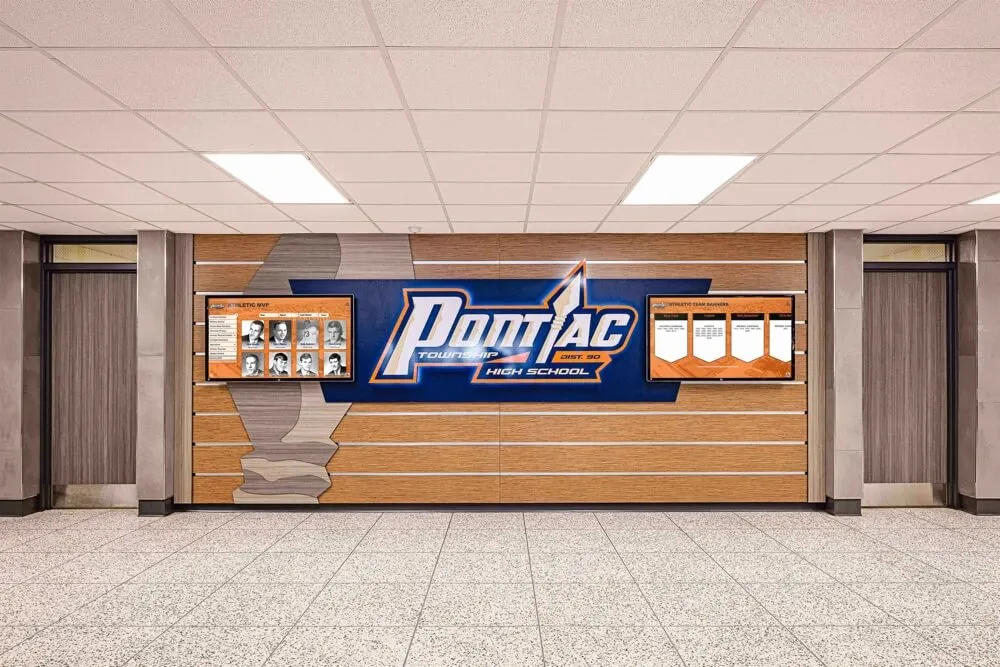
An athletic honor wall is only as accurate as the archive behind it — a completed metadata remediation plan ensures that every name, season, and award on the wall reflects a verified, consistent record
Ready to Connect a Remediated Athletic Archive to a Recognition Display?
A completed metadata remediation plan gives your school’s athletic history the consistent, verified foundation it needs to power hall-of-fame displays, digital yearbooks, and lobby touchscreens that athletes, alumni, and families trust.
Rocket Alumni Solutions works with schools to build athletic archive and recognition platforms designed around clean, structured data — giving athletic directors and administrators the field standards, import tools, and content management controls to maintain metadata quality across staff transitions and platform updates.
Schedule a demo with Rocket Alumni Solutions to see how a structured archive platform supports both recognition programs and long-term data integrity.
Ready to see this for your school?
Picture your collection in a custom mockup
Start with your yearbook collection and digitization goals, then request a custom digital mockup for your school.